web
You’re offline. This is a read only version of the page.
close
Skip to main content

Notifications

Announcements

No record found.

Community site session details

Community site session details

Session Id :
Microsoft Dynamics AX (Archived)

AOS in dead state frequently

(0) ShareShare
ReportReport
Posted on by 1,235

I have 6 Aos's. 5 are part of one cluster and other one which is a batch server is in separate cluster. For the past few months, we been noticing that 2 or 3 random Aos's out of 6 are going to dead state in online users form (Including batch AOS server), though the services are in started state. The users who are already on the dead AOS's are still able to perform their tasks for some time. But eventually the services will stop and kick everyone out.  This is happening more often recently. Did not find any information in application and system event logs for any of the AOS servers or database servers. 

Kernel version: 6.0.11.8.5628

Application version: 6.0.947.280
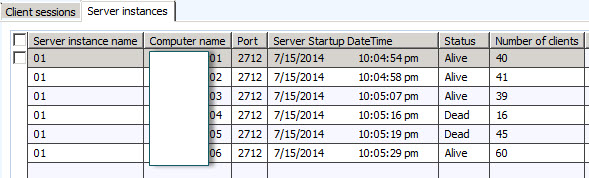
Has anyone else faced the similar problem? Please help

*This post is locked for comments

I have the same question (0)
  • André Arnaud de Calavon Profile Picture
    300,915 Super User 2025 Season 2 on at

    Hi,

    Can you find any related events in the Windows event viewer on the servers?

    Do you know something about memory consumption on those servers? Did you.monitor the used hardware resources already?

  • SomuAx2012 Profile Picture
    1,235 on at

    Thanks for the reply.

    I have monitored the resources on all the servers and they are looking good. All of them have 16GB memory and 2 core processors. Memory consumption as of now is about 30% on all the servers.

    No related events were found in the windows application or system log except below 2 which have been living with for a while.

    Object Server 01:  The database reported (session 1 (-AOS-)): [Microsoft][SQL Server Native Client 10.0][SQL Server]Warning: Null value is eliminated by an

    aggregate or other SET operation.. The SQL statement was: "UPDATE SYSCACHEFLUSH SET CLEARDATA=?,RECVERSION=?,MODIFIEDDATETIME=? WHERE ((RECID=?) AND (RECVERSION=?))"

    Object Server 01:  Dialog issued for client-less session 1: Cannot edit a record in System cache flush (SysCacheFlush).

    The SQL database has issued an error.

  • SomuAx2012 Profile Picture
    1,235 on at

    I have 2 other AOS's going down. This time the services are stopped completely. They still appear as dead in online users form.

    Windows application Event log reads the following

    Object Server 01:  Unexpected situation

    More Information: Session Allocation Failed: Session is already allocated.

  • Community Member Profile Picture
    on at

    Please verify why you have Kernel version and Application version difference

    it is recommended to keep both the version simmilar

    Please update us with your findings

  • André Arnaud de Calavon Profile Picture
    300,915 Super User 2025 Season 2 on at

    Hi Nitesh,

    Microsoft provides kernel updates separately. This is causing the difference in Kernel and Application version. This is normal and it is in this case not possible to have the versions similar.

    @SomuAx2012: Make sure the client executable version and AOS binaries do have the same version number. Do all AOS and clients have been updated with the same kernel version?

  • SomuAx2012 Profile Picture
    1,235 on at

    Hello Umesh,

    As I mentioned earlier. This is very random. Happening on any of the 6 servers. 

  • SomuAx2012 Profile Picture
    1,235 on at

    Hi Andre,

    All the AOS's have the same kernel and application versions.

    We use citrix for users to access the application. I see the same versions even if I login using citrix. Can you please let me know if I am missing anything here..

  • rudra Profile Picture
    6,534 on at

    Hi Somu,

    Can you try installing the latest kernel hotfix from the below link,

    blogs.msdn.com/.../overview-of-ax-build-numbers.aspx

    Also did you come across Denis blog sinedax.blogspot.in/.../ax-2012-aos-crash-kernel-hotfix_5.html

Under review

Thank you for your reply! To ensure a great experience for everyone, your content is awaiting approval by our Community Managers. Please check back later.

Helpful resources

Quick Links

Responsible AI policies

As AI tools become more common, we’re introducing a Responsible AI Use…

Neeraj Kumar – Community Spotlight

We are honored to recognize Neeraj Kumar as our Community Spotlight honoree for…

Leaderboard > 🔒一 Microsoft Dynamics AX (Archived)

#1
Martin Dráb Profile Picture

Martin Dráb 4 Most Valuable Professional

#1
Priya_K Profile Picture

Priya_K 4

#3
MyDynamicsNAV Profile Picture

MyDynamicsNAV 2

Last 30 days Overall leaderboard

Featured topics

Product updates

Dynamics 365 release plans



