web
You’re offline. This is a read only version of the page.
close
Skip to main content

Notifications

Announcements

No record found.

Community site session details

Community site session details

Session Id :
Microsoft Dynamics AX (Archived)

Sharepoint install on separate server EP issue

(0) ShareShare
ReportReport
Posted on by

Hi all,

I'm trying to install EP on an existing AX install.  I have a Sharepoint installed on a separate server.  Sharepoint was installed after AX. I'm getting these error when validating pre-install of EP.  
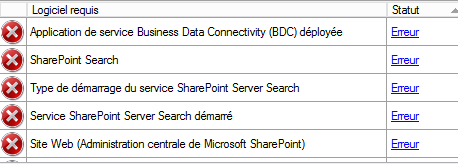
EPinstall.png

question 1:

Does anyone know if I need to install some features of Sharepoint on my AX server prior to installing EP?

Question 2:

Is there a way to tell AX that I have a Sharepoint Search and IIS already installed on another server?

Thank you all in advance

*This post is locked for comments

I have the same question (0)
  • André Arnaud de Calavon Profile Picture
    301,014 Super User 2025 Season 2 on at

    Which exact version of AX 2012 do you have and what version of Sharepoint do you have installed? Also which Windows server version are you using? Check the AX 2012 System requirements guide if the combination is supported.

  • Community Member Profile Picture
    on at

    Hi André,

    thanks for the quick response.

    AX 2012 R3 on Windows server 2012 R2

    Sharepoint 2013 on Windows server 2012 R2

    Both are installed with their own SQL servers, independently. As I undestand this would not be an issue.

    I installed AX a few months ago not needing web access at the time.  Decided that I should install Enterprise Portal(EP) for web access, so I installed a new Sharepoint server on another server.  Sharepoint works well, no issues.  AX works well also, however, when checking for required configuration for EP I get the errors mentionned in previous post.

    To me its as if AX does not know of Sharepoint's existence, so I figure I should have to let AX know where my Sharepoint server is, so it can find Sharepoint Search.

    I'm only trying to avoid a re-instal of AX, since I already have a lot configured into it.

    Thanks in advance

  • Verified answer
    Iulian Cordobin Profile Picture
    8,201 on at

    Basically you have to install the EP role from the AX installation media on the IIS / SP server (and run the installer from there). EP will run on top the IIS / SP and that can't be on another server. Let me know if you have question on this.

  • Verified answer
    Community Member Profile Picture
    on at

    Hi Julian,

    Thanks for this quick response, I think you nailed it.

    I was trying to add EP on AX server directly. I guess this is ok when SP is on same server.

    thank again

    regards

  • André Arnaud de Calavon Profile Picture
    301,014 Super User 2025 Season 2 on at

    Hi Allain,

    Luckily the solution is found. Please note that as of Service Pack 1 for Sharepoint 2013 it is supported on Windows Server 2012 R2. Without service pack 1 it could lead to unexpected behavior. I do hope you had applied a SP already. If not please do it ASAP.

  • Community Member Profile Picture
    on at

    Tks, we'll do.

Under review

Thank you for your reply! To ensure a great experience for everyone, your content is awaiting approval by our Community Managers. Please check back later.

Helpful resources

Quick Links

Responsible AI policies

As AI tools become more common, we’re introducing a Responsible AI Use…

Neeraj Kumar – Community Spotlight

We are honored to recognize Neeraj Kumar as our Community Spotlight honoree for…

Leaderboard > 🔒一 Microsoft Dynamics AX (Archived)

#1
Priya_K Profile Picture

Priya_K 4

#1
Martin Dráb Profile Picture

Martin Dráb 4 Most Valuable Professional

#3
Ali Zaidi Profile Picture

Ali Zaidi 2

Last 30 days Overall leaderboard

Featured topics

Product updates

Dynamics 365 release plans



