web
You’re offline. This is a read only version of the page.
close
Skip to main content

Notifications

Announcements

No record found.

Community site session details

Community site session details

Session Id :
Finance | Project Operations, Human Resources, ...
Unanswered

Adding fields to form through field groups to other extensions

(0) ShareShare
ReportReport
Posted on by 1,673

Hi everyone

I'm trying to add a field (MyField) to CustTable by extension (MyExtension). I need to add this field to the CustTable form, however, I need to add it by adding it to the CredManCreditReview field group, which belongs to the CustTable.CredMan extension.

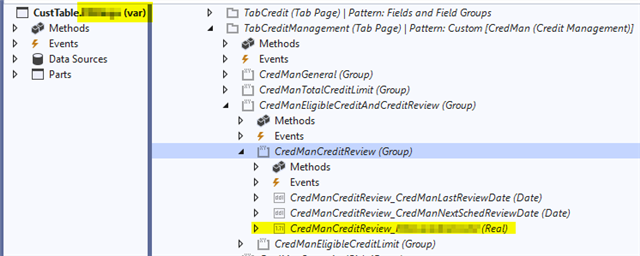
So, I've added my CustTable.MyField field to the CustTable in CustTable.MyExtension, and I added the field to the CredManCreditReview fieldgroup on CustTable.

I can now see the field being reflected in the Form design:
 FormDesign.png_2D00_640x480.png

However, I can't get this field to reflect in the UI. I've done compiles, and cache clears etc., but nothing seems to work.

It seems to be possible:

https://microsoft-business-applications.hcltech.com/customizing/dynamics-365-development-and-customization-field-group-extensions/

But this seems to reflect my problem better:

https://www.gangsta.se/blog/entry/fields-from-different-models-in-one-field-group-in-d365fo

Any ideas?

Thanks

I have the same question (0)
  • Alex VN Profile Picture
    1,994 on at

    Hi,

    Can you check for the field property on form to ensure if the field is correctly setup and if visible property is set to Yes in both Form control and table level?

    Please also do a full build and synchronization to ensure the compilation is working as expected.

    Regards,

  • André Arnaud de Calavon Profile Picture
    300,911 Super User 2025 Season 2 on at

    Hi Brandon,

    Have you set a model reference to the credit management model?

  • BrandonSA Profile Picture
    1,673 on at

    Hi Andre

    Thanks for the reply. Yes, there is a model ref to the credit management model.

  • BrandonSA Profile Picture
    1,673 on at

    Thanks Alex VN.

    Full compile and DB sync are done, but the results are the same.

  • Alex VN Profile Picture
    1,994 on at

    Hi,

    Can you check if there is any personalization for that form? Is that you are using standard view or a custom view for CustTable form?

  • BrandonSA Profile Picture
    1,673 on at

    Thanks Alex

    No personalization

  • BrandonSA Profile Picture
    1,673 on at

    I can only see my field if I go to the root object (in this case, the form called CustTable), and look at the extension field group from there. But from the actual form extension (ie. CustTable.CredMan), I see no affect to the field group, and that's why it's not visible on the form.  It makes perfect sense to me that I can't make changes to this form extension, because that would effectively be overlayering an extension. What I need here is to be able to extend an extension, which obviously isn't possible.

    CredManForm.png

    If someone wanted to modify the Credit and Collections tab on the CustTable form, how would they go about it? The only way I can see them doing it is by using personalization.

  • Community member Profile Picture
    2 on at
    With this code the form would be started with the fields added in the CredManCreditReview group
     
    internal final class MSCustTableFormEventHandler
    {
        /// <summary>
        ///
        /// </summary>
        /// <param name="sender"></param>
        /// <param name="e"></param>
        [FormEventHandler(formStr(CustTable), FormEventType::Initialized)]
        public static void CustTable_OnInitialized(xFormRun sender, FormEventArgs e)
        {
            
            FormGroupControl CredManCreditReview= sender.control(sender.controlId('CredManCreditReview'));
            FormDataSource  dataSource = sender.dataSource();

            if(CredManCreditReview && dataSource)
            {
                CredManCreditReview.addDataField(dataSource.id(), fieldNum(CustTable, Field1));
                CredManCreditReview.addDataField(dataSource.id(), fieldNum(CustTable, Field2));
                CredManCreditReview.addDataField(dataSource.id(), fieldNum(CustTable, Field3));
            }
        }
    }

Under review

Thank you for your reply! To ensure a great experience for everyone, your content is awaiting approval by our Community Managers. Please check back later.

Helpful resources

Quick Links

Responsible AI policies

As AI tools become more common, we’re introducing a Responsible AI Use…

Neeraj Kumar – Community Spotlight

We are honored to recognize Neeraj Kumar as our Community Spotlight honoree for…

Leaderboard > Finance | Project Operations, Human Resources, AX, GP, SL

#1
Martin Dráb Profile Picture

Martin Dráb 664 Most Valuable Professional

#2
André Arnaud de Calavon Profile Picture

André Arnaud de Cal... 522 Super User 2025 Season 2

#3
Sohaib Cheema Profile Picture

Sohaib Cheema 303 User Group Leader

Last 30 days Overall leaderboard

Product updates

Dynamics 365 release plans



