web
You’re offline. This is a read only version of the page.
close
Skip to main content

Announcements

No record found.

News and Announcements icon
Community site session details

Community site session details

Session Id :
Customer experience | Sales, Customer Insights,...
Unanswered

'f.get_entityLogicalName is not a function' error message when using addCustomView

(0) ShareShare
ReportReport
Posted on by 54

Hi all!  I'm getting the following error message on a field after using the addCustomView call.

Error: "f.get_entityLogicalName is not a function"
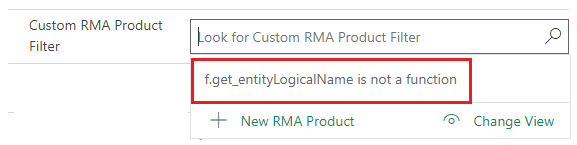
pastedimage1626363706337v1.png

If I run my FetchXML in the FetchXML Builder it works perfectly and get the returned results.  So I don't know what is causing the issue.  My code is as below:

function addCustomRMAProductView(executionContext)
{
    let formContext = executionContext.getFormContext();
    let viewID = '{00000000-0000-0000-0000-000000000001}';
    let entityName = 'msdyn_rmaproduct';
    let viewDisplayName = 'This is a custom view'; 
    let rmaNumberGUID = formContext.getAttribute('po_rma').getValue()[0].id;
    let rmaNumber = formContext.getAttribute('po_rma').getValue()[0].name;

    if (!rmaNumber)
    {
        console.log("RMA Number not Found.  Lookup field not populated");
    }
    else
    {  
        let fetchXML = 
            ""
                  ""
                     ""
                      ""
                      ""
                      ""
                      ""
                      ""
                          ""
                          ""
                      ""
                      ""
                          ""
                              ""
                          ""
                      ""
                  ""
              "";

        let layoutXML = 
            ""
                  ""
                      ""
                  ""
              "";

        formContext.getControl('po_customrmaproductfilterid').addCustomView(viewID, entityName, viewDisplayName, fetchXML, layoutXML, true)
    }
}

Any thoughts?

I have the same question (0)
  • Community Member Profile Picture
    on at

    I ran into the same issue and - after some trial and error - discovered that removing the attribute aliases solved the problem.

  • Tuddrussel Profile Picture
    54 on at

    Thank you for the suggestion.  I gave it a go but now I'm getting "An alias must be specified for every attribute in an aggregate query. NodeXml: <attribute name="msdyn_productname" groupby="true" />".

    Per the error since I'm aggregating the values then I need those alias values.

Under review

Thank you for your reply! To ensure a great experience for everyone, your content is awaiting approval by our Community Managers. Please check back later.

Helpful resources

Quick Links

Introducing the 2026 Season 1 community Super Users

Congratulations to our 2026 Super Stars!

Congratulations to our 2025 Community Spotlights

Thanks to all of our 2025 Community Spotlight stars!

Leaderboard > Customer experience | Sales, Customer Insights, CRM

#1
ManoVerse Profile Picture

ManoVerse 212 Super User 2026 Season 1

#2
CU11031447-0 Profile Picture

CU11031447-0 100

#3
NeerajPawar Profile Picture

NeerajPawar 68

Last 30 days Overall leaderboard

Product updates

Dynamics 365 release plans
