web
You’re offline. This is a read only version of the page.
close
Skip to main content

Notifications

Announcements

No record found.

Community site session details

Community site session details

Session Id :
Customer experience | Sales, Customer Insights,...
Suggested Answer

How to make editable grid as optional and show read only grid as default

(0) ShareShare
ReportReport
Posted on by

Hi 

I have enabled editable grids for few entities by default when user logins they see editable grid first and they can switch to the read-only grid. But how can we set read-only grid as default? I used javascript on record selection to make read-only this is not useful.  

I have the same question (0)
  • Suggested answer
    Daniel Neudert Profile Picture
    on at

    Hello Krish,

    Thanks for using the Microsoft Dynamics CRM community Forums. My name is Daniel Neudert and I will try to further help you with your issue on this.

    As you mentioning, the grid view is automatically editable, immediately after your users login, this seems for me, for the first displayed entity the control for editable grid was selected.

    So if your users are getting for example the Account entity gridlist displayed, please check the control settings for the account entity within the customizations.

    1. Go to the Customizations > Settings > Customizations > Customize the System

    2. Select the Account entity and go to the "Controls" Tab

    > you will see, the control for the editable grid is by default selected for showing in the Web client (and/or tablet mode)
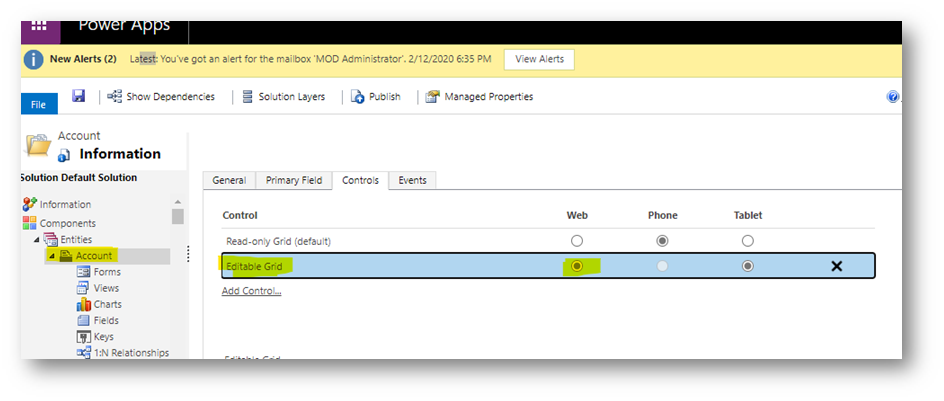
    pastedimage1587733934795v2.png

    3. Just change it back to "Web", but DON'T delete the editable grid line, if the users still want the possibility, to switch back to editable manually
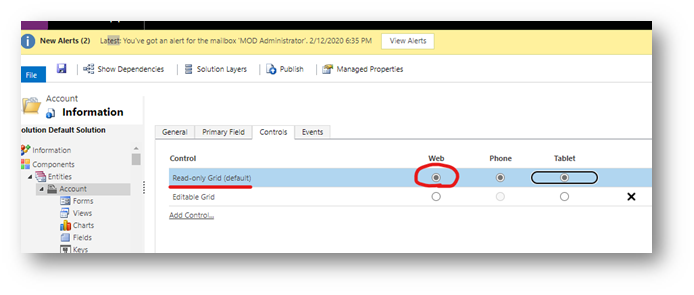
    pastedimage1587733942365v3.png

    4. After saving and publishing the changes, the users will see by default the read-only grid, but they can switch back to "Show As" > "Editable Grid"

    pastedimage1587733950553v4.png

    Please note, if your environment is a production environment, at which the customizations are delivered by managed solutions, your customizer should follow their usual solution transfer pipeline, to change this in Development environment first and then push it to production.

    Please let me know, if this this resolved your issue and I hope with this information, I was able to help you.

    Thank you very much, I'm looking forward to your feedback and have a nice day and please stay healthy.

    Best regards

    Daniel

  • Mahdyar Profile Picture
    67 on at

    Hi Danial, 

    Thank you for your message. It worked for me and I think it must be tagged as the correct answer.

    Best Regards,

    Mahdyar

  • Turlybird Profile Picture
    12 on at

    HI there guys,

    I have the same problem but when ive changed this setting, then published this change is still showing as editable as default.

    Is there any other settings which might affect this functionality?

    Thank you for your help in advance

Under review

Thank you for your reply! To ensure a great experience for everyone, your content is awaiting approval by our Community Managers. Please check back later.

Helpful resources

Quick Links

Responsible AI policies

As AI tools become more common, we’re introducing a Responsible AI Use…

Neeraj Kumar – Community Spotlight

We are honored to recognize Neeraj Kumar as our Community Spotlight honoree for…

Leaderboard > Customer experience | Sales, Customer Insights, CRM

#1
Tom_Gioielli Profile Picture

Tom_Gioielli 170 Super User 2025 Season 2

#2
#ManoVerse Profile Picture

#ManoVerse 61

#3
Gerardo Rentería García Profile Picture

Gerardo Rentería Ga... 52 Most Valuable Professional

Last 30 days Overall leaderboard

Product updates

Dynamics 365 release plans
Liquid error: parsing "/globalsearch/?q=Intel(r" - Not enough )'s.



