web
You’re offline. This is a read only version of the page.
close
Skip to main content

Notifications

Announcements

No record found.

Community site session details

Community site session details

Session Id :
Finance | Project Operations, Human Resources, ...
Suggested Answer

DMF Error while importing data in Second Data Partition " Record for id - not found"

(0) ShareShare
ReportReport
Posted on by 520

Hi All, 

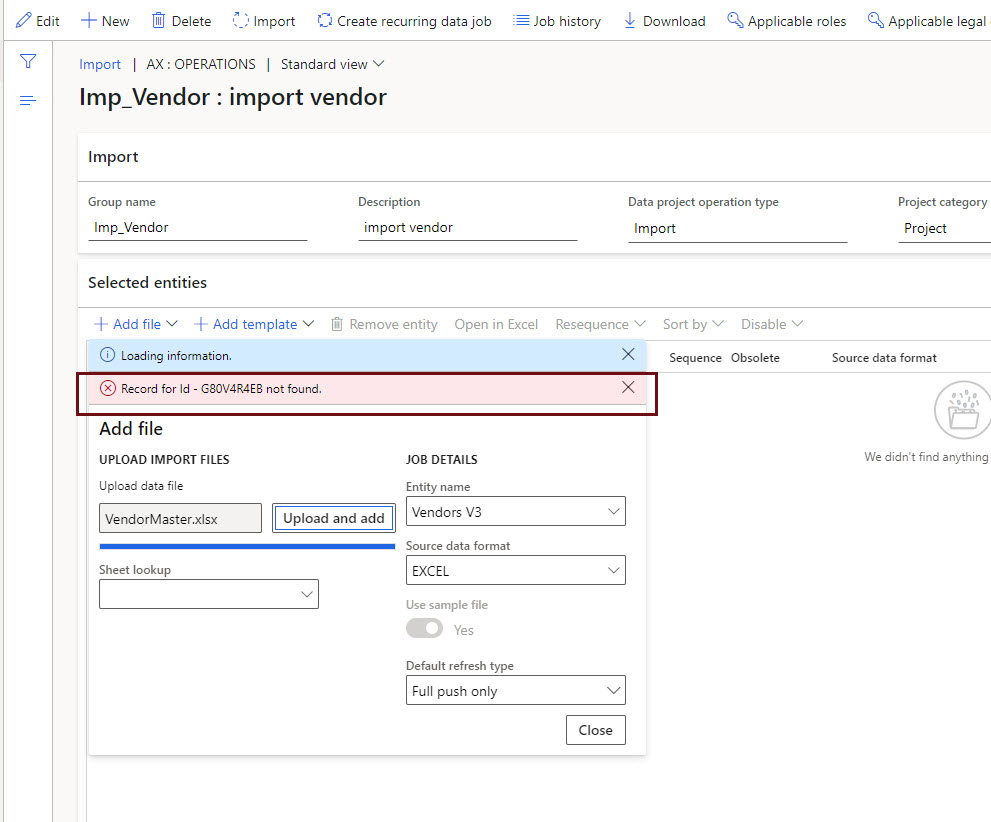
We have just created another partition in our D365FO on-premise deployment, while importing data through DMF we are getting this unknow error 'Record for id - G80V4R4EB not found'  even my data does not contains such id, and it fails to get the file either excel or csv format.

I am wondering is there any additional setup need to be perform after creating Data partition? I have checked, it's working fine with the 'initial' partition created by system. My file has only three columns 'Vendor Account' , 'Name' and 'Group', and I tried with the one row only but has same result.

any help in this regard will be highly appreciated.
DMF-Import-Error.jpg

I have the same question (0)
  • Suggested answer
    Alireza Eshaghzadeh Profile Picture
    14,672 Super User 2025 Season 2 on at

    Hi Muhammad,

    Please share your source file that you want to import.

    As simple solution, you can first export the entity "Vendors V3" and then fill out it with required information (e.g VendorGroupId and VENDORORGANIZATIONNAME) and then try to import it.

    Ref. to the error message, it seem that your source file does not have correct heading in regards to staging table.

  • Muhammad Moin Mubeen Profile Picture
    520 on at

    Thanks Alireza, for your reply.

    I exported "Vendor 3" Entity and add some more columns in my import file, but still the error is same, please look in to my source file which is attached. 

    Test.xlsx

  • Suggested answer
    Alireza Eshaghzadeh Profile Picture
    14,672 Super User 2025 Season 2 on at

    Hi Muhammad,

    I have checked the Excel file, It seems that you use fail heading on Excel file in regards to staging table for vendor.

    Please use the following heading:

    VENDORACCOUNTNUMBER : V-0002

    VENDORORGANIZATIONNAME : Muhammad

    VENDORSEARCHNAME : Muhammad

    VENDORGROUPID : Default

    CURRENCYCODE : SAR

    LANGUAGEID : en-us

    VENDORPARTYTYPE : Organization

    pastedimage1640159606425v1.png

  • Muhammad Moin Mubeen Profile Picture
    520 on at

    Thanks for your prompt reply,

    I tried your suggested column names, but still the error is same. by the way I used my file in 'initial' partition of the same environment and it worked.

    I don't know why it's failing in new Data Partition which had created.

    Anymore suggestions?

  • Suggested answer
    Alireza Eshaghzadeh Profile Picture
    14,672 Super User 2025 Season 2 on at

    Hi Muhammad,

    Please check the following points:

    1-Add "VENDORPARTYNUMBER" to the Excel file and let it be empty

    2-Save the file and navigate to data management and create a new data import project

    3- Enter "Vendors V3" entity and Excel format and then upload the Excel file

    pastedimage1640160465900v1.png

    4-Once the entity have been loaded, click on "Close"

    pastedimage1640160562776v2.png

    5- Click on "View map"

    pastedimage1640160614112v3.png

    6- On mapping detail, filter on "Mapping detail" and activate "Auto-generated"

    pastedimage1640160677007v4.png

    Click on save and navigate back to the Import data project and click on import

    pastedimage1640160762734v5.png

  • Muhammad Moin Mubeen Profile Picture
    520 on at

    Thanks once again for your quick reply with lots of help screens shot, really appreciated your efforts.

    unfortunately, still your solution didn't work. as per your guidelines, I am stuck on step # 4, where entity is not getting loaded and gives the same error with different id always.

    for your review I am attaching my excel screen shot.

    pastedimage1640162808298v1.png

  • Suggested answer
    Alireza Eshaghzadeh Profile Picture
    14,672 Super User 2025 Season 2 on at

    Please try the same process with entity "Vendors V2".

    If it does not work, you need to check if the DMF service is running in your environment. You can test it by exporting a simple entity. If it works, you can try to refresh the entity list and once it has been refreshed, you can load the file again by entity "Vendors V2".

    dynfotech.com/.../

  • Muhammad Moin Mubeen Profile Picture
    520 on at

    Dear Alireza,

    I have done the following steps.

    1. Refresh Entity list.

    2. Tried to export "Vendors 3" entity with CSV file format and it worked, but package is not getting downloaded as per Screen Shot pastedimage1640167645842v1.png

    3. Tried to export "Vendors 3" entity with Excel File format and it does not work, 

    pastedimage1640167772481v2.png

    pastedimage1640167931076v3.png

    here my question is, still I need to check the service is running or not? because it is working on initial Partition, within the same environment, and which VM this service should be installed, as we have On-premise Environment and I am unable to found any service related to Data management. 

  • Suggested answer
    Alireza Eshaghzadeh Profile Picture
    14,672 Super User 2025 Season 2 on at

    Hi Muhammad,

    Please try the same process with Entity "Vendors V2" and export to Excel and give me an update, if it works.

    If not you need to restart your DMF service for your environment. What type of environment do you have?

  • Suggested answer
    Alireza Eshaghzadeh Profile Picture
    14,672 Super User 2025 Season 2 on at

    Can you find following service on your VM?

    pastedimage1640168770253v1.png

Under review

Thank you for your reply! To ensure a great experience for everyone, your content is awaiting approval by our Community Managers. Please check back later.

Helpful resources

Quick Links

Responsible AI policies

As AI tools become more common, we’re introducing a Responsible AI Use…

Neeraj Kumar – Community Spotlight

We are honored to recognize Neeraj Kumar as our Community Spotlight honoree for…

Leaderboard > Finance | Project Operations, Human Resources, AX, GP, SL

#1
Martin Dráb Profile Picture

Martin Dráb 660 Most Valuable Professional

#2
André Arnaud de Calavon Profile Picture

André Arnaud de Cal... 549 Super User 2025 Season 2

#3
Sohaib Cheema Profile Picture

Sohaib Cheema 307 User Group Leader

Last 30 days Overall leaderboard

Product updates

Dynamics 365 release plans
