web
You’re offline. This is a read only version of the page.
close
Skip to main content

Notifications

Announcements

No record found.

Community site session details

Community site session details

Session Id :
Microsoft Dynamics AX (Archived)

Help : add space in SSRS report

(0) ShareShare
ReportReport
Posted on by

Dear All 
Good day 

I'm editing some report I'm a beginner in VS , So I need some help 

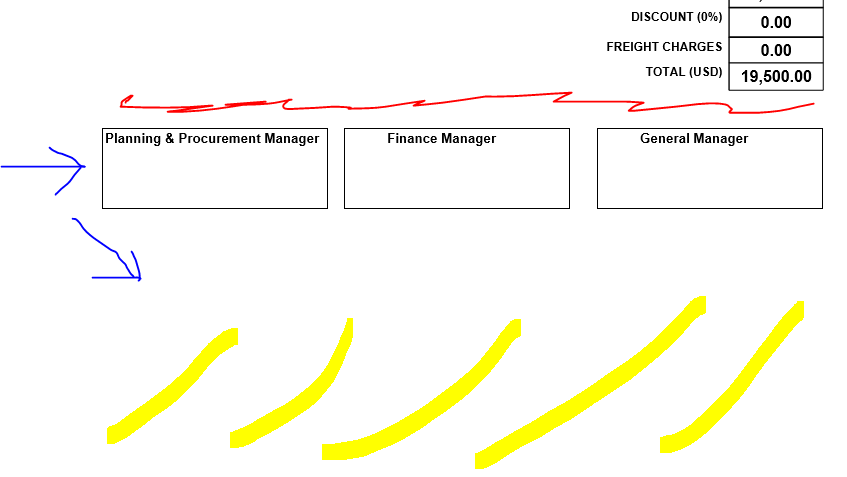
here I have a report I need to add more space between Planning and Finance manager ... and the upper border (Expr & Freight Charges) 


8306.Capture.PNG

because when I print the report it's look like below
7658.Capture1.PNG

Red color add more space 

Yellow highlight the new place for the Planning & finance  

so how can I do it ? 

how to control in place of each box in VS at the paper 

my VS is 2014 

*This post is locked for comments

I have the same question (0)
  • Community Member Profile Picture
    on at

    or how can I adjust the data layout on papers A4 in VS

  • Suggested answer
    Zain Bokhari Profile Picture
    3,208 Moderator on at

    You should consider putting these boxes in the footer section because if you manage fixed additional space between these by adding some control it could get pushed to the second page if there is a table with dynamically growing rows in the upper part of this page.

  • Community Member Profile Picture
    on at

    Hi Zain

    actually there're more data below these boxes so I can't put it in the footer

    also now I get blank paper when print it (my layout for A4 but still getting black one)

  • Suggested answer
    Zain Bokhari Profile Picture
    3,208 Moderator on at

    If you want to fix it, you can add a rectangle control and then fix your boxes with required space inside it.

    About the extra blank paper at the end, it happens when your controls exceed the dimensions of the report. Search for it, you'll find many helpful articles.

    Plus there is a property on report "Consume white space" set its value to "true".

  • Community Member Profile Picture
    on at

    Dear Zain

    thanks for reply

    I have add a rectangle control then add my boxes inside it then put it

    but still have more space maybe because blank paper, I have search too much about it but nothing helped me

    * Consume white space is true

  • Zain Bokhari Profile Picture
    3,208 Moderator on at

    The initial issue that you posted in this thread, is it resolved? 

    and for blank pages take a look at this article:

    https://stoneridgesoftware.com/blank-page-issues-ssrs-reports/

    https://stackoverflow.com/questions/362902/how-to-get-rid-of-blank-pages-in-pdf-exported-from-ssrs

  • Community Member Profile Picture
    on at

    Hi Zain

    no it's not resolved till now

    I try all the steps in this link

    stoneridgesoftware.com/blank-page-issues-ssrs-reports

    non of them fix blank paper

  • Verified answer
    Zain Bokhari Profile Picture
    3,208 Moderator on at

    You are talking about two different issues here.

    1. You need extra space between those boxes and controls above them.

    Rectangle control was a suggestion for that.

    2. Blank page at the end

    The link in my last reply was that. You have to make sure that your form controls don't exceed the report width and the body width + margins  should also be within the report dimensions.

    The above suggestions worked for me, Both issues still not resolved?

    If nothing works for you, you should try posting this issue on SSRS Forum.

Under review

Thank you for your reply! To ensure a great experience for everyone, your content is awaiting approval by our Community Managers. Please check back later.

Helpful resources

Quick Links

Responsible AI policies

As AI tools become more common, we’re introducing a Responsible AI Use…

Neeraj Kumar – Community Spotlight

We are honored to recognize Neeraj Kumar as our Community Spotlight honoree for…

Leaderboard > 🔒一 Microsoft Dynamics AX (Archived)

#1
Martin Dráb Profile Picture

Martin Dráb 4 Most Valuable Professional

#1
Priya_K Profile Picture

Priya_K 4

#3
MyDynamicsNAV Profile Picture

MyDynamicsNAV 2

Last 30 days Overall leaderboard

Featured topics

Product updates

Dynamics 365 release plans



