web
You’re offline. This is a read only version of the page.
close
Skip to main content

Notifications

Announcements

Community site session details

Community site session details

Session Id :
Microsoft Dynamics NAV (Archived)

After Windows 10 update to 1803 Nav 5.1 running as a RDS2012R2 app loses some mouse functionality

(0) ShareShare
ReportReport
Posted on by

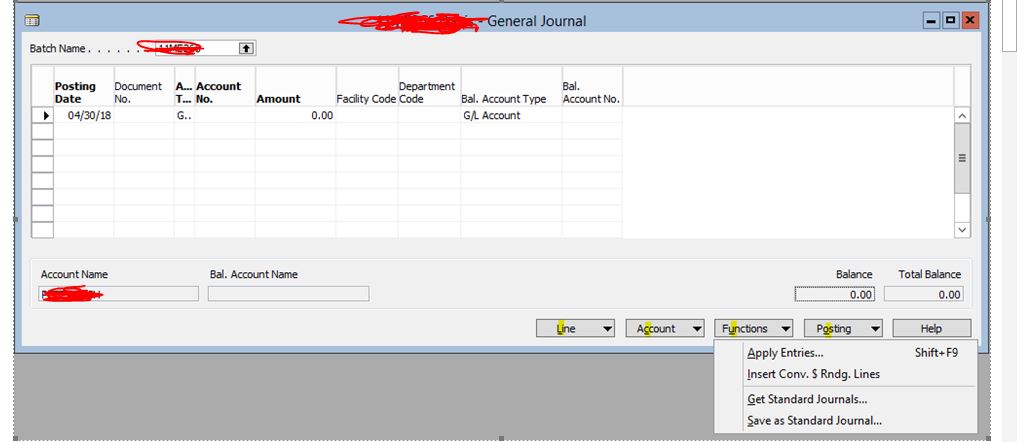
navWin1803issue.JPG

Good Day,

We have a few Windows 10 machines that have updated to build 1803. Upon doing so, the ability to use the mouse to click on the bottom right selections when in the general ledger or the chart of accounts is lost. The keyboard shortcuts still work, but the mouse clicks on those selections and nothing happens.

The applications run in a RDS2012r2 environment that is up to date on MS patches as well. The Nav version is 5.1

*This post is locked for comments

I have the same question (0)
  • Rashed Profile Picture
    3,765 on at

    NAV 5.1 is not supported on windows 10.

    I suggest to update your exe to 2009 sp1 on all the clients.

  • Suggested answer
    Stefano Demiliani Profile Picture
    37,166 Most Valuable Professional on at

    With Windows 10, a technical upgrade to NAV 2009 R2 is required to avoid problems. A technical upgrade is quite simple:

    1) Convert the database by opening it with NAV 2009 R2 Development Environment

    2) Install NAV 2009 clients

    3) If you're using RTC, upgrade also the NAV service to 2009 R2.

    You don't need to work with code and objects (merge and so on).

  • Community Member Profile Picture
    on at

    Thank you and yes we do need to update.

    It looks like the issue is not just with Nav now. Another published app on RDS2012R2 is also glitchy. MS must have changes something on the RDP client and how it interacts with RDS2012R2 with this last round of security updates.

  • Community Member Profile Picture
    on at

    Thank you! I didn't realize the update was so simple. We do have a lot of customizations so I will ask our Nav partner about the risks of doing this.

Under review

Thank you for your reply! To ensure a great experience for everyone, your content is awaiting approval by our Community Managers. Please check back later.

Helpful resources

News and Announcements

Season of Giving Solutions is Here!

Quick Links

Responsible AI policies

As AI tools become more common, we’re introducing a Responsible AI Use…

Neeraj Kumar – Community Spotlight

We are honored to recognize Neeraj Kumar as our Community Spotlight honoree for…

Leaderboard > 🔒一 Microsoft Dynamics NAV (Archived)

#1
HoangNam Profile Picture

HoangNam 7

Last 30 days Overall leaderboard

Featured topics

Product updates

Dynamics 365 release plans



