web
You’re offline. This is a read only version of the page.
close
Skip to main content

Announcements

News and Announcements icon
Community site session details

Community site session details

Session Id :
Dynamics 365 Community / Forums / Field Service forum / Customization on Sched...
Field Service forum

Customization on Schedule Board

(0) ShareShare
ReportReport
Posted on by

Hi,

I m triyng to customize Bookable Resource list in Schedule Board.

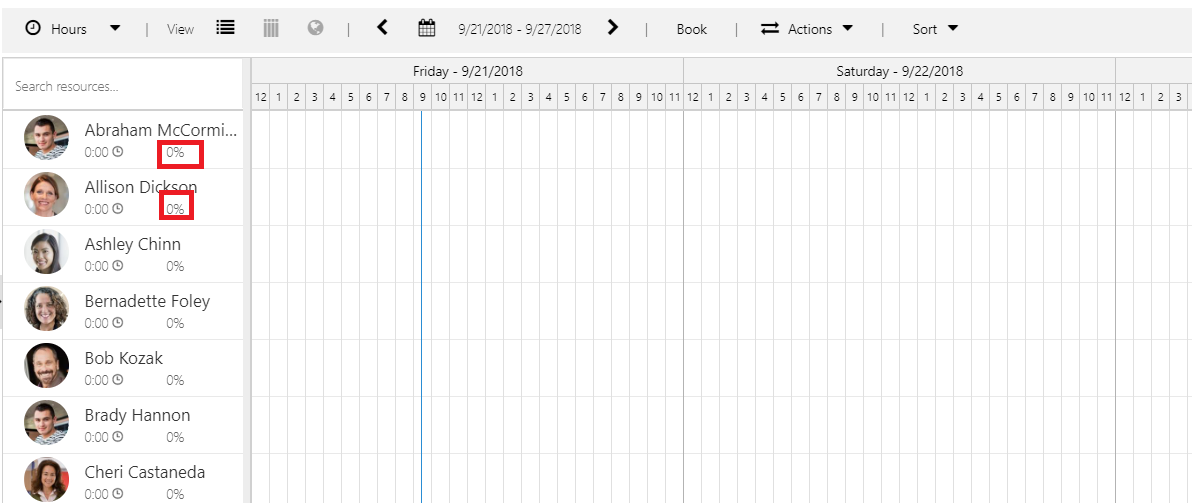
I created a new custom field which is named as "Total Capacity" on Bookable Resource form and I created another new field which is called as "Booked Capacity" on Bookable Resource Booking form. I d like to calculate percentage of booked capacity with these two fields and show that under the name of the resource. Please see below screenshot. It also should work according to selected dates and refresh after new booking is added. It has already had a percentage field which works according to booked times, I just need same field but calculated from different fields. Is there any way to do this ? Thank you for helping
fieldservices.png

Categories:
I have the same question (0)
  • Suggested answer
    Andreas Cieslik Profile Picture
    9,267 on at

    No it is not supported to do this kind of customizing.

  • Suggested answer
    Andreas Cieslik Profile Picture
    9,267 on at

    What you can do is this:

    blogs.msdn.microsoft.com/.../new-use-schedule-board-date-ranges-in-custom-queries-in-universal-resource-scheduling

    Maybe that helps you?

  • MoMo Profile Picture
    430 on at

    Hi, 

    Thanks for sharing this article, I believe these options are not available in on Premise version of D365,

    Is there any alternative to achieve same in On-Premise Field Service in D365?

  • Andreas Cieslik Profile Picture
    9,267 on at

    I fear not. Only unsupported customizing could help, but there are no examplatory solutions for that.

  • Suggested answer
    Fannie30 Profile Picture
    2,990 Moderator on at

    AGCYAZILIM,

    You can extend the schedule board and the Resource Cell Template.  Refer to this example:  docs.microsoft.com/.../extending-urs-step-by-step

    You can find all the documentation on how to extend URS here:  blogs.msdn.microsoft.com/.../universal-resource-scheduling-extensibility-documentation-released

    I hope that helps you in your quest to determine what you can/can't do on the Schedule board with extensibility.

    Regards,


    Scott

Under review

Thank you for your reply! To ensure a great experience for everyone, your content is awaiting approval by our Community Managers. Please check back later.

Helpful resources

Quick Links

November Spotlight Star - Khushbu Rajvi

Congratulations to a top community star!

Forum Structure Changes Coming on 11/8!

In our never-ending quest to help the Dynamics 365 Community members get answers faster …

Dynamics 365 Community Platform update – Oct 28

Welcome to the next edition of the Community Platform Update. This is a status …

Leaderboard > Field Service

Last 30 days Overall leaderboard

Featured topics

Product updates

Dynamics 365 release plans



