web
You’re offline. This is a read only version of the page.
close
Skip to main content

Notifications

Announcements

No record found.

Community site session details

Community site session details

Session Id :
Customer experience | Sales, Customer Insights,...
Answered

Email Lookup Field in Custom Entity

(0) ShareShare
ReportReport
Posted on by 25

I have a custom entity named Completed Project Follow-Ups.  The "Project Account" field in the custom entity is related to the Accounts entity.  I can lookup the Account Name in Accounts and display it in the Project Account field.  The "Project Contact" field in the custom entity is related to the Contacts entity.  I can lookup the Contact Full Name in Contacts and display it in the Project Contact field.

I tried creating Lookup fields in the custom entity for the Contact's email, First Name and Last Name.  It does not work.  The look up displays the contact's full name.  How do pull into the custom entity these other fields?

I have the same question (0)
  • Verified answer
    Bipin D365 Profile Picture
    28,983 Moderator on at

    HI,

    For your requirement you can use create quick view form in Contact Entity and add First Name, Last Name and Email fields on quick view form. Now add this quick view form on your custom entity to show those fields based on your lookup field "Project Contact".

    Check below article to setup quick view form.

    www.marksgroup.net/.../

    Please mark my answer verified if i were helpful

  • Merlin_DIS Profile Picture
    25 on at

    Partial solution.  This does give me the information I need to populate the three fields but it is not a lookup field.  I have to take the information form the quickview section and enter the data into the fields.  Thanks for your help.  

    Merlin

  • Suggested answer
    LuHao Profile Picture
    40,892 on at

    Hi Merlin,

    There are multiple ways that pull into the custom entity these other fields, 1) Javascript, 2) calculated field, 3) workflow or flow.

    Here I will introduce the calculated field, its advantage is that you do not need to code as Javascript, and its setup process is simpler than workflow or flow. Note that the calculated field is not editable on the form.

    Create two new fields of calculated for First Name and Last Name.

    pastedimage1601262681910v1.png

    pastedimage1601262778692v2.png        pastedimage1601262794265v3.png

    pastedimage1601262829762v4.png

    pastedimage1601262871520v5.png        pastedimage1601262885488v6.png

    Use experience:

    pastedimage1601263435435v7.png

  • Merlin_DIS Profile Picture
    25 on at

    Is this process reading the first name and the last name from the Project Contact field?  If so that works for First Name and Last Name but that doesn't get me the Project Contact's email from the Contact entity.  This entity "Project Follow-Up" is related to the Account entity via Project Account and to the Contact entity via Project Contact.  Haven't been able to figure out how to pull the First Name, Last Name and Email from the related Contact entity record.  Thanks, Merlin

  • Suggested answer
    LuHao Profile Picture
    40,892 on at

    Hi Merlin,

    1. Is this process reading the first name and the last name from the Project Contact field?

    - Yes.

    2. Does "Project Contact's Email" refer to the contact's mailbox?

    If so, we can create an email field which is calculated and set it as the first name and the last name.

    Here we have to go to https://make.powerapps.com/ to create an email field, because the classic customizations do not have field data type "Email".

    In the powerapps maker, select the D356 environment, go to Data > Entities, find and open "Project Follow-Up", then add a field.
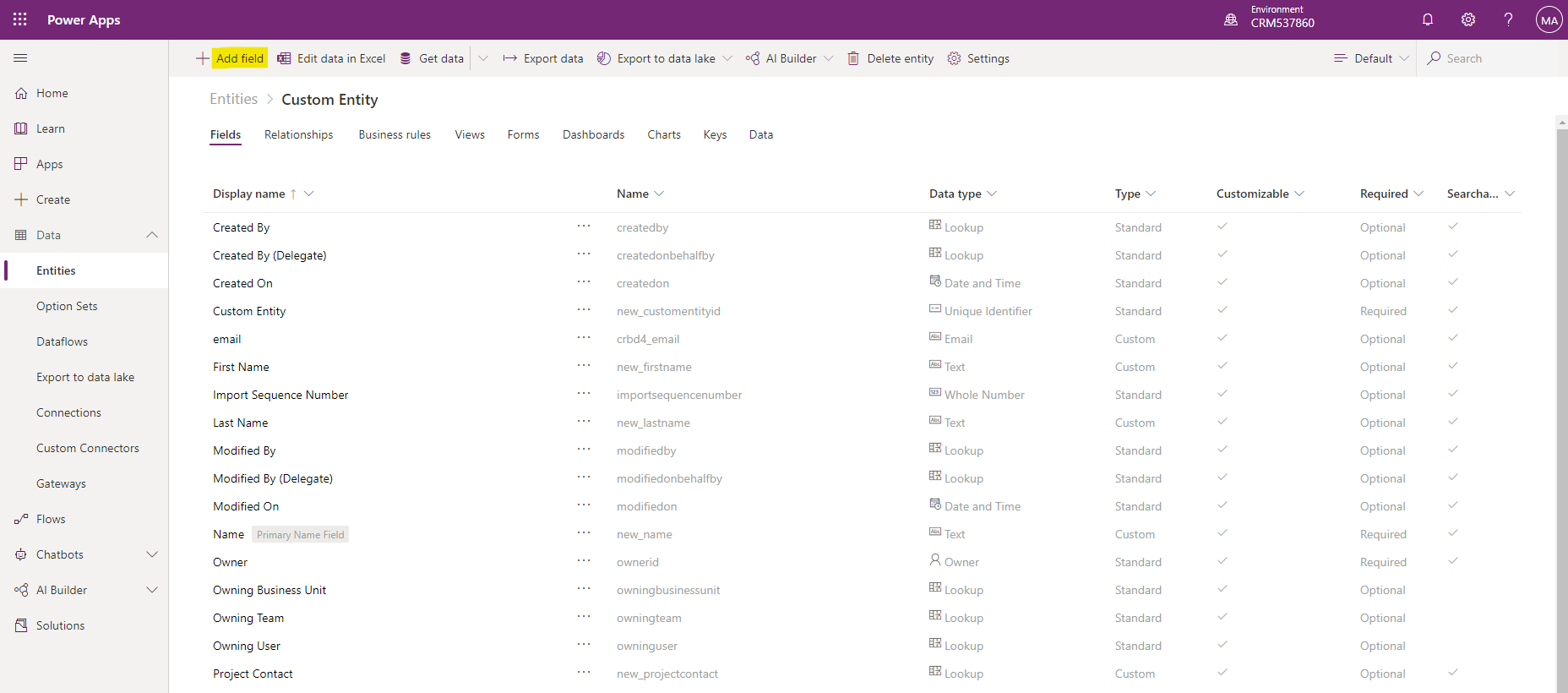
    pastedimage1601347003819v1.png

    Select data type to Email, then Add > Calculation. Save.
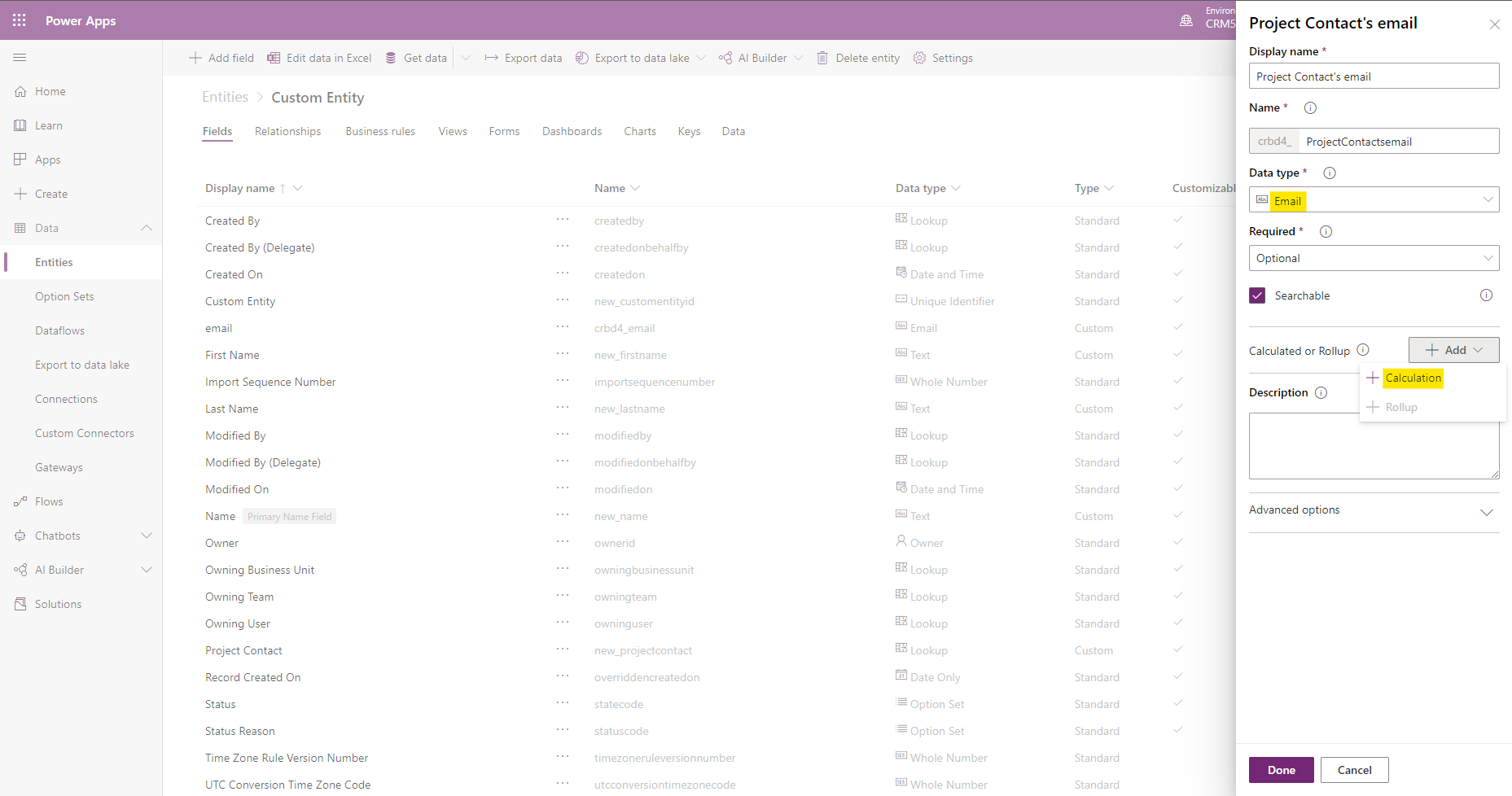
    pastedimage1601347677313v2.png

    In the new window, set as follow.

    pastedimage1601347783196v3.png

    pastedimage1601347800331v4.png

  • Merlin_DIS Profile Picture
    25 on at

    Hao,

    This the error I get.  Got similar errors when I tried your suggestion for the First Name and Last Name.  It seems to me we are just working in this entity.  I need to pull the information from the Contacts entity.  Might not be possible.

    Thanks for your help.

    Merlin

  • LuHao Profile Picture
    40,892 on at

    Hi Merlin,

    Could you provide the error screenshot?

  • Merlin_DIS Profile Picture
    25 on at

    Screenshot-2020_2D00_09_2D00_28-223206.png

    Sorry, Past my bedtime and sent the email and shut down.  Saw your reply on my phone.  I got a similar error when I tried the other two fields as well.

    Merlin

  • Verified answer
    LuHao Profile Picture
    40,892 on at

    Hi Merlin,

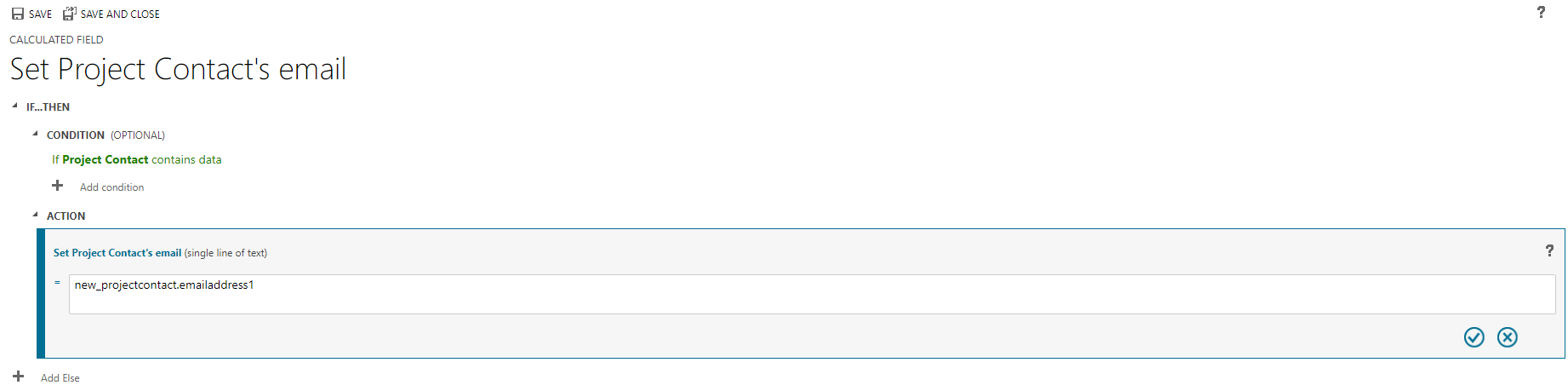
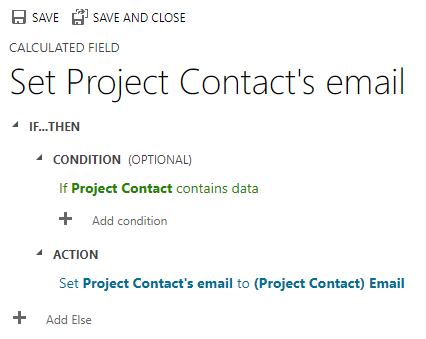
    This error is because the formula is incorrect, we should write the lookup field name.related entity's field name.

    Please check again the two screenshots of the calculated fields in my answer above. The first is how we should write it, and the second is how it looks after clicking √.

    pastedimage1601359450441v1.png

    pastedimage1601359466851v2.png

  • Merlin_DIS Profile Picture
    25 on at

    Haom

    Thank you very much.  That worked.  All I to do now is set up the same approach for the other two fields.  I appreciate your persistence.

    Merlin Siefken

Under review

Thank you for your reply! To ensure a great experience for everyone, your content is awaiting approval by our Community Managers. Please check back later.

Helpful resources

Quick Links

Responsible AI policies

As AI tools become more common, we’re introducing a Responsible AI Use…

Neeraj Kumar – Community Spotlight

We are honored to recognize Neeraj Kumar as our Community Spotlight honoree for…

Leaderboard > Customer experience | Sales, Customer Insights, CRM

#1
Tom_Gioielli Profile Picture

Tom_Gioielli 70 Super User 2025 Season 2

#2
Gerardo Rentería García Profile Picture

Gerardo Rentería Ga... 43 Most Valuable Professional

#3
Daniyal Khaleel Profile Picture

Daniyal Khaleel 32 Most Valuable Professional

Last 30 days Overall leaderboard

Product updates

Dynamics 365 release plans