web
You’re offline. This is a read only version of the page.
close
Skip to main content

Notifications

Announcements

No record found.

Community site session details

Community site session details

Session Id :
Microsoft Dynamics NAV (Archived)

sales price work sheet markup% and profit% showing wrong

(0) ShareShare
ReportReport
Posted on by 428

Hi All,

MS Dynamics NAV 2013R2

I set new unit price for 1 item in 'Sales Price Work Sheet', and in the work sheet it correctly updates the markup% and profit%.

But, when I implement it, in the retail item card, it is showing Markup%=-100 and Profit%=0;

And, in the Implement Price Change report, there is no validation for new unit price.

I think this is the issue. Any body help why NAV does not validate new unit price given in sales price work sheet?.

PFA.
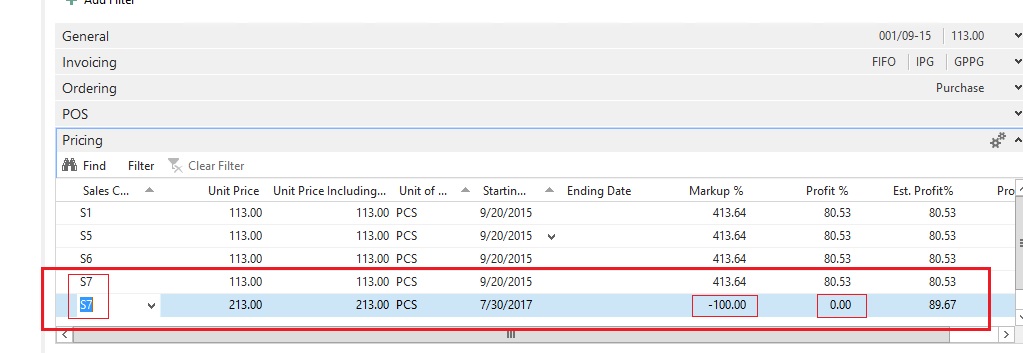
Sales-Price-Work-sheet-issue.jpg

Regards,

Abdul Rahman

*This post is locked for comments

I have the same question (0)
  • AbduTeeyech Profile Picture
    428 on at

    hi,, any body knows this?

  • Suggested answer
    Amol Salvi Profile Picture
    18,698 on at

    Check with standard item card as i think you are checking with LS item card

  • AbduTeeyech Profile Picture
    428 on at

    Hi,

    standard item card (Page:30) does not have 'Pricing' Tab.

    I am trying to update the sales price for the LS POS.

    So, the prices are getting updated in the 'Sales Price' table.

    This 'sales price work sheet' option in NAV updates the entered new prices by calling a report called 'Implement Price Change'. In this report, there are codes to update the 'Sales Price' table with the new values that we enter in 'Sales price work sheet' page. and, this report has codes for validating few fields

    (Eg:

    SalesPrice.VALIDATE("Item No.","Item No.");

    SalesPrice.VALIDATE("Sales Type","Sales Type");

    SalesPrice.VALIDATE("Sales Code","Sales Code");

    )

    but, there is no code in this to validate the 'Unit Price' field of the same 'Sales price' table.

    I think, it will be okay if I put code to validate 'Unit Price' field in this report, but, have to confirm that it wont affect any other part of pricing.

    first time working on this.

    Please help.

  • Verified answer
    Amol Salvi Profile Picture
    18,698 on at

    You can try changing the code on Test database and check

    Alternatively you can contact LS forum/community for more info

  • AbduTeeyech Profile Picture
    428 on at

    Okay, thank you.

  • Community Member Profile Picture
    on at

    Could you solve this problem? I'm stuck two.. when I create prices from that worksheet the margin is always filled with "0"

Under review

Thank you for your reply! To ensure a great experience for everyone, your content is awaiting approval by our Community Managers. Please check back later.

Helpful resources

Quick Links

Responsible AI policies

As AI tools become more common, we’re introducing a Responsible AI Use…

Neeraj Kumar – Community Spotlight

We are honored to recognize Neeraj Kumar as our Community Spotlight honoree for…

Leaderboard > 🔒一 Microsoft Dynamics NAV (Archived)

#1
HoangNam Profile Picture

HoangNam 7

Last 30 days Overall leaderboard

Featured topics

Product updates

Dynamics 365 release plans



