web
You’re offline. This is a read only version of the page.
close
Skip to main content

Notifications

Announcements

No record found.

Community site session details

Community site session details

Session Id :
Customer experience | Sales, Customer Insights,...
Answered

Mark Opportunity as overdue if the opportunity or related activities are overdue

(0) ShareShare
ReportReport
Posted on by 13

Hello.

This is my first post here so please bear with me. I've just started on my Dynamics learning journey.

I'm trying to update a new field in Opportunities which captures either if an opportunity is overdue or if any of the activities related to the opportunity are overdue.

I’ve created a new field in opportunities called ‘Old Activities’. This is a rollup field which captures the earliest ‘due date’ on any open activities related to the opportunity.
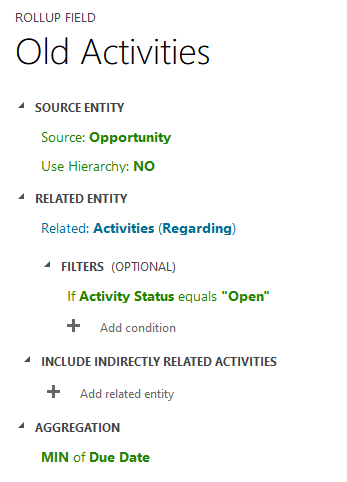
Old-Activities.png

I have also created a calculated field called ‘CurrentDate’ which captures today’s date.
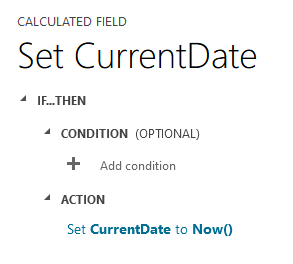
CurrentDate.png

I have created a new process (workflow) as below which should set the ‘Activity Status’ field.
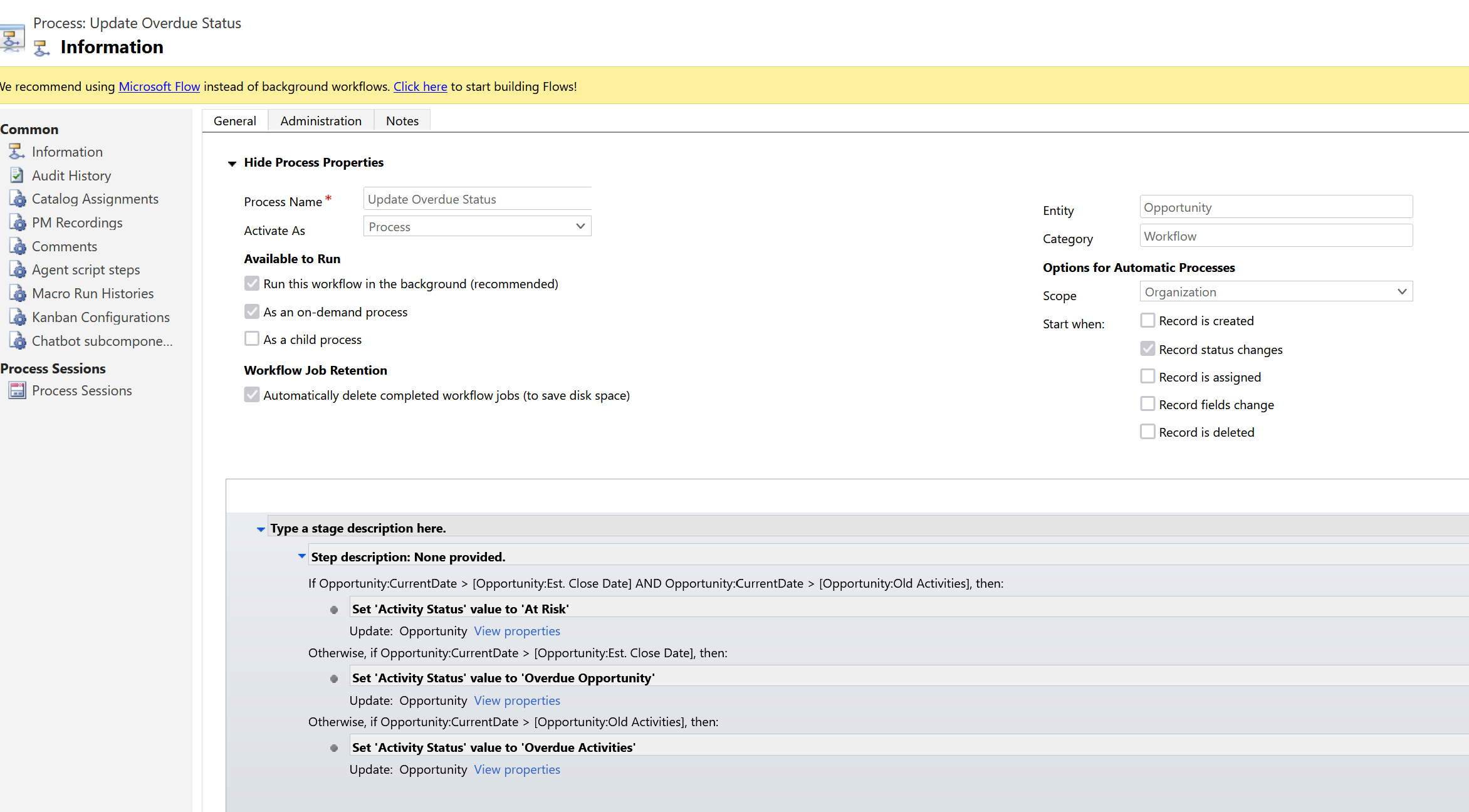
Update-Overdue-Status.png

This last step doesn’t seem to be working.

The requirement is as below.

If ‘Est Close Date’ & ‘Old Activities’ fields are older than today, then set ‘Activity Status’ field to ‘At Risk’

Or

If  â€˜Est Close Date’ field is older than today then set ‘Activity Status’ field to ‘Overdue Opportunity’

Or

If  â€˜Old Activities’ field is older than today then set ‘Activity Status’ field to ‘Overdue Activities’

Or

If ‘Est Close Date’ & ‘Old Activities’ fields are equal to or newer than today, then set ‘Activity Status’ field to ‘On Track’


This needs to run overnight or hourly rather than on status change.

I've just started out on Dynamics so I'd be glad if anyone could offer some advice or point me in the direction of a better way to get to the end result.

Many thanks,

Russ

I have the same question (0)
  • Verified answer
    Community Member Profile Picture
    on at

    Hi Russ,

    If you want to run it overnight or hourly rather than on status change, you can achieve the whole thing through using schedule flow:

    Go Power Automate(https://us.flow.microsoft.com/en-us/ )

    1.Trigger:

    Run flows on a schedule - Power Automate | Microsoft Docs

    pastedimage1635992877012v1.png

    pastedimage1635993133963v2.png

    2.Retrieve all opportunities through 'List rows' action:

    Use lists of rows in flows - Power Automate | Microsoft Docs

    pastedimage1635993637985v3.png

    3.Compare dates through 'Condition' action:

        Note: 'Apply to each' action will appear automatically after filling value from 'List rows'.

    pastedimage1635993721639v4.png

    4.Update opportunities through 'Update a row':

    Use a flow to update a row in Dataverse - Power Automate | Microsoft Docs

    pastedimage1635994045191v5.png

    In 'Update a row' action to find the field--Activity Status to set correct value.

    5.Save.

  • Russ S Profile Picture
    13 on at

    Hi , Thanks that has worked perfectly.

Under review

Thank you for your reply! To ensure a great experience for everyone, your content is awaiting approval by our Community Managers. Please check back later.

Helpful resources

Quick Links

Responsible AI policies

As AI tools become more common, we’re introducing a Responsible AI Use…

Neeraj Kumar – Community Spotlight

We are honored to recognize Neeraj Kumar as our Community Spotlight honoree for…

Leaderboard > Customer experience | Sales, Customer Insights, CRM

#1
Tom_Gioielli Profile Picture

Tom_Gioielli 70 Super User 2025 Season 2

#2
Gerardo Rentería García Profile Picture

Gerardo Rentería Ga... 43 Most Valuable Professional

#3
Daniyal Khaleel Profile Picture

Daniyal Khaleel 32 Most Valuable Professional

Last 30 days Overall leaderboard

Product updates

Dynamics 365 release plans



