web
You’re offline. This is a read only version of the page.
close
Skip to main content

Notifications

Announcements

No record found.

Community site session details

Community site session details

Session Id :
Microsoft Dynamics AX (Archived)

AX 2012 R3 CU9 - TMS Route status

(1) ShareShare
ReportReport
Posted on by

Hi everybody,

I'm starting to see what it is offered by the new TMS module. I'm more interested in the "routing" functionality.

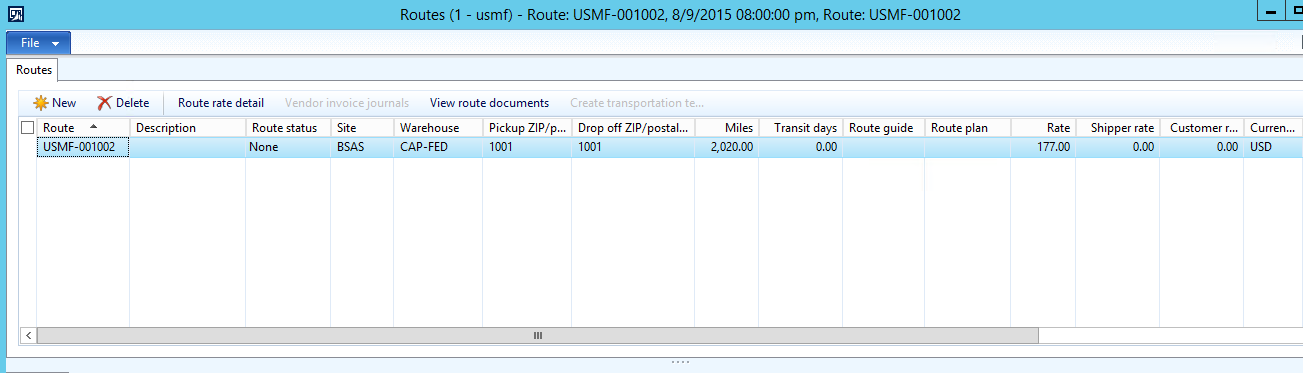
Up to now, i have been able to add different loads to a route however i'm not finding any way to update the route status.

Does anybody know how to do it? And what does the status depend on? With my last question i'm talking about which transactions make updates to the route status (if exist any transaction that makes updates) because i have already posted packing slips and invoices for the loads linked to that route and anything changed.
tms.PNG

If you could tell me where to find further information, i'll be glad.

Thank you and hope you can help me!

*This post is locked for comments

I have the same question (0)
  • Verified answer
    AX1 Profile Picture
    522 on at

    Hi,

    Standard AX maintain two "Route status"

    • None
    • Confirmed

    Route status change to "Confirmed" after "Outbound shipment". Once you done outbound shipment Load status changed to Shipped and Route status changed to Confirmed

    Please find below screenshot for reference:

    Routes_5F00_Confirmed.png

    Route status is not linked with Packing slip and invoices.

    Regards

    Sanjay Gupta

  • Suggested answer
    5400 Profile Picture
    7,162 on at

    When an outbound load is confirmed, you can generate shipping documents, such as a packing slip or bill of lading to be shipped with the load. When an inbound load is confirmed, you can define a packing structure that specifies how the load should be packed. After the packing structure is defined, you can confirm the inbound load.

    you can try below link for details.

    technet.microsoft.com/.../dn553204.aspx

  • Community Member Profile Picture
    on at

    Thanks for your answers.

    Sanjay Gupta i have two more questions:

    The first one is if it is possible to continue adding manual charges to the route once it has been confirmed.

    The second one is if both route plan and route guide need to be added to the route to be  able to be confirmed.

    Thank you very much for your response.

  • Verified answer
    AX1 Profile Picture
    522 on at

    Hi,

    1. You can't apply manual charges to route once route status changed to Confirmed.

    Same can be verify in "Routes" form (as per above screen shots)> Route rate detail button.

    AX maintain System generated and user generate details after confirmation you can not apply manual rate. However if required you can add misc. charges in source document line OR you can use freight reconciliation functionality for adjustment which is a different functionality.

    2. Route plan and route guide should be configured first under below navigation path -

    Transportation management > Setup > Routing > Route plan

    Transportation management > Setup > Routing > Route guide

    Attach route plan to Route guide.

    Based on source and destination address in Rate route workbench system pick route guide and plan.

    Regards

    Sanjay Gupta

  • Hardik Profile Picture
    35 on at

    Hi,

    what if i'm not using warehouse wave and work, still in outbound, can i use transport management

    i did created load and route, but route status is not updated , any specific reason ?

  • Community Member Profile Picture
    on at

    Hi Hardik,

    I recommend you to have a look at the following link: https://blogs.msdn.microsoft.com/dynamicsaxscm/2014/09/04/using-transportation-management-without-the-new-warehouse-management-module/

    But a simple answer to your question is: yes, you can use Transportation Management module without "waves and works" (Warehouse Management module). You need to be sure that your item has the "Use transportation management processes" checkbox checked and your warehouse has the "Use warehouse management processes" checkbox checked.

    About your second question, your route status is only updated if you confirm your Shipment (you can do it with the "Outbound shipment" confirmation button on your Load or Shipment).

Under review

Thank you for your reply! To ensure a great experience for everyone, your content is awaiting approval by our Community Managers. Please check back later.

Helpful resources

Quick Links

Responsible AI policies

As AI tools become more common, we’re introducing a Responsible AI Use…

Neeraj Kumar – Community Spotlight

We are honored to recognize Neeraj Kumar as our Community Spotlight honoree for…

Leaderboard > 🔒一 Microsoft Dynamics AX (Archived)

#1
Martin Dráb Profile Picture

Martin Dráb 4 Most Valuable Professional

#1
Priya_K Profile Picture

Priya_K 4

#3
MyDynamicsNAV Profile Picture

MyDynamicsNAV 2

Last 30 days Overall leaderboard

Featured topics

Product updates

Dynamics 365 release plans



