web
You’re offline. This is a read only version of the page.
close
Skip to main content

Notifications

Announcements

No record found.

Community site session details

Community site session details

Session Id :
Customer experience | Sales, Customer Insights,...
Unanswered

Getting error while loading PCF Control on Form in Dynamics 365 Sales

(0) ShareShare
ReportReport
Posted on by 110

Hi ,

I have developed custom PCF Control in Typescript . I have used some React JS code to open React-Modal as popup window in Control Button Click.

This custom PCF Control is running fine when i am running it locally i.e from Visual Studio code. But when i deployed PCF Control to my Dynamics 365 environment.

And tried to access control in CRM Form then getting below error show in screenshot.
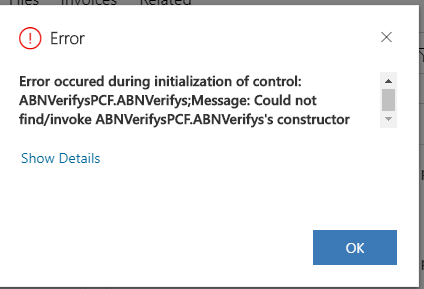
4150.pastedimage1592823800123v1.png

i did some analysis and found that when i remove Modal tsx file from my PCF Control then this error is not coming .

So below is my piece of code i wrote it down to call my Modal component. Basically passing one parameter to Modal Component.

<MyModal inputABN = {this.state.inputValue}/>
And below is constructor of My Modal component. 
export class MyModal extends React.Component<ModalProps, any> {
  constructor (props: ModalProps) {
    super(props);
    this.state = {
      showModal: false , inputABN: props.inputABN
    };
............................
So can somebody help me to sort out this issue.
Thanks


I have the same question (0)
  • kojisaiki Profile Picture
    on at

    If you provide source code, I can try to build it.

  • Dynamics 365 Sumit Thakran Profile Picture
    110 on at

    Thanks for your input,

    I got it sorted out.

  • tayurskiy Profile Picture
    20 on at

    What was your solution for fixing it? I have a similar problem when control is loading successfully when I open record from main grid or Recent area. The control is giving me below error when I navigate to cached form from related records.

    Error occured during initialization of control: rsm_RSM.AddressAutocomplete;Message: Could not find/invoke RSM.AddressAutocomplete's constructor

  • Dynamics 365 Sumit Thakran Profile Picture
    110 on at

    Sorry, i couldn't remember fix now as it was long time ago.

Under review

Thank you for your reply! To ensure a great experience for everyone, your content is awaiting approval by our Community Managers. Please check back later.

Helpful resources

Quick Links

Responsible AI policies

As AI tools become more common, we’re introducing a Responsible AI Use…

Neeraj Kumar – Community Spotlight

We are honored to recognize Neeraj Kumar as our Community Spotlight honoree for…

Leaderboard > Customer experience | Sales, Customer Insights, CRM

#1
Tom_Gioielli Profile Picture

Tom_Gioielli 70 Super User 2025 Season 2

#2
Gerardo Rentería García Profile Picture

Gerardo Rentería Ga... 33 Most Valuable Professional

#3
Daniyal Khaleel Profile Picture

Daniyal Khaleel 32 Most Valuable Professional

Last 30 days Overall leaderboard

Product updates

Dynamics 365 release plans



