web
You’re offline. This is a read only version of the page.
close
Skip to main content

Notifications

Announcements

No record found.

Community site session details

Community site session details

Session Id :
Customer experience | Sales, Customer Insights,...
Suggested Answer

Rich text activity description fields showing HTML on timeline

(2) ShareShare
ReportReport
Posted on by 39

Hello, I'm new to the community and hoping someone will be able to point me in the right direction. 

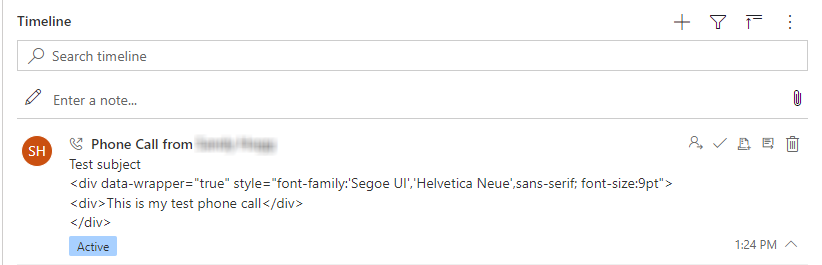
We've enabled a rich text editor control on the Description field of the main Phone Call form so that our Sales agents can capture their call notes using bulleted lists, bolding, etc. When the activity appears on a timeline, the HTML tags are showing and it's quite distracting (see image below). The timeline doesn't seem to have any issues rendering the HTML from tracked emails or from rich text notes, so I'm curious why the rich text description field on the phone call activity is behaving this way. Any ideas if this is a known issue (perhaps related to docs.microsoft.com/.../rich-text-editor-control or if there is a solution?
pastedimage1646860300641v1.png

I have the same question (0)
  • Community Member Profile Picture
    on at

    Hi shogg,

    Based on my test results,it cannot be achieved.

    pastedimage1647410470133v1.png

    pastedimage1647410482216v2.png 

  • shogg Profile Picture
    39 on at

    Thanks for confirming. Looks like we'll just need to disable the rich text editor control on the phone call record for now.

    If anyone becomes aware of an update that addresses this in the future, please let me know!

  • Community Member Profile Picture
    on at

    Hi shogg,

    I am experiencing the same issue with a custom activity. Did you contact Microsoft regarding this issue and get any clarity about a fix for it?

    Best regards,

    Johanna

  • DynamicsNik Profile Picture
    75 on at

    Hi,

    This post will help you :)

    community.dynamics.com/.../rich-text-for-appointment-shows-html-tags-in-timeline-card

    User Shlesh:

    "Unfortunately, If an attribute of Entity is a rich text type, styles applied to text in that field are stored as html tags so this issue is by design. There is no OOB way to remove the HTML tag and keep the rich text editor turned on."

    We have also been looking for a solution to this problem. There is definitely no OOB solution. Even creating a custom control is not clear that this will work.

    We suspect that Microsoft will improve the note and post entity for further functionality.

  • Community Member Profile Picture
    on at

    Thank you for your answer!

  • Suggested answer
    Community Member Profile Picture
    on at

    Found there is a solution for this issue.

    Go to you solution with the column using Rich Text editor.

    Edit column, select the Rich text format option (RTF).

    pastedimage1663577811822v1.png

    Save and publish.

    Best regards,

    Johanna

  • Suggested answer
    Teppo Riutanheimo Profile Picture
    35 on at

    Tacks !  Vi hade samma problem att lösa och du räddade dagen!

  • shogg Profile Picture
    39 on at

    Johanna -- does this approach result in the timeline activity (phone call) showing the description in rich text instead of surrounded by HTML tags?

  • Suggested answer
    Community Member Profile Picture
    on at

    Yes exactly, the description will show in rich text instead of surrounded by HTML tags. 

    pastedimage1664777189052v1.png

  • shogg Profile Picture
    39 on at

    Can you confirm if this screenshot is from the timeline, or just from the view of the call notes? I am able to get the call notes to appear formatted correctly without HTML tags by enabling rich text, but the issue is that when the activity appears on the Opportunity or Contact timeline the call notes appear with HTML tags.

Under review

Thank you for your reply! To ensure a great experience for everyone, your content is awaiting approval by our Community Managers. Please check back later.

Helpful resources

Quick Links

Responsible AI policies

As AI tools become more common, we’re introducing a Responsible AI Use…

Neeraj Kumar – Community Spotlight

We are honored to recognize Neeraj Kumar as our Community Spotlight honoree for…

Leaderboard > Customer experience | Sales, Customer Insights, CRM

#1
Tom_Gioielli Profile Picture

Tom_Gioielli 171 Super User 2025 Season 2

#2
#ManoVerse Profile Picture

#ManoVerse 83

#3
Jimmy Passeti Profile Picture

Jimmy Passeti 50 Most Valuable Professional

Last 30 days Overall leaderboard

Product updates

Dynamics 365 release plans



