web
You’re offline. This is a read only version of the page.
close
Skip to main content

Notifications

Announcements

No record found.

Community site session details

Community site session details

Session Id :
Finance | Project Operations, Human Resources, ...
Answered

How to add relation to table on EDT in Dynamics 365?

(0) ShareShare
ReportReport
Posted on by 314

Hi Expert! Greeting!

So, I want to add an EDT relation on the LedgerJournalNameId that is linked to the LedgerJournalName table on D365, like the one in AX2012.
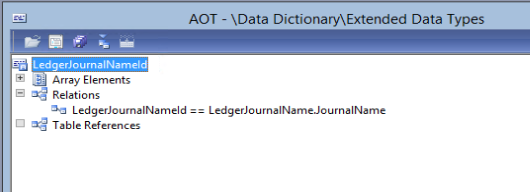
pastedimage1627975216171v1.png

(This is AX2012 EDT relationship)

What I want to achieve is to get the same feature as AX2012, which is a dropdown option when selecting Journal Name.

pastedimage1627975347609v2.png

But unfortunately on D365 the relation from EDT to that table no longer exists, and I can't add it via extension either.
How to add this feature, what should I do? Please give me advice my friend.

pastedimage1627977803491v3.png

(This is Dynamics365 EDT extension)

I have the same question (0)
  • Verified answer
    nmaenpaa Profile Picture
    101,160 Moderator on at

    EDT extensions are a legacy feature, and you can't add such relations in D365.

    Depending on your scenario, you should either use table relations, or develop x++ lookup to achieve your goal.

  • Verified answer
    WillWU Profile Picture
    22,361 on at

    Hi Michael,

    As Nikolaos said, relationship on EDT has been removed inD365FO.

    You should write codes to create a lookup control now, please check the blog:

    msdynamics.nevoitech.com/.../

  • Michael Antony Profile Picture
    314 on at

    Hi Nikolaos, thank you for your advice.

    Okay I think, I will try to develop a lookup to achieve this.

  • Verified answer
    Martin Dráb Profile Picture
    237,884 Most Valuable Professional on at

    The option to add table relations on EDTs was removed already in AX 2012 - it was kept for EDTs created in previous versions, but you weren't allowed to add new ones.

    Note that table references on EDTs are available in both AX 2012 and D365FO.

  • Michael Antony Profile Picture
    314 on at

    Not forget to mention, just for the record, I have to include the relation between the two tables in the main table.

    So that the dropdown selector can be shown in the UI of the main table form.

    Or I can create a lookup like Will Wu said.

Under review

Thank you for your reply! To ensure a great experience for everyone, your content is awaiting approval by our Community Managers. Please check back later.

Helpful resources

Quick Links

Responsible AI policies

As AI tools become more common, we’re introducing a Responsible AI Use…

Neeraj Kumar – Community Spotlight

We are honored to recognize Neeraj Kumar as our Community Spotlight honoree for…

Leaderboard > Finance | Project Operations, Human Resources, AX, GP, SL

#1
Martin Dráb Profile Picture

Martin Dráb 544 Most Valuable Professional

#2
André Arnaud de Calavon Profile Picture

André Arnaud de Cal... 450 Super User 2025 Season 2

#3
Sohaib Cheema Profile Picture

Sohaib Cheema 250 User Group Leader

Last 30 days Overall leaderboard

Product updates

Dynamics 365 release plans
