web
You’re offline. This is a read only version of the page.
close
Skip to main content

Notifications

Announcements

No record found.

Community site session details

Community site session details

Session Id :
Microsoft Dynamics AX (Archived)

Accounts payable invoice number grayed out

(0) ShareShare
ReportReport
Posted on by

I'm trying to enter an accounts payable invoice, but the invoice number is grayed out. Invoices have been entered before with invoice numbers so I'm not sure what has changed. No security changes have been made. What is causing the invoice number to be grayed out?
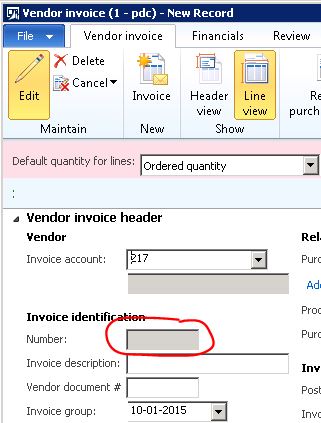
4834.Capture1.JPG

Thanks,

Paul

*This post is locked for comments

I have the same question (0)
  • nunomaia Profile Picture
    25 Moderator on at

    Can you right click on top on the field, choose personalize and verify is editable checkbox is checked?

  • Ludwig Reinhard Profile Picture
    Microsoft Employee on at

    Hi Paul, can you also please verify whether a workflow step is missing? Your screenshot seems showing a workflow process bar on top - maybe you simply tried to jump over an essential step? Ludwig

  • 5400 Profile Picture
    7,162 on at

    I will suggest you, if there is no security change and custom code, please try to clear the usage data or clear AUC file and check.

  • Community Member Profile Picture
    on at

    Hi Nuno,

    Thanks for your reply. It looks like the editable checkbox is checked.

    Paul

    2018.Capture.JPG

  • Community Member Profile Picture
    on at

    Hi Bhasker,

    Thanks for your response. I deleted the .AUC files and cleared the usage data but no luck.

  • Ludwig Reinhard Profile Picture
    Microsoft Employee on at

    Hello Paul, Can you possibly compare the PO invoice that cannot be posted with an earlier PO invoice that was successfully posted in AX? Try to compare all details in the PO header and line section to identify the difference and possibly the cause why your current PO invoice cannot be posted. All the best, Ludwig

  • 5400 Profile Picture
    7,162 on at

    please check vendinvoiceinfotable  field - num is modified as non-editable or not by user by mistake. It looks me standard does not have any code to disabled the control.

  • nunomaia Profile Picture
    25 Moderator on at

    I don’t remember any reason for that field being disabled (besides the mentioned above), most likely there is a customization that disabled that field ( custom property, workflow, etc.)

  • Community Member Profile Picture
    on at

    Hi Bhasker,

    From what I can see it looks editable and enabled.

    5504.Capture.JPG

  • Community Member Profile Picture
    on at

    Hi Ludwig,

    I don't even get to the point of posting the invoice. If I go to Accounts Payable\Common\

    Vendor invoices\Open vendor invoices and then click new invoice, the invoice entry form opens but the invoice number is grayed out.

    Thanks,

    Paul

Under review

Thank you for your reply! To ensure a great experience for everyone, your content is awaiting approval by our Community Managers. Please check back later.

Helpful resources

Quick Links

Responsible AI policies

As AI tools become more common, we’re introducing a Responsible AI Use…

Neeraj Kumar – Community Spotlight

We are honored to recognize Neeraj Kumar as our Community Spotlight honoree for…

Leaderboard > 🔒一 Microsoft Dynamics AX (Archived)

#1
Martin Dráb Profile Picture

Martin Dráb 4 Most Valuable Professional

#1
Priya_K Profile Picture

Priya_K 4

#3
MyDynamicsNAV Profile Picture

MyDynamicsNAV 2

Last 30 days Overall leaderboard

Featured topics

Product updates

Dynamics 365 release plans



