web
You’re offline. This is a read only version of the page.
close
Skip to main content

Notifications

Announcements

No record found.

Community site session details

Community site session details

Session Id :
Customer experience | Sales, Customer Insights,...
Suggested Answer

SharePoint Access permissions

(0) ShareShare
ReportReport
Posted on by 160

Dear All,

I can access SP from Dynamics, but the users in my team can't as shown below:

pastedimage1641314538498v1.png

It seems it is possible to resolve the problem if I add the same email id of the User in the field called “Sharepointemailaddress”. Please see below:
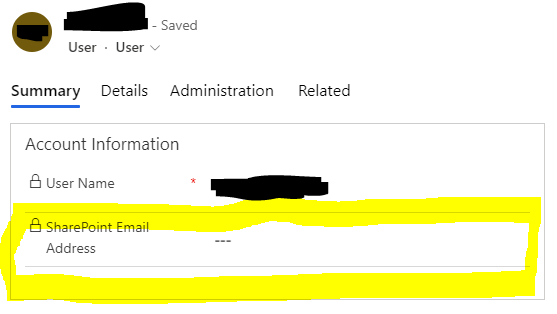
2677.pastedimage1641314242906v1.png

However, the field doesn't allow me to enter data, does anyone knows how to enter info to that field?

It shows this when I click on it:
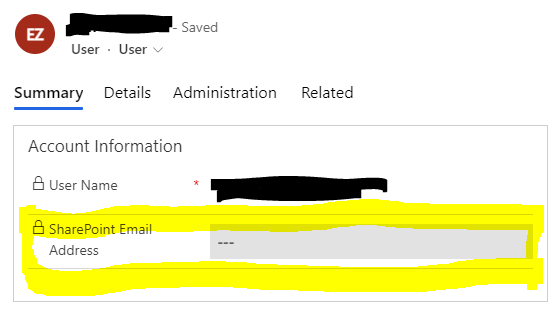
pastedimage1641314683257v2.png

I have the same question (0)
  • Community Member Profile Picture
    on at

    Hi,

    Please open your User main form and unlock that field. Then you could enter info to that field.( That field is unlocked by default.)

    You should also check the following point:

    1. Users' security role.

    2. Users are added into your team or not in the SharePoint site.

  • Dynamics try-to-be-advanced user Profile Picture
    160 on at

    Could you please provide me with how to unlock the field? I have tried it before, it didn't work.

    About the users' security role, what are the roles which allow them to access? I have granted them permission both in dynamics & SharePoint, it didn't work.

  • Suggested answer
    Community Member Profile Picture
    on at

    Hi,

    Navigate to the User entity and uncheck the read-only checkbox in the User main form.

    pastedimage1641431913316v1.png

    pastedimage1641431919798v2.png

    Save and publish it. If this field in still lock, please check if you create any Business rule, Workflow, JS event to set it read-only.

    About security role, please refer to this doc:

    Permissions and roles for SharePoint document management tasks - Power Platform | Microsoft Docs

Under review

Thank you for your reply! To ensure a great experience for everyone, your content is awaiting approval by our Community Managers. Please check back later.

Helpful resources

Quick Links

Responsible AI policies

As AI tools become more common, we’re introducing a Responsible AI Use…

Neeraj Kumar – Community Spotlight

We are honored to recognize Neeraj Kumar as our Community Spotlight honoree for…

Leaderboard > Customer experience | Sales, Customer Insights, CRM

#1
Tom_Gioielli Profile Picture

Tom_Gioielli 70 Super User 2025 Season 2

#2
Gerardo Rentería García Profile Picture

Gerardo Rentería Ga... 33 Most Valuable Professional

#3
Daniyal Khaleel Profile Picture

Daniyal Khaleel 32 Most Valuable Professional

Last 30 days Overall leaderboard

Product updates

Dynamics 365 release plans



