web
You’re offline. This is a read only version of the page.
close
Skip to main content

Announcements

No record found.

News and Announcements icon
Community site session details

Community site session details

Session Id :
Microsoft Dynamics AX (Archived)
Answered

Employee services on Enterprise portal

(0) ShareShare
ReportReport
Posted on by 1,370

Hi again,

I am again into some trouble and need guidance as I didn't find a way out.

This time I am stuck at employee services module. I am unable to figure out which controls are working behind the links below Time-sheet (highlighted in yellow).
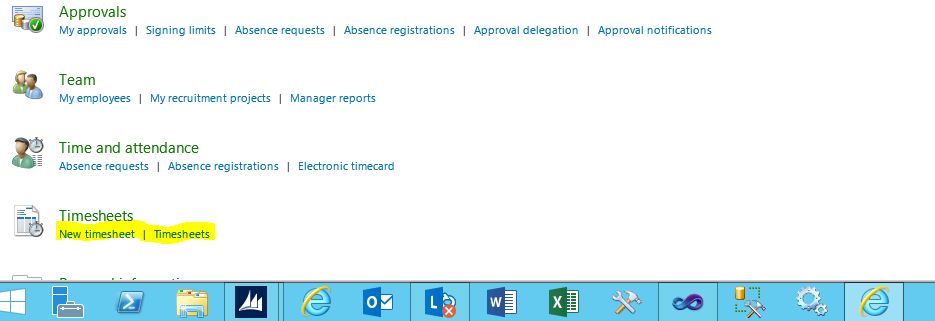
I have checked it and found that this page is controlled by web control named ESSActivityPicker. But unable to find the control behind the link. Please help....

Regards,

Rishi

*This post is locked for comments

I have the same question (3)
  • Verified answer
    André Arnaud de Calavon Profile Picture
    303,756 Super User 2026 Season 1 on at

    Hi Rishi,

    If you copy the url from the links, this provides e.g. the web menu item WMI used to open a form. In the AOT you can find the WMI and look which object will be opened.

  • Suggested answer
    Iulian Cordobin Profile Picture
    8,201 on at

    Hi Rishi,

    As André mentioned you need to get the link for those pages and go from there.

    I want to add that you can do this by actually opening the link, right click on the newly opened page, select Properties and copying the entire URL Adress you have in your popup window. Now, open a new browser, paste the url just copied, append this to the URL: '?ToolPaneView=2&pagemode=edit' and navigate.

    This will open the page in Edit mode directly, so this way you will see the controls.

    Hope it helps you with your task.

  • Rishi1403 Profile Picture
    1,370 on at

    Hi Iulian,

    I have tried your suggestion but it again opens the employee services home page instead of the pop up window in edit mode.

    Regards,

    Rishi

  • Rishi1403 Profile Picture
    1,370 on at

    Many Thanks André ,

    I found the web control finally... :)

  • Marcin D. Profile Picture
    5 on at

    Hi,

    Could you please advise me how can I reset the view of the Emplyee services in Enterprise portal to the previous "default" one for Contoso demo. Currently my webpage is totally different. I already used "reset specific page to site definition version" tool but as you probably know, this is not what I am looking for. Thank you in advance for your help.

Under review

Thank you for your reply! To ensure a great experience for everyone, your content is awaiting approval by our Community Managers. Please check back later.

Helpful resources

Quick Links

Introducing the 2026 Season 1 community Super Users

Congratulations to our 2026 Super Stars!

Meet the Microsoft Dynamics 365 Contact Center Champions

We are thrilled to have these Champions in our Community!

Congratulations to the March Top 10 Community Leaders

These are the community rock stars!

Leaderboard > 🔒一 Microsoft Dynamics AX (Archived)

#1
Joris dG Profile Picture

Joris dG 5

#2
Andrew Jones a1x Profile Picture

Andrew Jones a1x 2

#3
GL-01081504-0 Profile Picture

GL-01081504-0 1

Last 30 days Overall leaderboard

Featured topics

Product updates

Dynamics 365 release plans
