web
You’re offline. This is a read only version of the page.
close
Skip to main content

Announcements

News and Announcements icon
Community site session details

Community site session details

Session Id :
Supply chain | Supply Chain Management, Commerce
Suggested Answer

How to make “Quantity to pack” field blank by default in D365 WMS mobile packing

(1) ShareShare
ReportReport
Posted on by 12

Hi Experts,

I am working on the Warehouse Management mobile app (Process Guide framework) in Dynamics 365 Supply Chain Management.

Requirement:
I need the “Quantity to pack” field to be blank (empty) by default, so that users are forced to enter the quantity manually instead of accepting the full remaining quantity.
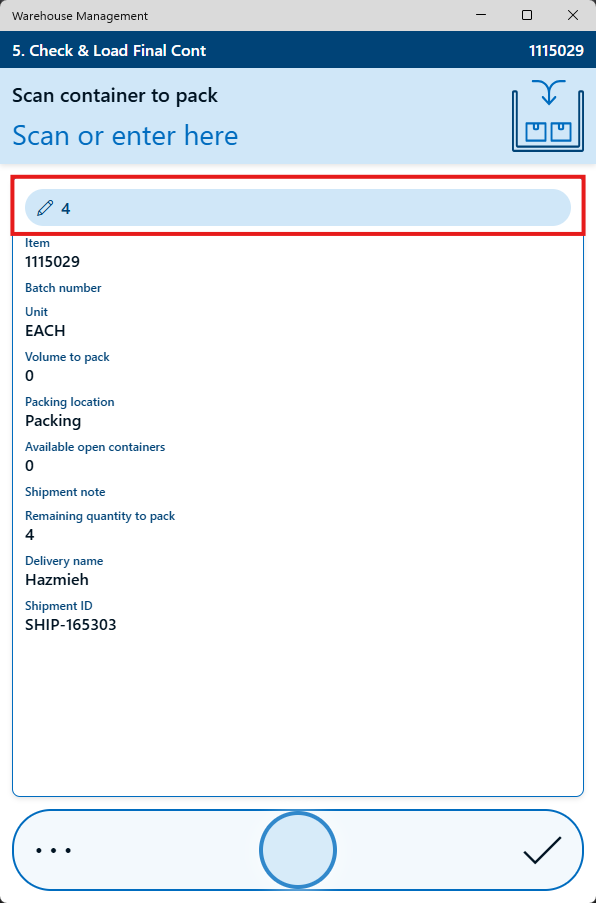
User's image

I have the same question (0)
  • Suggested answer
    Sagar Suman Profile Picture
    6,775 Super User 2026 Season 1 on at
    Hi,
     
    Can you confirm if you are using the mobile device container packing policies setup which has value 'Capture one by one' value for the capture tracking dimension field.
     
    In case of serial controlled items user will be asked to scan each and every serial but I need to check once for non-serial items.
     
    I will check and revert again. 
     
    Regards,
  • AF-09021258-0 Profile Picture
    12 on at
    Hi Sagar,

    Please check attached, Mobile device container packing policies:


    But i don't think the quantity is related to item dimensions. 
  • Laurens vd Tang Profile Picture
    4,893 Super User 2026 Season 1 on at
    Good day,
     
    Can you share a screenshot of the "Mobile device container packing policies" ? 


    Best regards,
    Laurens van der Tang
  • AF-09021258-0 Profile Picture
    12 on at
    Hi Laurens,

    Please check attached, Mobile device container packing policies:


    But i don't think the quantity is related to item dimensions. 
  • Laurens vd Tang Profile Picture
    4,893 Super User 2026 Season 1 on at
    Good day,
     
    Thanks for sharing the screenshot! Do you have active tracking dimensions like batch or serial numbers for the products which you need to pack?
     
    Best regards,
    Laurens van der Tang
  • AF-09021258-0 Profile Picture
    12 on at
    Hello,

    Yes On Batches

  • Suggested answer
    Laurens vd Tang Profile Picture
    4,893 Super User 2026 Season 1 on at
    Good day,
     
    I'm believe it is limitation of Dynamics. I think the only option is to raise an idea on the ideas portal or to consider a customization. 
     
    Link to the ideas portal: https://experience.dynamics.com/ideas/
     
    Best regards,
    Laurens van der Tang 

Under review

Thank you for your reply! To ensure a great experience for everyone, your content is awaiting approval by our Community Managers. Please check back later.

Helpful resources

Quick Links

Season of Sharing Community Challenge Launch!

Jump in, show your community spirit, and win prizes!

Women in Power Builds Momentum

Expanding mentorship, skilling, and AI innovation

Congratulations to the May Top 10 Community Leaders

These are the community rock stars!

Leaderboard > Supply chain | Supply Chain Management, Commerce

#1
André Arnaud de Calavon Profile Picture

André Arnaud de Cal... 169 Super User 2026 Season 1

#2
Abhilash Warrier Profile Picture

Abhilash Warrier 102 Super User 2026 Season 1

#3
Subra Profile Picture

Subra 94

Last 30 days Overall leaderboard

Product updates

Dynamics 365 release plans



