web
You’re offline. This is a read only version of the page.
close
Skip to main content

Notifications

Announcements

No record found.

Community site session details

Community site session details

Session Id :
Finance | Project Operations, Human Resources, ...
Answered

Global address book

(0) ShareShare
ReportReport
Posted on by 100

Found a person.

How were they added in Global address book?

Thanks

Maxwell

I have the same question (0)
  • Verified answer
    Gunjan Bhattachayya Profile Picture
    35,423 on at

    Hi Maxw,

    Global address book records are created from Contacts, Customers, Vendor, Workers, Prospects, Applicants, Competitor as outlined in this document.

    docs.microsoft.com/.../overview-global-address-book

    In case you can't find a related role under "Roles" section, maybe the record is orphaned as the master record was deleted.

    You can find the person who created by going to "Name history" and checking for Modified By. You can find the created date time from Global address books form > Options > Record Info > Show all fields. You can check the Created date time field here.

  • Verified answer
    André Arnaud de Calavon Profile Picture
    301,069 Super User 2025 Season 2 on at

    Hi Maxw,

    Gunjan is correct. There is a setting on the Global Address Book parameters to determine if a party should be deleted if there are no roles linked anymore.

    There is another option. A user would be able to go to the Global Address Book form and add a person or organization without a role as e.g. worker, user or contact.

  • Verified answer
    vinitgoyal2005 Profile Picture
    6,332 on at

    Hi Maxw,

    Q:How were they added in Global address book?

    A: As mentioned by Gunjan, Party will be created for any customer, vendor, Workers etc. If you delete them party doesn't get deleted unless you set the parameter "Delete parties with no roles". 

    pastedimage1598305688092v1.png

    Q: Is there a way to add someone in Global address book automatically when I create a user in system administration or whatever?

    A: No, you have to create a Worker/Employee in HR first and then assign it to User. Of course, you can do customization if you want to. 

    Q; Also, do you a way to check when was the one added in Global address book and who added the one in Global address book?

    A: Name history will give "Modified by" and "Effective date" which is when it was added in the system.
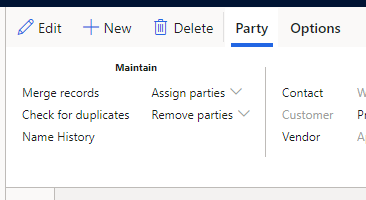
    pastedimage1598305907682v2.png

  • vinitgoyal2005 Profile Picture
    6,332 on at

    Hi,

    If your question is answered, could you please mark the verified answer/s?

Under review

Thank you for your reply! To ensure a great experience for everyone, your content is awaiting approval by our Community Managers. Please check back later.

Helpful resources

Quick Links

Responsible AI policies

As AI tools become more common, we’re introducing a Responsible AI Use…

Neeraj Kumar – Community Spotlight

We are honored to recognize Neeraj Kumar as our Community Spotlight honoree for…

Leaderboard > Finance | Project Operations, Human Resources, AX, GP, SL

#1
Martin Dráb Profile Picture

Martin Dráb 559 Most Valuable Professional

#2
André Arnaud de Calavon Profile Picture

André Arnaud de Cal... 464 Super User 2025 Season 2

#3
Sohaib Cheema Profile Picture

Sohaib Cheema 250 User Group Leader

Last 30 days Overall leaderboard

Product updates

Dynamics 365 release plans
