web
You’re offline. This is a read only version of the page.
close
Skip to main content

Announcements

News and Announcements icon
Community site session details

Community site session details

Session Id :
Microsoft Dynamics AX (Archived)
Answered

How to set up database logging on VendTable.BankAccountNum

(0) ShareShare
ReportReport
Posted on by 25

Hi, 

Let's see if the community can help me!

We would like to have a database log set up on the VendTable.BankAccountNum, however I can't find the field in the Database log setup form. 
Currently we have the database log set up on VendTable.BankAccount. Since this field can only contain 10 characters it doesn't show the entire bank account number (incl IBAN). 
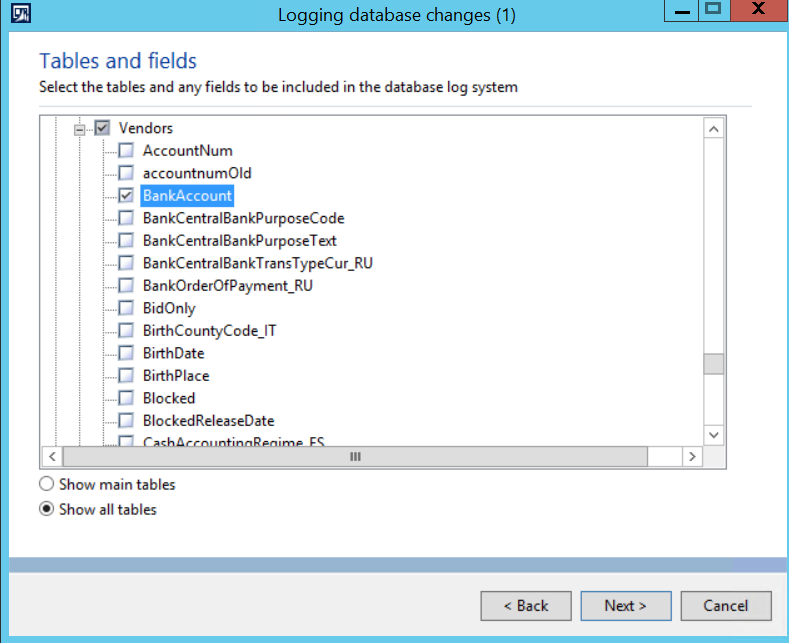
2019_2D00_03_2D00_28_5F00_1254.png

Did anyone face this problem before and how did you solve it?

Regards,

Niels

*This post is locked for comments

I have the same question (0)
  • Suggested answer
    nmaenpaa Profile Picture
    101,172 Moderator on at

    VendTable contains only the BankAccount id. The details of the bank account (including IBAN) are in VendBankAccount ("Vendor bank accounts") table.

  • NCom Profile Picture
    25 on at

    Hi Nikolaos,

    Thanks. In the meantime we also figured we should use VendBankAccount.BankIBAN instead. Just now we are facing another issue: We can only set the checkbox for 'Update', while we also want to log on 'Insert' and 'Delete'. For some reason these options are not editable. 

    2019_2D00_03_2D00_28_5F00_1421_5F00_001.png

    Gr Niels

  • Verified answer
    nmaenpaa Profile Picture
    101,172 Moderator on at

    If you specify a field, you can only track Update. Fields can only be updated, not inserted or deleted. Only full records can be inserted or deleted. This means you can only track "Update" for individual fields.

    Please see the documentation docs.microsoft.com/.../configure-and-manage-database-logging

  • NCom Profile Picture
    25 on at

    Thanks a lot! I must have overlooked that Note.

Under review

Thank you for your reply! To ensure a great experience for everyone, your content is awaiting approval by our Community Managers. Please check back later.

Helpful resources

Quick Links

Season of Sharing Community Challenge Launch!

Jump in, show your community spirit, and win prizes!

Women in Power Builds Momentum

Expanding mentorship, skilling, and AI innovation

Congratulations to the May Top 10 Community Leaders

These are the community rock stars!

Leaderboard > 🔒一 Microsoft Dynamics AX (Archived)

#1
Sanhthosh.Kumar.K Profile Picture

Sanhthosh.Kumar.K 2

#2
Raed Salah Bzour Profile Picture

Raed Salah Bzour 1

Last 30 days Overall leaderboard

Featured topics

Product updates

Dynamics 365 release plans
