web
You’re offline. This is a read only version of the page.
close
Skip to main content

Notifications

Announcements

No record found.

Community site session details

Community site session details

Session Id :
Microsoft Dynamics AX (Archived)

Rejecting Cycle Count Work and Re-Count

(0) ShareShare
ReportReport
Posted on by

Hello  all,

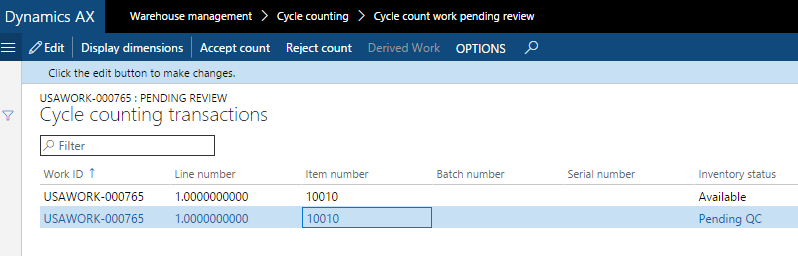
I am rejecting cycle count work in AX from the 'Cycle count pending review" screen. If I recall correctly there was a way in AX 2012 to automatically create new counting work for what was rejected. I cannot seem to make that happen in the new version of AX. Can anyone point me in the right direction of how to make this happen? I thought this is why is there is a "derived work" field on the form below? To show new work that was created from rejecting a count.
2016_2D00_10_2D00_14_5F00_22_2D00_37_2D00_31.png

Thank you for any help you can provide.

*This post is locked for comments

I have the same question (0)
  • Suggested answer
    Ivan (Vanya) Kashperuk Profile Picture
    on at

    I don't believe there ever was such a function there. Rejecting just, well, rejects the count the does nothing else.

    Maybe you had a customization?

    Out of the box, you'd just need to go and create a new cycle count work for the specific location, if necessary (manually)

  • Community Member Profile Picture
    on at

    Hi Ivan,

    Thank you for your reply. I was able to get into a 2012 instance and it seems like I was indeed mistaken. Since there is a "Derived work" button in my screen shot above I was hoping there was a way to have re-count work generated upon rejection.

    Does anyone know what the functionality of this "Derived work" is?

    Thank you.

  • Suggested answer
    Community Member Profile Picture
    on at

    Hi Luke,

    like it wrote down here: https://technet.microsoft.com/en-us/library/dn727123.aspx

    Click Derived Work to view details of the cycle counting work that is created after accepting the difference.

    This means, if you accepting the difference there is created a new work of work order type "Counting discrepancies accepted". And with the button derived work you can jump from work order type "Cycle counting" to the belonging work order type "Counting discrepancies accepted".

    Click Source order, in the created work of work order type "Counting discrepancies accepted", to view details of the original cycle counting work before accepting the difference.

Under review

Thank you for your reply! To ensure a great experience for everyone, your content is awaiting approval by our Community Managers. Please check back later.

Helpful resources

Quick Links

Responsible AI policies

As AI tools become more common, we’re introducing a Responsible AI Use…

Neeraj Kumar – Community Spotlight

We are honored to recognize Neeraj Kumar as our Community Spotlight honoree for…

Leaderboard > 🔒一 Microsoft Dynamics AX (Archived)

#1
Martin Dráb Profile Picture

Martin Dráb 4 Most Valuable Professional

#1
Priya_K Profile Picture

Priya_K 4

#3
MyDynamicsNAV Profile Picture

MyDynamicsNAV 2

Last 30 days Overall leaderboard

Featured topics

Product updates

Dynamics 365 release plans
