web
You’re offline. This is a read only version of the page.
close
Skip to main content

Notifications

Announcements

No record found.

Community site session details

Community site session details

Session Id :
Microsoft Dynamics AX (Archived)

problem design receipt

(0) ShareShare
ReportReport
Posted on by 2,050

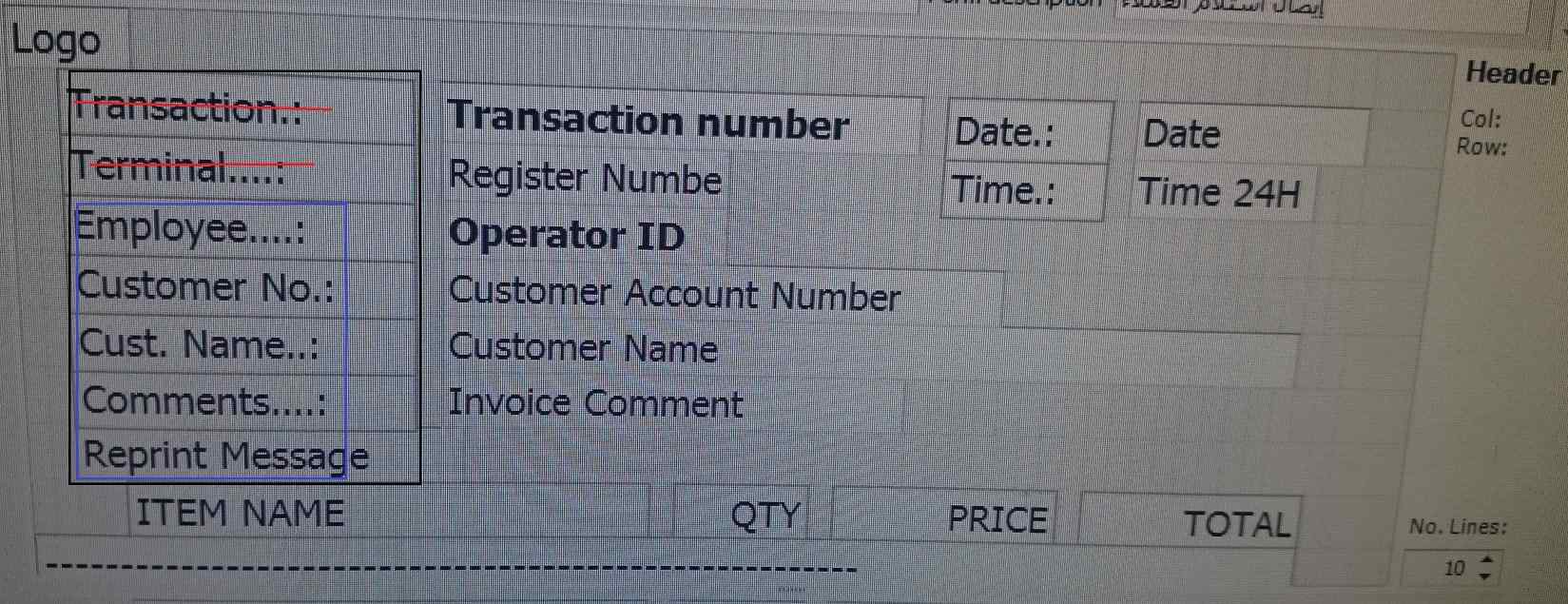
i have problem with design receipt 
4186.www.jpg

i already do custmaize on design receipt i change those text to Arabic langue, and then i delete all element those inside blue box because i don't need them,

but i faced problem the element have red line not appear any more it's show me when i printed empty also their field are missing

what solve to show them?

*note when i see print preview they are appeared  

*This post is locked for comments

I have the same question (0)
  • Oksana Kovaliova Profile Picture
    3,597 on at

    Hi Mohammed,

    Was your printer earlier able to print Arabic?

    If you can see the text in print preview that means AX receipt layout is correct.

    It can happen that printer encoding in Hardware profile is wrong, so printer cannot print Arabic symbols.

    You can try to use PDF printer or any other virtual printer to test if printing to file shows Arabic fields.

    Regards,

    Oksana

  • mohammed.mqi Profile Picture
    2,050 on at

    thanks Oksana for replay yes my printer can print Arabic and also i can see it on print preview ,

    but now also when i try to back those element to English they still not appear it's give me empty when i print but they appear on print preview !!!

    is there any way to rest the layout and design to default?

    Regards

  • Verified answer
    Oksana Kovaliova Profile Picture
    3,597 on at

    Hi Mohammed,

    What AX version are you using?

    As I know, no standard way exists to reset layout.

    What you can do is to copy layout from any DEMO system.

    I would recommend to create new layout in your system (for test) and copy layout fields from any DEMO system/system where layout was not changed

    The possible way to copy layout fields is:

    1) Open DEMO system AOT;

    2) Open RetailFormLayout table in table browser;

    3) Find required layout by FormLayoutID;

    4) Copy footerXML, headerXML, linesXML fields to your TARGET system..

    Regards,

    Oksana

  • mohammed.mqi Profile Picture
    2,050 on at

    thanks Oksana  for replay,

    but i don't have Demo system aot can you please provide me

    those default field

  • Verified answer
    Oksana Kovaliova Profile Picture
    3,597 on at

    Hi Mohammed,

    Here is excel export of 'Customer receipt' from R3 DEMO system (please, try this on new receipt before changing your existing receipt)

    drive.google.com/.../view

    Also the question about your existing receipt: did you try to delete these 2 fields and add new text fields instead of them?  

    Regards,

    Oksana

  • mohammed.mqi Profile Picture
    2,050 on at

    thanks for helping

    and yes i want add new text

Under review

Thank you for your reply! To ensure a great experience for everyone, your content is awaiting approval by our Community Managers. Please check back later.

Helpful resources

Quick Links

Responsible AI policies

As AI tools become more common, we’re introducing a Responsible AI Use…

Neeraj Kumar – Community Spotlight

We are honored to recognize Neeraj Kumar as our Community Spotlight honoree for…

Leaderboard > 🔒一 Microsoft Dynamics AX (Archived)

#1
Martin Dráb Profile Picture

Martin Dráb 4 Most Valuable Professional

#1
Priya_K Profile Picture

Priya_K 4

#3
MyDynamicsNAV Profile Picture

MyDynamicsNAV 2

Last 30 days Overall leaderboard

Featured topics

Product updates

Dynamics 365 release plans



