web
You’re offline. This is a read only version of the page.
close
Skip to main content

Notifications

Announcements

No record found.

Community site session details

Community site session details

Session Id :
Microsoft Dynamics AX (Archived)

AX POS RETAIL : Modify FrmNewCustomer design

(0) ShareShare
ReportReport
Posted on by 95

Dear All, 

I am still new on AX POS development, so i need some help, i try to customize some form, FrmNewCustomer by adding field, but when i open the FrmNewCustomer design from Customer service - SDK Plug- in.

it show some warning,
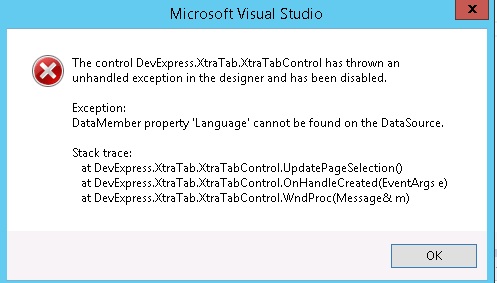
 ErrorDevExpress_2D00_Language.jpg

I already purchase subscription and install devExpress. .

And also another errors also show up.

Could not find type 'Microsoft.Dynamics.Retail.Pos.Customer.ViewModels.CustomerViewModel'. Please make sure that the assembly that contains this type is referenced. If this type is a part of your development project, make sure that the project has been successfully built using settings for your current platform or Any CPU.

Could not find type 'Microsoft.Dynamics.Retail.Pos.Customer.WinFormsTouch.ViewAddressUserControl'. Please make sure that the assembly that contains this type is referenced. If this type is a part of your development project, make sure that the project has been successfully built using settings for your current platform or Any CPU. 


I try to find dll for the reference but couldn't found it.

*This post is locked for comments

I have the same question (0)
  • Rodolfo Recalde Profile Picture
    on at

    Hi Heron,

    Please check:

    a. The version/folder of Retail SDK (CU8,CU9...) And if the SDK version has all othe compatible updates (KBs)

    b. The version of DevExpress. Check this link the appropriate version for the AX-Retail-SDK version.

    c. KB 3059368. "this hotfix was released shortly after R3 CU9 which updated to a newer version of the DevExpress components".


    I hope this Helps!

    Regards,

    Rodolfo Recalde.

  • Heroniko Halim Profile Picture
    95 on at

    Hi Rodolfo,

    I really appreciate your help.

    1) The version of retail SDK that we use is CU 10, and when install the is also CU8, CU9     folder i checked all ,and get the same error , and could you explain where to check

    the compatible updates (KBs) ?

    2) The version of devExpress, when first time open i see the reference of devExpress is refer to 11.2 , and i have tried to upgrade the project to 14.2.107. but the errors seems still occurs.

    3) i have installed the hotfix but still get the same errors.

    It seems the errors is related with datasource ,do you have any idea if there is anything we can do with the datasource?

    Thank you,

    Best Regards,

    Heroniko Halim

  • Heroniko Halim Profile Picture
    95 on at

    From this errors , it seems the problem is when reading the datasource, as i search there is similar case and some suggestion is to change the target platform into x64 but it seems still not working for me..

  • Verified answer
    Rodolfo Recalde Profile Picture
    on at

    1. I meant: The version of the SDK should be the same version as EPOS. If you have installed any specific KBs in the EPOS component. You should also check if there is any update for the SDK component. I imagine you did it.

    2. You have upgraded DevExpress, correct? I would recommend uninstalling version 11 and 14 and installing again version 14. just to ensure that there is no "dirt" reference.

    NOTE: "Info" in the Visual Studio log/output is not necessarily an impediment to customize and build the project in Retail-SDK.

    What can I suggest to you.


    > Verify  if DataSource reference and DevExpress Reference exist in the Customer  project. Example (Figure 1 - A, B)

    AX_5F00_PDV_5F00_Retail_5F00_SDK_5F00_Customer_5F00_Recalde2.png

    Figure 1

    > Reinstall the Retail SDK (and all CUs) (if you do not have a backup of the SDK folder)

    > Uninstall DevExpress and re-install the correct version, compatible with the version of the SDK. (I already had problems with the DevExpress upgrade)

    > Build  the Customer project. Check for success in this operation.

    > Open the FrmNewCustomer form design. (Figure 1)

    This way you can ensure that your environment is O.K. That you don't have  installation problem and you can start customizing.

    Then, make your customization including the new field.

    I Hope this Helps!

    Regards,

    Rodolfo Recalde.

  • Heroniko Halim Profile Picture
    95 on at

    It works now ,yes you are right it seems there is problem devExpress upgrade.

    Thank you very much for your help Rodolfo

    Best Regards,

    Heron

Under review

Thank you for your reply! To ensure a great experience for everyone, your content is awaiting approval by our Community Managers. Please check back later.

Helpful resources

Quick Links

Responsible AI policies

As AI tools become more common, we’re introducing a Responsible AI Use…

Neeraj Kumar – Community Spotlight

We are honored to recognize Neeraj Kumar as our Community Spotlight honoree for…

Leaderboard > 🔒一 Microsoft Dynamics AX (Archived)

#1
Priya_K Profile Picture

Priya_K 4

#1
Martin Dráb Profile Picture

Martin Dráb 4 Most Valuable Professional

#3
Ali Zaidi Profile Picture

Ali Zaidi 2

Last 30 days Overall leaderboard

Featured topics

Product updates

Dynamics 365 release plans



