web
You’re offline. This is a read only version of the page.
close
Skip to main content

Notifications

Announcements

No record found.

Community site session details

Community site session details

Session Id :
Customer experience | Sales, Customer Insights,...
Answered

retrieve data from POA table

(0) ShareShare
ReportReport
Posted on by 448

Hi all

I need to retrieve data from principalobjectaccess (POA) table, but the dataverse connector dont recognize the name of the hide table.
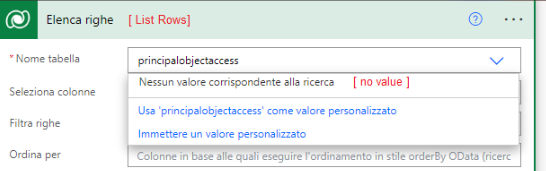
pastedimage1664354076695v1.png

in most post that I've read, I find that I should use the CDS connector and CDS (current environment) connector, but I'm not able to find them in my list of connector .... maybe I mistake something with translation in italian??? ....

I'm working with dataverse db on Dynamics 365 sales.


Thanks for any help or suggestion.

I have the same question (0)
  • Suggested answer
    a33ik Profile Picture
    84,331 Most Valuable Professional on at

    Hello,

    I remember your previous question so I will reply using info that you provided before. PrincipalObjectAccess table is not directly queryable but you can use it in links. Here is the query that you can use to query users with who record is shared with:


    Here is how you can use that fetchxml query in Power Automate:

    pastedimage1664392027908v1.png

    Obviously, you will have to replace '00000000-0000-0000-0000-000000000000' with the Id of the record.

  • Ram Prakash Duraisamy Profile Picture
    2,287 on at

    Hi,

    May i know why you want to Retrieve POA Table ?

    Note:

    Please make sure when ever you are trying to Remove Values from POA Table it will break the Relationship with Table and It will remove Existing Share and Assign Access.

    Its not Recommend to the update manually.

    Please mark as Answer if it is helpful and provide Kudos

    Subscribe : www.youtube.com/.../UCnGNN3hdlKBOr6PXotskNLA

    Follow me on Twitter : @rampprakashd

    Blog : microsoftcrmtechie.blogspot.com

  • DiePic Profile Picture
    448 on at

    Hi @Ramprakash Duraisamy

    I dont want manage data in table POA, I want retrive all the user whom the opportunity is shared to send them a mail

  • DiePic Profile Picture
    448 on at

    thanks a lot a33ik ,

    how you have understood for sure, I'm new in D365Sales ...... my need is "retrive all the user whom the opportunity is shared to send them a mail".

    There is the possibility to have a complete example for dummies or have a link with a step by step guide... or something similar?

    Thanks for your courtesy and your patience.

    p.s.

    I need 2 condition in your xml similar like this, but it give me always an error on the 2nd condition:

    <link-entity name="principalobjectattributeaccess" from="principalid" to="systemuserid">
       <filter type="and">
          <condition attribute="objectid" operator="eq" value="bd9d5e13-0ec5-4da3-8a43-3e771f05b27a" />
          <condition attribute="principaltypecode" operator="eq" value="systemuser" />
       </filter>
    </link-entity>

  • Suggested answer
    Bipin D365 Profile Picture
    28,983 Moderator on at

    Hi,

    How about invoking below oob action from power automate

    RetrieveSharedPrincipalsAndAccessRequest

    See below link on how to perform bound and unbound action

    learn.microsoft.com/.../bound-unbound

  • DiePic Profile Picture
    448 on at

    Hi Bipin Kumar

    as i've said, I'm new in D365, please can indicate some example or something for dummies?

    thanks in advance

  • Verified answer
    a33ik Profile Picture
    84,331 Most Valuable Professional on at

    Try to use the following FetchXml filter instead:


    8 corresponds to systemuser table.You can check this as a list of object type codes for OOB entities - msdynamicscrmblog.wordpress.com/.../

  • DiePic Profile Picture
    448 on at

    Hi a33ik  and thank you for reply.

    now all it's working ... the error was in the name of table:

    "principalobjectaccess" instead of "principalobjectattributeaccess"

    thanx for your patience.

  • DiePic Profile Picture
    448 on at

    Attached the steps to obtain the users from table POA (hoping that can be usefull)

    pastedimage1664543486059v1.png

    pastedimage1664543731421v2.png

    pastedimage1664544004751v4.png

    pastedimage1664544364756v5.png

    pastedimage1664544505276v6.png

    thanks a33ik 

Under review

Thank you for your reply! To ensure a great experience for everyone, your content is awaiting approval by our Community Managers. Please check back later.

Helpful resources

Quick Links

Responsible AI policies

As AI tools become more common, we’re introducing a Responsible AI Use…

Neeraj Kumar – Community Spotlight

We are honored to recognize Neeraj Kumar as our Community Spotlight honoree for…

Leaderboard > Customer experience | Sales, Customer Insights, CRM

#1
Tom_Gioielli Profile Picture

Tom_Gioielli 70 Super User 2025 Season 2

#2
Gerardo Rentería García Profile Picture

Gerardo Rentería Ga... 33 Most Valuable Professional

#3
Daniyal Khaleel Profile Picture

Daniyal Khaleel 32 Most Valuable Professional

Last 30 days Overall leaderboard

Product updates

Dynamics 365 release plans
