Hi Sloka,
I think you are talking about Referential integrity, the database of d365fo follows this.
The foundation of D365FO is the relational database. Relationships can be created between tables that contain related data. In D365FO, the relationship between tables is called a relation.
Relations in D365FO:
-Keep the database consistent (enforce referential integrity).
-Are used by the Auto Join system in forms.
-Enable the look up of values in other tables (through lookup list/selection list boxes and the View details Form command).
-Are used to validate data.
-Automatically propagate changes from one table to another.
-Auto-define table relationships in queries.
This is the document about creating Relation in ax2012, which also applies to d365fo :
docs.microsoft.com/.../best-practices-for-table-relations
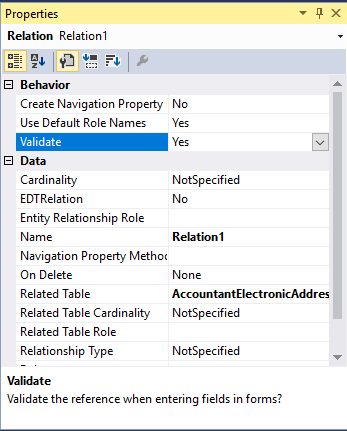
In your case, just need to set the validation property of the relation to Yes.