web
You’re offline. This is a read only version of the page.
close
Skip to main content

Notifications

Announcements

No record found.

Community site session details

Community site session details

Session Id :
Microsoft Dynamics AX (Archived)

Intercompany Purchase order to Sales order - passing Data

(0) ShareShare
ReportReport
Posted on by 689

Dear Experts,

Background: I have A company and B company, I will set up trading Relationship between vendor A com and Customer B com like this 
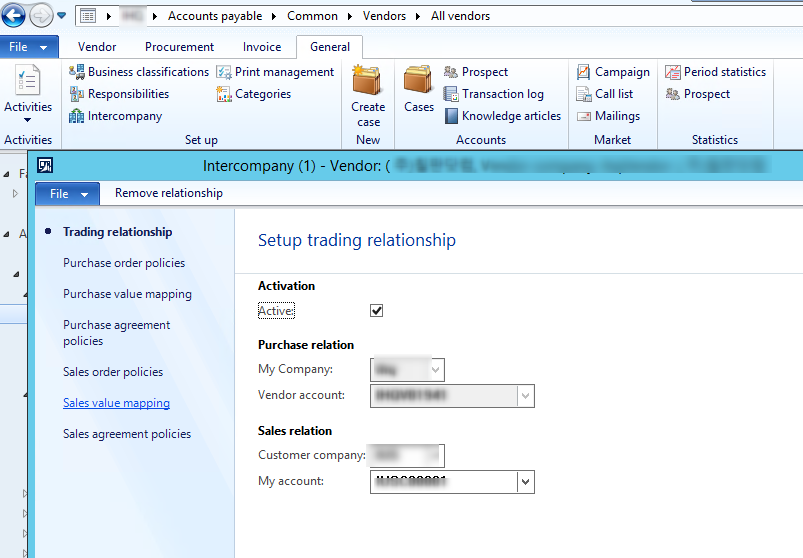
2016_2D00_07_2D00_14_5F00_14h37_5F00_47.png

It's mean, when I create PO in A com, it's also create SO in B com

Purpose: I did add one option (parameter)  like this in Intercompany configure form
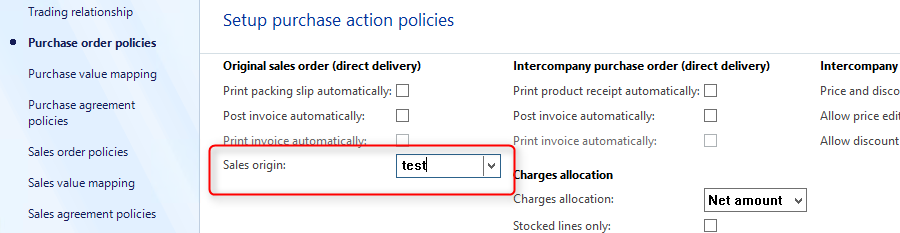
2016_2D00_07_2D00_14_5F00_14h44_5F00_19.png

Here is SO that I opened in B com base
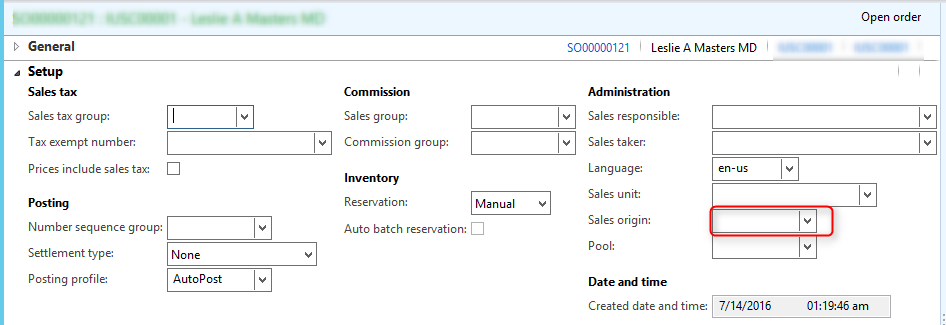
2016_2D00_07_2D00_14_5F00_14h41_5F00_30.png

I want this Sales origin field in SO (that created from PO) automatically come base on Parameter I put in Intercompany configure form.

Is there a possibility? then Which class that I need to take to do that ?

 Version: AX 2012 R3
thank you in advance,


*This post is locked for comments

I have the same question (0)
  • Verified answer
    krishna.rao@dax Profile Picture
    3,006 on at

    Place a breakpoint in insert() method of Sales Table & find how the data filled up.

    Probably need to place your customized code here

    Classes\PurchTableType\interCompanyMirror

    // to this 

    if (create || purchTable.fieldChanged(fieldnum(PurchTable, DeliveryPostalAddress)))
    {
    axSalesTable.parmDeliveryPostalAddress(purchTable.DeliveryPostalAddress);
    }

  • Luan Nguyen Profile Picture
    689 on at

    Hi Krishna,

    Thank for your answer!

    Actually, I already did bebug all those class (Purchtableform, PurchTableType), method on PurchTalbe form, Method on DS PurchTalbe, but no result.

    you mentioned Classes\PurchTableType\interCompanyMirror, I put breakpoints here but it not go inside.

    Any helps?

    Thanks

  • krishna.rao@dax Profile Picture
    3,006 on at

    In my system break point hitting  the method interCompanyMirror

    Ensure that you have proper debugger configurations & Module setup parameters.

    & also keep break point in insert() method of Sales Table method.Here you find how the data is filling 

    in the SalesTable

  • Luan Nguyen Profile Picture
    689 on at

    Dear Krishna,

    Thank for your answer.
    Of course, the Debugger works properly.
    But It was not go to your method that you mentioned.
    I did find SO Line insert on SalesLineType/Insert() Class, but I couldn't find where is SO header created from PO.
    Any Ideals ?

    Thank

  • krishna.rao@dax Profile Picture
    3,006 on at

    Dear Max,

    Could you please elaborate how you find the place for sales header creation &

    what are the changes you made. So that someone might find how to fix.

    If you observe responses which you marked as answered  are not in harmony.

  • Luan Nguyen Profile Picture
    689 on at

    Dear Krishna,

    Thank for your reply,

    In my case, I can do it by 2 ways

    1. In axSalesTable, You can create new parm method here and passing data from Intercompany configure form, Save it in InterCompanyEndpointActionPolicy, to inter Create SO from PO.

    2. You can easy directly write in Insert() method of SalesLine or SalesTable with below relation (also save field parm in InterCompanyEndpointActionPolicy)

    party = CustTable::find(salesTable.CustAccount).Party;
    tradingPartnerCustRecId = InterCompanyTradingPartner::findCustomer(party,salesTable.dataAreaId).RecId;
    select interCompanyTradingPartner
    where interCompanyTradingPartner.RecId == tradingPartnerCustRecId;
    tradingPartnerVendRecId = InterCompanyTradingRelation::getRelatedTradingPartner(interCompanyTradingPartner).RecId;
    interPartner = InterCompanyEndpointActionPolicy::findPartner(tradingPartnerVendRecId).InterCompanyTradingPartner;
    
    salesTable.SalesOriginId = InterCompanyEndpointActionPolicy::findPartner(tradingPartnerVendRecId).SalesOriginId;
    salesTable.update();

    Correct me if any wrongs.

    Thanks

  • krishna.rao@dax Profile Picture
    3,006 on at

    It's not a wise idea/best practice to write code directly in insert method of SalesTable.

    We need to follow the standard AX flow for data updation. I've worked similar requirement in the past & done as said in first reply.

    I'm not aware of the code which you've written.

  • Luan Nguyen Profile Picture
    689 on at

    Yes, Thank for your commend, I agree it was not best practice.

    anyways, if using this way we have to check InterCompanyOrder first then insert(),

    Base on your first reply, it's correct, but one thing I done know how to do is debugging ? I did try using Visual Studio but it did not work, I think because of AIF service. So, do you have any idea about this?

    Thanks

Under review

Thank you for your reply! To ensure a great experience for everyone, your content is awaiting approval by our Community Managers. Please check back later.

Helpful resources

Quick Links

Responsible AI policies

As AI tools become more common, we’re introducing a Responsible AI Use…

Neeraj Kumar – Community Spotlight

We are honored to recognize Neeraj Kumar as our Community Spotlight honoree for…

Leaderboard > 🔒一 Microsoft Dynamics AX (Archived)

#1
Martin Dráb Profile Picture

Martin Dráb 4 Most Valuable Professional

#1
Priya_K Profile Picture

Priya_K 4

#3
MyDynamicsNAV Profile Picture

MyDynamicsNAV 2

Last 30 days Overall leaderboard

Featured topics

Product updates

Dynamics 365 release plans
