web
You’re offline. This is a read only version of the page.
close
Skip to main content

Notifications

Announcements

No record found.

Community site session details

Community site session details

Session Id :
Microsoft Dynamics AX (Archived)

Incorrect VAT Settlement calculation

(0) ShareShare
ReportReport
Posted on by 140

Dear All, 

We are facing a strange behavior when running the settle and post sales tax declaration.

There are multiple booking on the Sales tax code "Full". The sales tax code has a nothing special to it. No reverse charge no use tax regarding the sales tax group that is set up to it. 

We have invoices booked through the project and through free text invoice. The VAT set up the same in both cases.

The VAT calculation is correct on both of the invoices. 

Freetext invoice sales tax voucher

Freetext.png.jpg

Project invoice voucher

6116.project.png

When creating the sale tax settlement, for some reason all the booking are correct expect for the ones relating relating to the free text invoices.

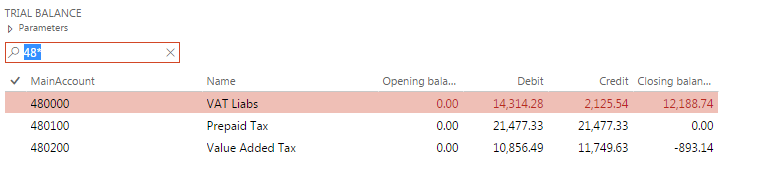
Main account 480200 is the Value added tax, 480100 is the Prepaid tax, 480000 is the vat liability

After the VAT settlement the main account 480200 is not 0, the remaining value comes from the freetext invoice VAT amount which are doubled. And are not settled in the correct direction.
0830.trial-balance.png

Here is one of the invoices and their VAT booking and VAT settlement

VAT_2D00_freetext.png

I would be grateful if any one could give some pointers what could be causing this.

*This post is locked for comments

I have the same question (0)
  • Ludwig Reinhard Profile Picture
    Microsoft Employee on at

    Hi,

    Is it possible that you share some additional details about your sales tax setup?

    What is interesting are especially

    - Whether your sales tax codes have a non-deductibe % Setup in the value form?

    - Whether your sales tax groups have the use tax parameter setup? A doubling of the amounts indicates that there might be something related to reverse charge postings?!

    - What main accounts have been setup in your sales tax ledger posting Groups.

    Any additional setup info would help because it is quite difficult giving you some concrete hints from the posted transactions alone.

    Many thanks and best regards,

    Ludwig

  • Emilia_R Profile Picture
    140 on at

    Hi Ludwig,

    Sadly I'm not able to post the picture in comment (not even with the rich text formatting as the field Description can not be edited but it is mandatory...)

    There is no non-deductible part for the VAT also there is no use tax or reversed charge set for the code (and related group)

    I've made a test in the contoso system with DEMF company. And there all the booking are correct from the settlement.

    I've made a comparison documentation regarding the set up, can I forward it to you somehow?

    Thank you

  • Ludwig Reinhard Profile Picture
    Microsoft Employee on at

    Hello Emilia_R,

    The best thing would be if you could attach the file by making use of the rich formatting form that can be accessed through the respective button right below the text field.

    If this does not work, you can also sent me the file via email, which you can access by clicking on my profile and selecting to send an email.

    Before doing that, can you check whether the problem that you identified in your live environment can be replicated in a demo/test environment?

    Best regards,

    Ludwig

  • Emilia_R Profile Picture
    140 on at

    Hi Ludwig,

    I've made a test in the Contoso demo system with DEMF company. And there all the booking are correct from the settlement. So the issue could not be replicated. We have given over the task to our developer to investigate. As only the VAT bookings from the Freetext invoices are handled incorrectly by the settlement run, we suspect that there might have been a code modification that causes this.

    Will post the solution once we have it.

    Thank you,

    Best regards,

    Emilia

  • Verified answer
    Emilia_R Profile Picture
    140 on at

    Hi All,

    The solution was a hotfix: MS Hotfix - KB 3218347.

    It turns out this was a standard bug in the older version we had. (Update7 (7.0.4542.16189))

Under review

Thank you for your reply! To ensure a great experience for everyone, your content is awaiting approval by our Community Managers. Please check back later.

Helpful resources

Quick Links

Responsible AI policies

As AI tools become more common, we’re introducing a Responsible AI Use…

Neeraj Kumar – Community Spotlight

We are honored to recognize Neeraj Kumar as our Community Spotlight honoree for…

Leaderboard > 🔒一 Microsoft Dynamics AX (Archived)

#1
Martin Dráb Profile Picture

Martin Dráb 4 Most Valuable Professional

#1
Priya_K Profile Picture

Priya_K 4

#3
MyDynamicsNAV Profile Picture

MyDynamicsNAV 2

Last 30 days Overall leaderboard

Featured topics

Product updates

Dynamics 365 release plans
