web
You’re offline. This is a read only version of the page.
close
Skip to main content

Notifications

Announcements

No record found.

Community site session details

Community site session details

Session Id :
Customer experience | Sales, Customer Insights,...
Answered

Custom Codes in dynamics Marketing

(0) ShareShare
ReportReport
Posted on by 235

Hi all

I am wondering if there is another way using custom codes in D365 Marketing? Here is my conditional. I would like to send an email to a group in English, and the other group in another Languages. But instead of using the custom code, like in the picture I would like to add this conditional in the text box in the email. 

pastedimage1588056668366v1.png

Send this text to a group in english

pastedimage1588056858210v2.png.

Can I add the code directly in the HTML, and how would that look like?

And also I would like to add a field from a related entity, not using custom code. 

Is this possible?

Camilla

I have the same question (0)
  • Verified answer
    cloflyMao Profile Picture
    25,210 on at

    Hi Camilla,

    1. Adding custom code in HTML directly is supported.

    pastedimage1588063673701v1.png

    pastedimage1588063725286v2.png

    Result 1: 

    pastedimage1588063778092v3.png

    Result 2:

    pastedimage1588063816929v4.png

    2. We could add a field from a related entity by assist-edit:

    pastedimage1588063903831v5.png

    e.g:

    display contact's owner name in email content:

    pastedimage1588064023457v6.png

    pastedimage1588064096462v8.png

    pastedimage1588064079999v7.png

    Regards,

    Clofly

  • Camilla Larsson Profile Picture
    235 on at

    Thank you Clofly,

    This i exactly, what i was locking for.

    But, when I am trying to add a related entity field in marketing it stopes and says, I can do this with #each. How do I do that?

  • cloflyMao Profile Picture
    25,210 on at

    Hi Camilla,

    It means relationship between Contact:Related Entity is 1:N, we should add some code to display all related entity records of the contact.

    Format:

    {{ each contact.relationship }}

    {{ this.relatedEntityFieldLogicalName }}

    {{/each}}

    e.g: show all event registration records of current contact: msevtmgt_name is logical name of Registration ID in Event Registration form.

    {{# each  contact.msevtmgt_eventregistration_contact_msevtmgt_contactid}}

    {{this.msevtmgt_name}}

    {{/each}}

    pastedimage1588077611601v2.png

    pastedimage1588077382855v1.png

    You could find introduction about how to use #each in marketing email in article below:

    https://docs.microsoft.com/en-us/dynamics365/marketing/dynamic-email-content#for-each-loops

    Regards,

    Clofly

  • Camilla Larsson Profile Picture
    235 on at

    Thank you,

    One last question. Can`t I have This in the same setting?

    {{#if (eq contact.address1_country 'Norge')}}

    Kind Regards

    Camilla

  • cloflyMao Profile Picture
    25,210 on at

    Hi Camilla,

    What do you mean about "Can`t I have This in the same setting?"?

    As per my understanding, we could do any checking in if statement.

    such as

    {{#if (eq contact.address1_country 'Norge')}}

    {{#if (eq contact.address1_country 'Sweden')}}

    {{#if (eq contact.address1_country 'Finland')}}

    if there are serveral country, we could do below:

    -----------------------------------------------------------

    {{if (eq contact.address1_country 'Norge')}}

    {{else if (eq contact.address1_country 'Sweden')}}

    {{else if (eq contact.address1_country 'Finland')}}

    {{/if}}

    -----------------------------------------------------------

    Regards,

    Clofly

  • Camilla Larsson Profile Picture
    235 on at

    What I mean is.

    I I use [tag:if] and else in my setting. Am I not able to use

    {{# each  contact.msevtmgt_eventregistration_contact_msevtmgt_contactid}}

    {{this.msevtmgt_name}}

    {{/each}}?

  • cloflyMao Profile Picture
    25,210 on at

    Hi Camilla,

    We could combine them in different ways:

    1. If a related entity name equals to a specific value, then change output.

    e.g: I have arranged 3 appointments for my test contact:

    * Assistance on Power Automate Configuration

    * Discussion about Laptop purchasement

    * Visit our factory

    pastedimage1588140391625v1.png

    I nested a #if expression inside #each loop:

    {{#each contact.appointment_contact_regardingobjectid}}

        {{#if (eq this.subject 'Discussion about Laptop purchasement')}}

           Laptop

        {{else}}

           {{this.subject}}

        {{/if}}

    {{/each}}

    pastedimage1588140504299v3.png

    Output:

    pastedimage1588140472844v2.png

    2. Only display related entity records if a field of contact equals to a specific value:

    Hi {{contact.firstname}},

    {{#if (eq contact.firstname 'Clofly')}}

    we have arranged some appointments between us:

        {{#each contact.appointment_contact_regardingobjectid}}

            {{this.subject}}

        {{/each}}

    {{/if}}
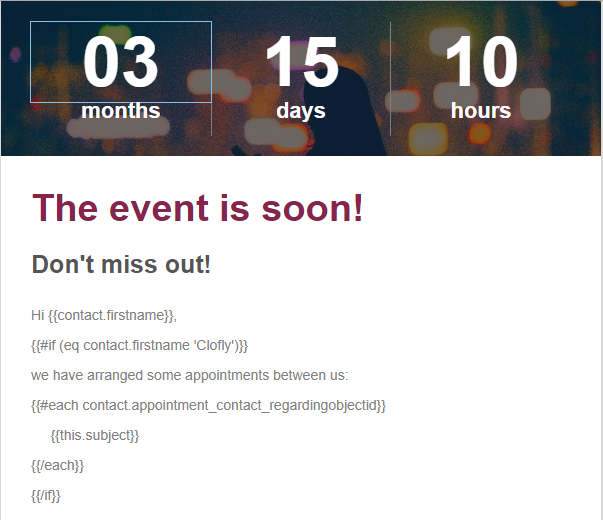
    pastedimage1588141022017v7.png

    Result:

    Only Clofly could see arranged appointments for him.

    pastedimage1588140940629v5.png

    Abbie could only see her firstname:

    pastedimage1588140990352v6.png

    In addition, I would like share some supplements:

    1. Sort result is random in each time.

    2. By using conditional statements and comparisons, currently only text and number fields are good supported.

    Regards,

    Clofly

  • Camilla Larsson Profile Picture
    235 on at

    Thank you Clofly,

    I wish new codes better :)

    Is it possible to have one field to show a contact?

    Example.

    Hi {{contact.firstname}}

    Your student id is: (field) (This field is on a related entity 1:N.

    Should I use Each for this?

    And if I need to combine with an if, is it possible?

    Kind Regards

    Camilla

  • Verified answer
    cloflyMao Profile Picture
    25,210 on at

    Hi Camilla,

    Yes, you should use "[tag:Each]" for it.

    "[tag:Each]" is always required to display 1:N related entity records, even if there is one related record.

    If you would like to only display some students, then combination 1 from my last answer could be your option.

    Hi {{contact.firstname}}

    Your student id is:

    {{#each contact.relationship_name}}

           {{#if (eq this.new_field 'abc')}}

              {{this.new_studentid}}

           {{/if}}

    {{/each}}

    Regards,

    Clofly

  • Camilla Larsson Profile Picture
    235 on at

    Thank you for answering so fast. This helps a lot.

    Kind Regards

    Camilla

Under review

Thank you for your reply! To ensure a great experience for everyone, your content is awaiting approval by our Community Managers. Please check back later.

Helpful resources

Quick Links

Responsible AI policies

As AI tools become more common, we’re introducing a Responsible AI Use…

Neeraj Kumar – Community Spotlight

We are honored to recognize Neeraj Kumar as our Community Spotlight honoree for…

Leaderboard > Customer experience | Sales, Customer Insights, CRM

#1
Tom_Gioielli Profile Picture

Tom_Gioielli 70 Super User 2025 Season 2

#2
Gerardo Rentería García Profile Picture

Gerardo Rentería Ga... 33 Most Valuable Professional

#3
Daniyal Khaleel Profile Picture

Daniyal Khaleel 32 Most Valuable Professional

Last 30 days Overall leaderboard

Product updates

Dynamics 365 release plans
