Hi everyone,
Can someone help me with my Javascript?
The Javascript does not hold the value (lock field) when the toggle Approved ADM1 or 2 is changed to Yes (true) for the current user. The current user is not allowed to adjust the second after adjusting one toggle because of the four-eye principle. In the beginning the toggle is adjusted (locked), but when the page is refreshed the second toggle is unlocked again (see image below before refresh page and after)
|
Bottom toggle locked for current user = page not refreshed
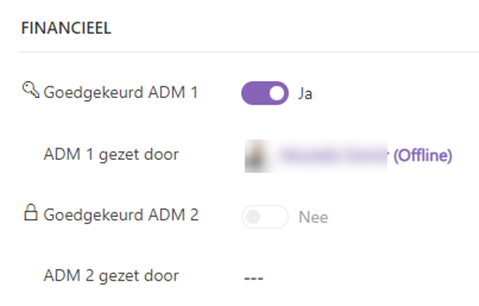
|
The bottom slide unlocked for the current user = page refresh

|
Short summary how it works for ADM1 and 2
When Goedgekeurd ADM 1 = Yes
- If Approved ADM 1 [Yes then fill field ADM 1 set by [current user
- Also Approved ADM 1 [Yes then field Approved ADM 2 [lock
When Goedgekeurd ADM 2 = Yes
- If Approved ADM 2 [Yes then fill field ADM 2 set by [current user
- Also Approved ADM 2 [Yes then field Approved ADM 1 [lock
Regarding fields and toggles
- Toggle: Goedgekeurd ADM 1 (logical name = gac_approved)
- Togle: Goedgekeurd ADM 2 (Logical name = gac_approved2)
- Field: ADM 1 gezet door (Logical name = fb_adm1gezetdoor)
- Field: ADM 2 gezet door (Logical name = fb_adm2gezet door)
How can I make sure that the second toggle remains locked when the page is refreshed and also as extra, how can I lock the change field with Toggle for other users except the current user who changed the field?
let userId;

// Lock field so that user can not set this field when he changed ADM1XXXXXXXXXXXXXXXXXXXXXXXXXXXXXXXXX
function lock_ApprovedADM2_Checked(executionContext) {
    //Initiated Form Context.
    const formContext = executionContext.getFormContext();
    const gac_approved = formContext.getAttribute('gac_approved').getValue()

    formContext.getControl("gac_approved2").setDisabled(gac_approved);
}

//OnLoad action [Goedgekeurd ADM1]
function lockApprovedADM1_Onload(executionContext) {
    userId = Xrm.Utility.getGlobalContext().userSettings.userId;
    var formContext = executionContext.getFormContext();
    var GoedgekeurdADM1 = formContext.getAttribute("fb_adm1gezetdoor").getValue();

    if (!GoedgekeurdADM1) {
        return;
    }

    var GoedgekeurdADM1ID = GoedgekeurdADM1[0].id;

    if (GoedgekeurdADM1ID == userId) {
        lock_ApprovedADM2_Checked(executionContext);
    }
    onChangeADM1checked(executionContext);
}

// Onchange ADM1
function onChangeADM1(executionContext) {
    var formContext = executionContext.getFormContext(); // get formContext

    const userLookup = [{
            id: userId,
            name: Xrm.Utility.getGlobalContext().userSettings.userName,
            entityType: "systemuser",
        }
    ];

    formContext.getAttribute("fb_adm1gezetdoor").setValue(userLookup);
    const gac_approved = formContext.getAttribute('gac_approved').getValue()
    formContext.getControl("gac_approved2").setDisabled(gac_approved);
    lock_ApprovedADM2_Checked(executionContext);
}

// Onchange fb_controleiban dan lock fb_adm1gezetdoor
function onChangeADM1Checked(executionContext) {
    var formContext = executionContext.getFormContext(); // get formContext

    var isChecked = formContext.getAttribute("gac_approved").getValue();
    const gac_approved = formContext.getAttribute('gac_approved').getValue()
    formContext.getControl("gac_approved2").setDisabled(gac_approved);
}

// Lock field so that user can not set this field when he changed ADM 2XXXXXXXXXXXXXXXXXXXXXXXXXXXXXXXXX
function lock_ApprovedADM1_Checked(executionContext) {
    //Initiated Form Context.
    const formContext = executionContext.getFormContext();
    formContext.getControl("gac_approved").setDisabled(true);
}

//OnLoad actions [Goedgekeurd ADM2]
function lockApprovedADM2_Onload(executionContext) {
    console.log('loadedADM2onload',1)
    userId = Xrm.Utility.getGlobalContext().userSettings.userId;
    var formContext = executionContext.getFormContext();
    var ADM1gezetdoor = formContext.getAttribute("fb_adm1gezetdoor").getValue();

    if (!GoedgekeurdADM2) {
        return;
    }

    var GoedgekeurdADM2ID = GoedgekeurdADM2[0].id;

    if (GoedgekeurdADM2ID == userId) {
        lock_ApprovedADM1_Checked(executionContext);
    }

}

// Onchange ADM2
function onChangeADM2(executionContext) {
    var formContext = executionContext.getFormContext(); // get formContext

    const userLookup = [{
            id: userId,
            name: Xrm.Utility.getGlobalContext().userSettings.userName,
            entityType: "systemuser",
        }
    ];

    formContext.getAttribute("fb_adm2gezetdoor").setValue(userLookup);
    formContext.getAttribute('gac_approved2').setValue(!formContext.getAttribute('gac_approved2').getValue());
    lock_ApprovedADM1_Checked(executionContext);
}
Any help is appreciated


