web
You’re offline. This is a read only version of the page.
close
Skip to main content

Notifications

Announcements

No record found.

Community site session details

Community site session details

Session Id :
Customer experience | Sales, Customer Insights,...
Suggested Answer

When to quality a lead

(0) ShareShare
ReportReport
Posted on by

Hi all,

I have a specific issue I wanted to get some expertise on...

Our sales teams go to an event and collect 10 business cards, all relating to contacts at a specific prospective Account. We currently add these 10 contacts as leads. 

As an incoming administrator for D365 this seems odd to me. My instinct would be to create 10 contact records and link them to the Account via the lookup field. 

The business logic which seems to be used in this business is that a lead is a contact who should be marketed to. In my view, the lead should be created (if the lead is with a org we do not have a relationship with i.e. not on our database) then converted to Oppty straight away (assume we have a very simple qualification criteria).

The way I see it, the Lead record is a potential opportunity and relates more to the sales process than it does to a contact. 

My next question relates to the data management. We have 4000 'leads' which are actually contacts. To follow my rules above, what is the best way to get these lead/contacts into D365 as contacts? Qualiying them will create a undesired opportunity, and also duplicate Account records (or perhaps none if the Dedupe rules fire).

Appreciate your thoughts.

Andrew

I have the same question (0)
  • Suggested answer
    SS-01100907-0 Profile Picture
    on at

    Hi,

    Please follow the below articles to understand the exact flow of Lead record and its life cycle.

    https://docs.microsoft.com/en-us/dynamics365/marketing/lead-lifecycle 

    https://community.dynamics.com/365/b/softchiefmicrosoftdynamics365/posts/dynamics-365-crm-sales-process-life-cycle

    Thanks,

    Soumen S

  • Suggested answer
    ba365guy Profile Picture
    2,950 on at

    Hi,

    To throw some light on your first part of the question:

    Lead: It is a potential business. This can be a bulk data collected from various sources. May not be clean data. Data which you are not sure whether business will come out of it. Data which you can play around, abuse (not literally).

    Contact / Account: The data of your customer OR an entity with whom you have performed a valid transaction. Transaction doesn't mean purely financial. It can be like gathering more information on requirement of customer by speaking with specific person from a company OR given a quotation or an authentic source from an entity. it means you are very sure of this data,

    in general, the data collected in marketing events goes to leads (if you meet completely new entities).

    If you meet new people from a known Company, you can create them as contacts. But you need to be sure about the data. (do not play around or abuse the contact & account data. This is very protective information).

    The above depends on the "Standard Operation Procedure" established by each organization on how to treat the people / entities you meet. 

    To qualify a lead, there should a criteria. It could be decided orally or via a logic (like simple decision yes / no fields)

    A qualified lead will always be converted to Opportunity, Account and Contact. 

    But inside lead there are two out of box fields (Parent Contact --> Lookup, Parent Account --> Lookup). If you are sure that this lead is for an existing contact, you can choose the value in "Parent Contact" field. When this lead is qualified, new contact is not created. Mapped Contact will be taken forward. Same is the case with Parent Account also. Duplicate account will not be created if you map parent account

    In D365 Current version, there is a configurations setting available, where system prompts the user to convey what to create on qualification of lead. Like below: (settings--> Administration --> System settings)
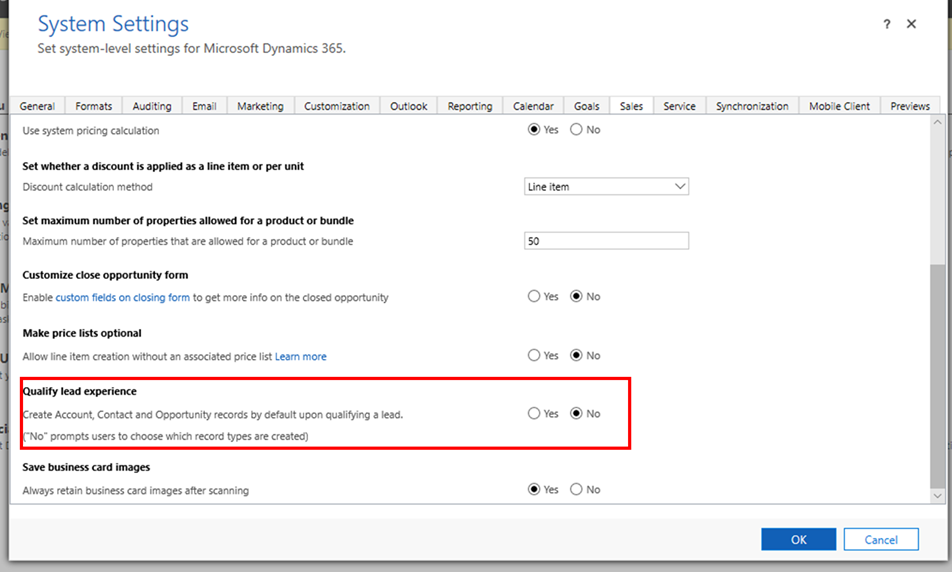
    pastedimage1577687610408v1.png

    On qualification of lead, system prompts
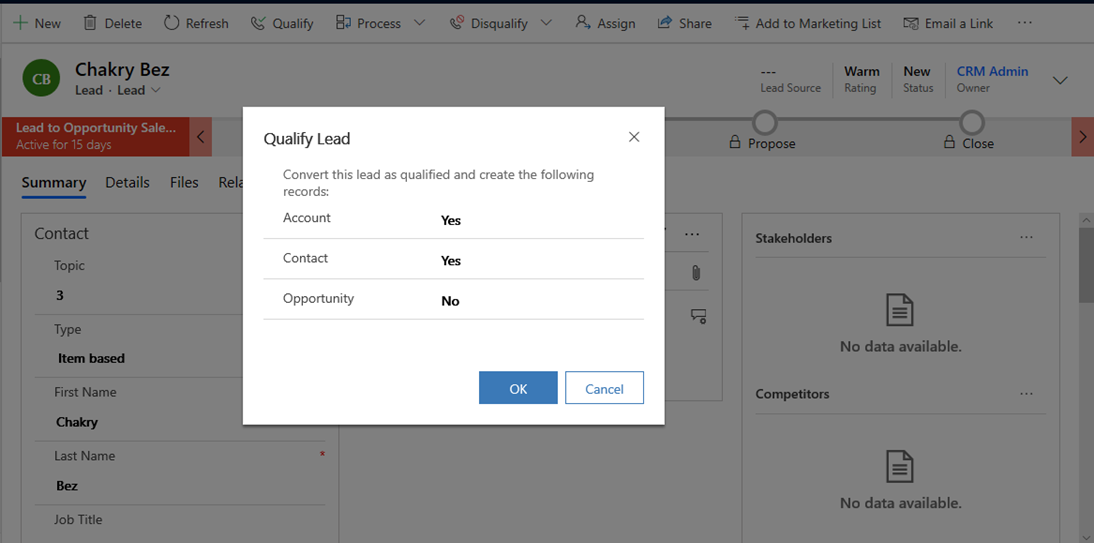
    pastedimage1577687742806v2.png

    Depending on user's response system proceeds to create respective records.

    Now if you still want to convert your leads to contacts, the second part of your question, to take the details from lead to contact, this is not going to be easy manual exercise looking at the number 4000. 

    So, please follow this post for creating a workflow and action. https://community.dynamics.com/crm/b/meganwalker/posts/qualifying-leads-without-creating-opportunities (Ignore the ribbon workbench part in the post. It may not be relevant to you. just follow till you create workflow and action. Run the workflows it should work for you)

  • Suggested answer
    ashish12 Profile Picture
    3,079 on at

Under review

Thank you for your reply! To ensure a great experience for everyone, your content is awaiting approval by our Community Managers. Please check back later.

Helpful resources

Quick Links

Responsible AI policies

As AI tools become more common, we’re introducing a Responsible AI Use…

Neeraj Kumar – Community Spotlight

We are honored to recognize Neeraj Kumar as our Community Spotlight honoree for…

Leaderboard > Customer experience | Sales, Customer Insights, CRM

#1
Tom_Gioielli Profile Picture

Tom_Gioielli 70 Super User 2025 Season 2

#2
Gerardo Rentería García Profile Picture

Gerardo Rentería Ga... 33 Most Valuable Professional

#3
Daniyal Khaleel Profile Picture

Daniyal Khaleel 32 Most Valuable Professional

Last 30 days Overall leaderboard

Product updates

Dynamics 365 release plans
