web
You’re offline. This is a read only version of the page.
close
Skip to main content

Notifications

Announcements

No record found.

Community site session details

Community site session details

Session Id :
Customer experience | Sales, Customer Insights,...
Suggested Answer

How to display the Contact ID shown in the URL

(0) ShareShare
ReportReport
Posted on by 50

In D365 when viewing a contact record, the URL contains a unique ID that my company is using. This record ID isn't present on the forms that I can see and I'd like to be able to add it to the form and view.

In this screenshot, once you have searched on a contact and opened their record, it is the last part of the URL string. 
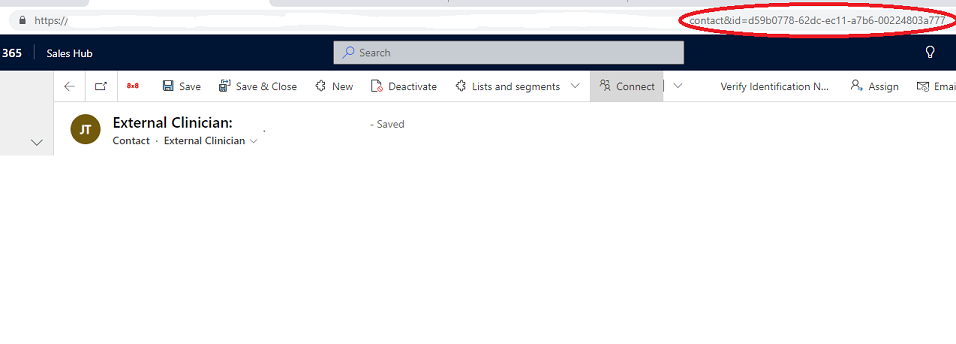
 Contact-ID.png

I have the same question (0)
  • Suggested answer
    Bipin D365 Profile Picture
    28,983 Moderator on at

    Hi,

    You can write javascript to store & show the record I'd  in custom field

    vblogs.in/.../

    You can also create Real time workflow to auto populate record guid in custom field.

  • Suggested answer
    dian74 Profile Picture
    2,477 Most Valuable Professional on at

    The simplest way to do this is by using a power automate flow to populate the record ID in a field.

    PLEASE MARK THIS AS VERIFIED IF HELPFUL

  • Suggested answer
    Amit Katariya007 Profile Picture
    10,409 Super User 2025 Season 2 on at

    Hello Tammy Locashio ,

    There is not OOB field which can store the GUID of the record. First you will have to create a Single line of text field.

    Then use one of the below options which will help you to implement your requirement.

    1. Create a Power Automated flow which will trigger on record creation and update the GUID field on the record.

    2. Custom Workflow or Plugin.

    3. JavaScript But there are some limitations like it will not run during Import records or any other way which does not include manual record creation.

    Thank you,

    Amit Katariya

Under review

Thank you for your reply! To ensure a great experience for everyone, your content is awaiting approval by our Community Managers. Please check back later.

Helpful resources

Quick Links

Responsible AI policies

As AI tools become more common, we’re introducing a Responsible AI Use…

Neeraj Kumar – Community Spotlight

We are honored to recognize Neeraj Kumar as our Community Spotlight honoree for…

Leaderboard > Customer experience | Sales, Customer Insights, CRM

#1
Tom_Gioielli Profile Picture

Tom_Gioielli 108 Super User 2025 Season 2

#2
Jimmy Passeti Profile Picture

Jimmy Passeti 50 Most Valuable Professional

#3
Gerardo Rentería García Profile Picture

Gerardo Rentería Ga... 49 Most Valuable Professional

Last 30 days Overall leaderboard

Product updates

Dynamics 365 release plans



