web
You’re offline. This is a read only version of the page.
close
Skip to main content

Notifications

Announcements

No record found.

Community site session details

Community site session details

Session Id :
Microsoft Dynamics AX (Archived)

Field value not updating after calling modified method

(0) ShareShare
ReportReport
Posted on by 240

Hi All,

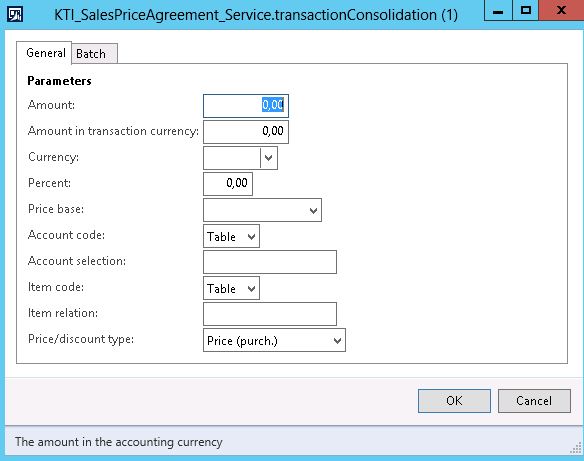
2742.CONTRACT.JPG

In the above image I need to give the dialog title. I tried parmdialogcaption method but that didn't work.

I used sysoperation framework for this batch.

One more issue I have is, I'veoverridden the modified method of the "percent" dialogfield. When i modify the field the value is not updating after the modified method is executed. In modified method I'm able to get the entered value but the field in dialog is automatically getting back to 0.00. I also tried changing the field value using percent.value(modified_value) but it didnt work.

Any solutions to do this.

*This post is locked for comments

I have the same question (0)
  • Martin Dráb Profile Picture
    237,795 Most Valuable Professional on at

    The title says "Field value not updating after calling modified method", so I'm going to skip the unrelated question about the dialog title and I'm going to focus on the update.

    Is you dialog built dynamically through an UI builder class, or are you using a modeled form?

    Can please show us the method that you registered to be called instead of the standard modified()?

  • Chaitanya Golla Profile Picture
    17,225 on at

    Hi,

    I believe you have used the parmdialogcaption method in the main method of the controller class. If this isn't working you can override the defaultCaption method of the controller class and provide your caption. I am not sure what you are trying to achieve by overriding the modified method. Could you provide some more details on it.

    Thanks,

    Chaitanya Golla

  • venkates Profile Picture
    240 on at

    Yes, I've used uibuilder to build the dialog.

    The method on post build to call when the modified is coded as below

    percent.registerOverrideMethod(methodStr(FormStringControl,modified),methodStr(KTI_SalesPriceAgreement_UIBuilder,setTransactionCurrency),this);

    on the overriden method I have below code:

    public void setTransactionCurrency(FormStringControl _control)

    {

    Percent localPercent;

    ;

    localPerent = percent.value();

    percent.value(localPercent);

    I also tried using _control.value() but also after the modified is executed the field again sets to 0.

    If i comment the registeroverride method(top line of code) then the value changes. I face this problem only when i call the modified method. I need to take the user given value and perform calculation and update the amount field dynamically.

  • Martin Dráb Profile Picture
    237,795 Most Valuable Professional on at

    Your code doesn't do anything useful. What did you intent to implement?

  • venkates Profile Picture
    240 on at

    I also added something like below. An item cost price will be populated in amount field. Consider item price being 100. Now ill be giving value in percent field(10). After modification of the percent i'll recalculate the amount.

    public void setTransactionCurrency(FormStringControl _control)

    {

    Percent localPercent;

    Amount localAmount;

    Amount recalculated;

    ;

    localPerent = percent.value();

    percent.value(localPercent);

    localAmount = amount.value()/localPercent;//which in this case is 100/10

    recalculated = amount.value()+localAmount;

    amount.value(recalculated );

    }

  • Verified answer
    Martin Dráb Profile Picture
    237,795 Most Valuable Professional on at

    First of all, let me simplify your code and add indentation, so it's easier to read:

    public void setTransactionCurrency(FormStringControl _control)
    {
        Percent localPercent = percent.value();
        Amount localAmount;
        Amount recalculated;
    
        percent.value(localPercent);
        
        localAmount = amount.value() / localPercent; //which in this case is 100/10
        recalculated = amount.value() + localAmount;
        amount.value(recalculated);
    }

    You still didn't explained the code I pointed out once here and once in your other thread. Let me try it for the third time.

    What's the point of doing this?

    Percent localPercent = percent.value();
    percent.value(localPercent);

    The best result you can get is that it won't do anything, therefore it's meaningless. Did you intent something by this code? If you had a reason, the bug is that you failed to do it and you have to fix it. If you didn't have any reason, the bug is that you have such meaningless code there - throw it away.

    Next bug: Why is the parameter type FormStringControl - isn't the Percent field a real number? Let me fix it and use the right method to get the value:

    public void setTransactionCurrency(FormRealControl _percentControl)
    {
        Amount localAmount = amount.value() / _percentControl.realValue();
        recalculated = amount.value() + localAmount;
        amount.value(recalculated);
    }

    Now you can try it again and debug it. But note that the calculation itself makes no sense to me and it lacks logic preventing division by zero.

    And by the way, the name of the method (setTransactionCurrency()) doesn't seem to match the method body.

  • venkates Profile Picture
    240 on at

    Percent localPercent = percent.value();

    percent.value(localPercent);

    won't this code set the dialog field value to the modified value.

  • Verified answer
    Martin Dráb Profile Picture
    237,795 Most Valuable Professional on at

    No. You read the value from percent object, put it into a local variable and then you put the same value back to the percent object, so you end up where you started. It's not useful.

    As you already found, the value is set automatically unless you don't break it by your code ("If i comment the registeroverride method [...] then the value changes"). It's already handled by AX, so you don't need any code for it.

Under review

Thank you for your reply! To ensure a great experience for everyone, your content is awaiting approval by our Community Managers. Please check back later.

Helpful resources

Quick Links

Responsible AI policies

As AI tools become more common, we’re introducing a Responsible AI Use…

Neeraj Kumar – Community Spotlight

We are honored to recognize Neeraj Kumar as our Community Spotlight honoree for…

Leaderboard > 🔒一 Microsoft Dynamics AX (Archived)

#1
Martin Dráb Profile Picture

Martin Dráb 4 Most Valuable Professional

#1
Priya_K Profile Picture

Priya_K 4

#3
MyDynamicsNAV Profile Picture

MyDynamicsNAV 2

Last 30 days Overall leaderboard

Featured topics

Product updates

Dynamics 365 release plans



