web
You’re offline. This is a read only version of the page.
close
Skip to main content

Notifications

Announcements

No record found.

Community site session details

Community site session details

Session Id :
Microsoft Dynamics AX (Archived)

Could Not Generate Payroll

(0) ShareShare
ReportReport
Posted on by

I have been trying to configure and use payroll. So I have done necessary setup in HR and Payroll using documentations from TechNet.

When I tried to Generate Earnings I get this info
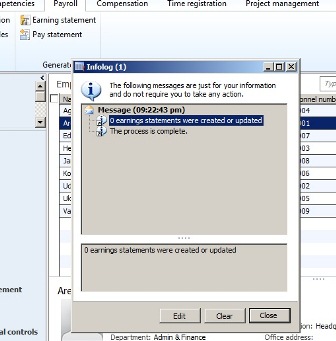
pay-state.jpg

I have manually created an earning statement with a line. 

When I tried to generate a Pay Statement, I get this info
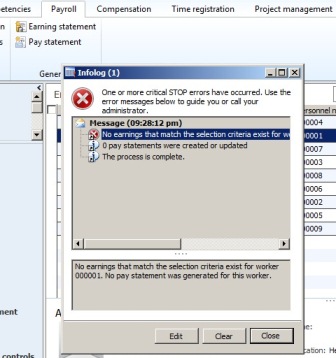
It is like am missing something.

Please somebody help!

*This post is locked for comments

I have the same question (0)
  • Community Member Profile Picture
    on at

    According to your screenshots, it seems like you already have manually created earning statements such that the Generate Earnings Statement process doesn't find anything else to generate.  The issue with 0 Pay statements being generated seems likely to be an issue with the query criteria you have used in the Generate Pay Statement process.  Are you sure you selected the correct pay period that your earning statement(s) are for?  Can you remove the selection criteria for worker 000001 and run it open ended and try again?

  • Community Member Profile Picture
    on at

    Thank you Justine for the help.

    I am much concerned about the "0 earning statements were created or updated" info. I did not create any earning statement manually.

    I wanted to configure and test just one employee record then I can do the same for others not yet configured for payrolling.

    Right now I have tried creating earning statement manually and it worked. Then after deleting the earning statement I created manually , I tried generating it automatically, but it keeps giving me this "0 earning statements were created or updated"

    Also right now I can generate pay statement with the manually created earning statement but it does not automatically create benefits (deductions and contributions). I have to create them manually. I thought the benefits can be generated automatically too.

    I don't know what am actually doing wrong.

  • Suggested answer
    Bashir Ahmad Profile Picture
    5,248 on at

    You may need to check the Pay cycle and pay period settings:

    technet.microsoft.com/.../jj677318.aspx

  • Community Member Profile Picture
    on at

    Thanks Bashir,

    I have earlier checked and used steps on that link during my setup.

    At the moment I have been able to generate earning statement automatically, but with a fixed compensation plan of "Grade" type and have also generated pay statement on the released earning statement. But benefits were not automatically generated... still need help here..

    I was initially using the "Step" type of fixed compensation plan which I prefer. Does this mean that this "Step" type does not generate earning statement automatically?

  • Suggested answer
    Community Member Profile Picture
    on at

    Some other thoughts for you to troubleshoot:

    - there is a lot of date effectivity on the setup that controls the how/what is processed in a payroll period. You may want to look at the date effective records for the payroll setup you've done for workers, positions, etc. to make sure it is all active for the pay period you are attempting to process.

    - regarding your question about HR fixed Compensation plans, you should be able to generate earnings based on the fixed compensation regardless of how it is set up.  It is important that you configure your "base" aka "regular" earning code appropriately to use the HR compensation setup in the right way.  You may want to look at this article for more info: https://technet.microsoft.com/en-us/library/jj677346.aspx#Example__Create_a_base_pay_earning_code_for_hourly_workers

    - for the missing benefits that you expect to be in the payroll process, have you verified that the worker is enrolled in the benefit with an appropriate effective date?

Under review

Thank you for your reply! To ensure a great experience for everyone, your content is awaiting approval by our Community Managers. Please check back later.

Helpful resources

Quick Links

Responsible AI policies

As AI tools become more common, we’re introducing a Responsible AI Use…

Neeraj Kumar – Community Spotlight

We are honored to recognize Neeraj Kumar as our Community Spotlight honoree for…

Leaderboard > 🔒一 Microsoft Dynamics AX (Archived)

#1
Martin Dráb Profile Picture

Martin Dráb 4 Most Valuable Professional

#1
Priya_K Profile Picture

Priya_K 4

#3
MyDynamicsNAV Profile Picture

MyDynamicsNAV 2

Last 30 days Overall leaderboard

Featured topics

Product updates

Dynamics 365 release plans



