web
You’re offline. This is a read only version of the page.
close
Skip to main content

Announcements

News and Announcements icon
Community site session details

Community site session details

Session Id :
Small and medium business | Business Central, N...
Suggested Answer

Cannot Post Sales Invoice created via Job

(0) ShareShare
ReportReport
Posted on by 96

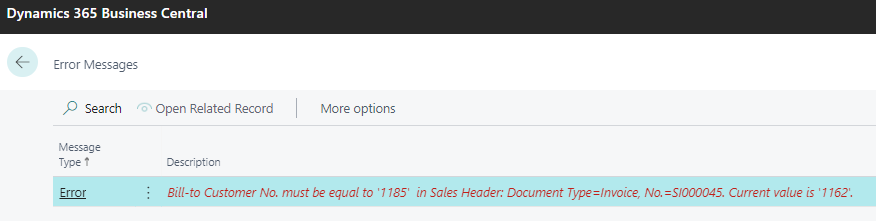
I have created a brand new job for a customer that does NOT have a bill to customer assigned. I add 1 job task line and 1 job planning line to the job. I create a sales invoice using the create sales invoice function from the job line. When i go to post the sales invocie it says:
pastedimage1664196392409v1.png

I cannot figure this out - why is it telling me to change the bill to customer?

I have the same question (0)
  • Suggested answer
    Mohana Yadav Profile Picture
    61,218 Super User 2026 Season 1 on at

    Please use Page Inspection and check what do you have in Bill-to Customer No. field of Sales Invoice.

    it should auto populate same as Sell-to Customer No.

  • Peter Taylor FP Profile Picture
    96 on at

    Page inspection shows the Bill to customer is the same as sell to customer - see screenshot.

    pastedimage1664356846862v1.png

  • Karan Mehta Profile Picture
    10 on at

    Hello,

    By Any Chance Is it changed in Customer Master ?

    Or on Sales invoice header ?

    If either of the place has it - then it might be possible that it's coming like this.

    Regards

    Karan

  • Peter Taylor FP Profile Picture
    96 on at

    nope, i created a brand new customer called TEST with no bill to customer, created a job, then an invoice from the job, and still get the same message. I then deleted the invoice, set the bill to customer = TEST on my customer called TEST, re-created the invoice, and still the same message. If i create a sales invoice for customer TEST manually i.e. NOT through the job create sales invocie function from the job, the message does not appear and the invocie will post. One thing I did do at an earlier stage was create a corrective credit memo against another invocie relating to another job, but i dont see how that should break anything!

  • Suggested answer
    IB-29041624-0 Profile Picture
    1,191 Moderator on at

    The only way you can create a invoice for a job is to assign a customer to a job.

    The system will not allow you to invoice to any other customer using that job other than the customer that actually is assigned to the job.

    So you can not run a scenario where you have several customer being invoiced against the same job.

  • Peter Taylor FP Profile Picture
    96 on at

    Hi, I have an example on my screen right now....the invoice IS created against the right customer (the customer on the job), but when i go to post, it says the invocie must be against a different customer. Feels like a bug to me..lets have a screen share if possible as this is really perplexing me!

  • Suggested answer
    Amit Profile Picture
    2,563 on at

    Hi,

    Pls debug the code. You will find the solution

    Regards

    Amit Sharma

    www.erpconsultors.com

  • Suggested answer
    IB-29041624-0 Profile Picture
    1,191 Moderator on at

    I would try to delete the invoice and try to recreate it from the job.

    If you really think there is a bug you should contact your partner and have them raise a support ticket to Microsoft about it.

  • Suggested answer
    YUN ZHU Profile Picture
    101,995 Super User 2026 Season 1 on at

    Hi, Did you use the function below to create a sales invoice?

    pastedimage1664841189461v1.png

  • Peter Taylor FP Profile Picture
    96 on at

    Yes, that's how i created the job invoice. I work for a partner.

Under review

Thank you for your reply! To ensure a great experience for everyone, your content is awaiting approval by our Community Managers. Please check back later.

Helpful resources

Quick Links

Season of Sharing Community Challenge Launch!

Jump in, show your community spirit, and win prizes!

Women in Power Builds Momentum

Expanding mentorship, skilling, and AI innovation

Congratulations to the May Top 10 Community Leaders

These are the community rock stars!

Leaderboard > Small and medium business | Business Central, NAV, RMS

#1
OussamaSabbouh Profile Picture

OussamaSabbouh 2,222 Super User 2026 Season 1

#2
YUN ZHU Profile Picture

YUN ZHU 1,603 Super User 2026 Season 1

#3
Grigorios Mavrogeorgis Profile Picture

Grigorios Mavrogeorgis 1,186 Super User 2026 Season 1

Last 30 days Overall leaderboard

Featured topics

Microsoft Training Manuals

Product updates

Dynamics 365 release plans



