web
You’re offline. This is a read only version of the page.
close
Skip to main content

Notifications

Announcements

Community site session details

Community site session details

Session Id :
Customer experience | Sales, Customer Insights,...
Answered

Unable to edit topic, sender & receiver new e-mail designer

(0) ShareShare
ReportReport
Posted on by 35

When I try to create a new e-mail from a template in Dynamics, I'm unable to edit the topic, sender adres and receiver adres. There is an error in the field:

This control (MscrmControls.FieldValidationControl.FieldValidationControl) is deprecated. Use MsdynmktControls.FieldValidationControl.FieldValidationControl instead.
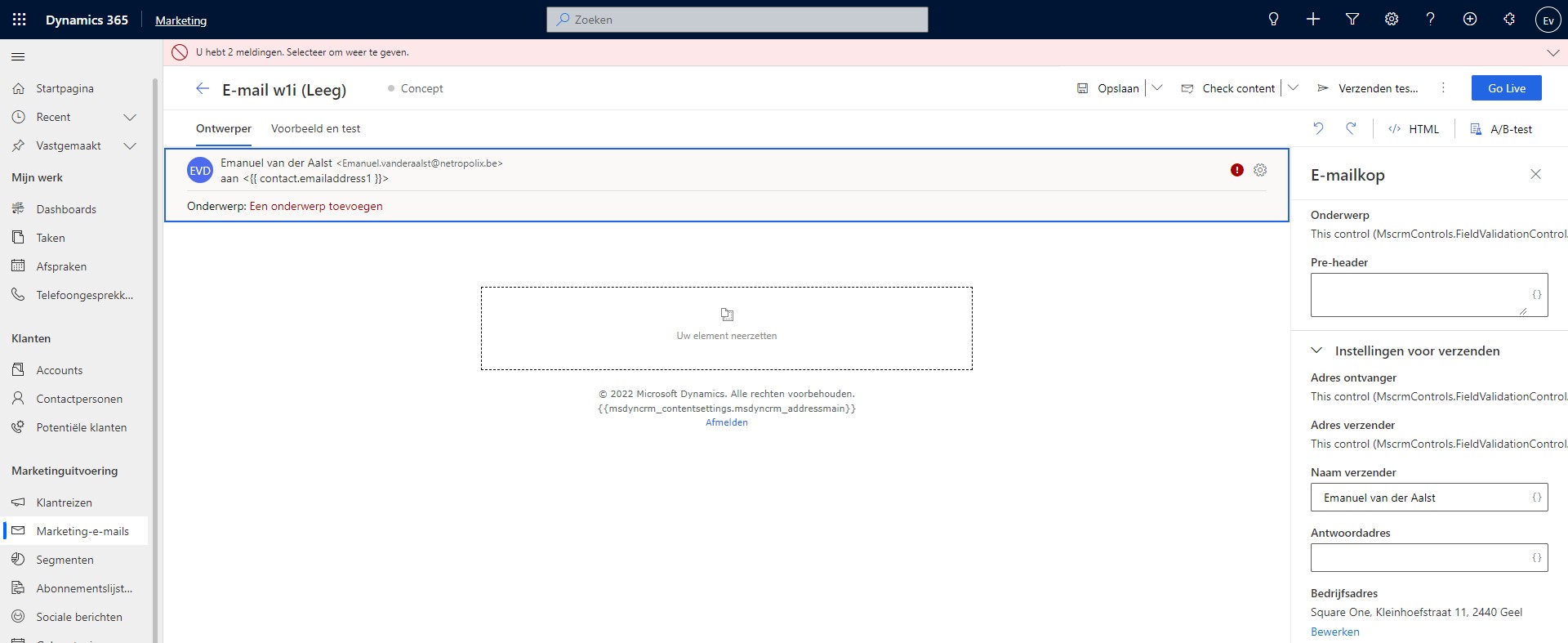
Dynamics-365-Marketing-Error.jpg

Dynamics 365 Marketing version: 1.82.2016.0

Any ideas?

I have the same question (0)
  • Emanuel van der Aalst Profile Picture
    35 on at

    Update: I ended up logging a ticket with support as I was not confident in changing the fields myself. With the help of Microsoft support, they responded very quickly, I was able to do what you suggested: Change the fields on the form to their new controls. That effectively solved the issue.

    Thank you for your suggestion.

  • Emanuel van der Aalst Profile Picture
    35 on at

    Hi

    1. I don't understand how it can suddenly be broken. We did not change anything crucial to the system.

    2. Would it not be better to raise a ticket instead of changing something so fundamental to the systeem? It seems to be a basic functionality of the Marketing app. Or would support not be able to help?

    3. If I would do it myself -> I think what you mean is that I have to change the mechanism that validates the entries into these field? Correct?

    Dynamics-365-Marketing-Form-change-control.jpg

    And it states that it only can be done in the old editor but where to begin?

    2555.Dynamics-365-Marketing-Form-change-control-_2D00_-old-editor.jpg

  • Verified answer
    Community Member Profile Picture
    on at

    Hi Emanuel van der Aalst,

    Based on your error message and the screenshot, it seems that you need to change the control on Subject, To Address and From Address field of the Marketing Email entity.

    Please navigate to the Marketing Email entity-> the form you are using->the above fields to change the control.

Under review

Thank you for your reply! To ensure a great experience for everyone, your content is awaiting approval by our Community Managers. Please check back later.

Helpful resources

Quick Links

Responsible AI policies

As AI tools become more common, we’re introducing a Responsible AI Use…

Congratulations to our 2025 Community Spotlights

Thanks to all of our 2025 Community Spotlight stars!

Leaderboard > Customer experience | Sales, Customer Insights, CRM

#1
Tom_Gioielli Profile Picture

Tom_Gioielli 98 Super User 2025 Season 2

#2
Pallavi Phade Profile Picture

Pallavi Phade 91

#3
TAHER_El_Mehdi Profile Picture

TAHER_El_Mehdi 58

Last 30 days Overall leaderboard

Product updates

Dynamics 365 release plans



