Vijay,
Here is my handout information I give my customers on what Item Type means:
A useful feature in Microsoft Dynamics 365 Business Central is the ‘Item Types’ where you can set an Item depending on how your company is using it. For example, if you use the items for consumables such as; packaging tape or office supplies and don’t track the inventory, or scenarios where you treat an item as a time unit to track the spent labor for supporting the business, for example, a consultancy hour.
The Item Types feature has been further enhanced in Microsoft Dynamics 365 Business Central compared to the previous versions, ‘Item Types’ were only categorized as either “Inventory” or “Service”. A third Item Type called “Non-Inventory” has been introduced in Microsoft Dynamics 365 Business Central. There is now better control in terms of setting up the pricing for items and defining the expense or revenue accounts, rather than the very limited option of using G/L Accounts or Resources in the purchase or sales order lines. The ‘Item Type’ can be entered in the ‘Item Card’ as per Figure 1 below:
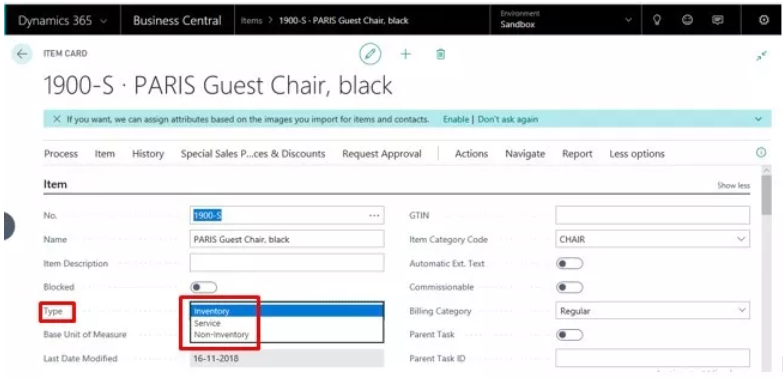
The three ‘Item Type’ options:
- Inventory This is the standard type of Item that we are all familiar with where the physical item stocks are tracked and values are accounted for. There is an actual item handling involved, therefore the Inventory item type is widely supported across different areas which include; Sales, Purchasing, Job Consumption, Service Consumption, Assembly Consumption, Production Consumption, Assembly Output, Production Output and Item/Physical Inventory Journals.
- Non-Inventory These are typically low-cost physical items that are used internally by the business where the item’s stock and value is not tracked. This option is mostly used if you want to record item purchases and capture it as an expense without affecting inventory. A good example of this item type is expense items such as office supplies. This Item Type cannot be used as Assembly Output and Production Output.
- Service These are non-physical items which often represents a time unit such as labor time. There are only limited transaction types for Service items that include; Sales, Purchasing, and Job Consumption.
Some of the vital points about Non-Inventory and Service Item Types are below:
- An Item Ledger Entry is created when a sales or purchase transaction is posted. But there will be no Cost Amount Actual and Remaining Quantity that will be recorded, hence the inventory and value are not tracked. The Quantity is still recorded in the ILE and the value is recorded in the Non-Inventoryible field.

-
-
- The posting to respective the G/L Accounts has changed because Inventory Accounts and COGS Account are not recorded. It uses the combination of the General Bus. Posting Group and Gen. Prod. Posting Group to map the G/L Accounts. Table 2 below shows which G/L Account will be recorded when a Purchase or Sales transaction is posted.

-
-
- Non-Inventory and Service items are excluded in the Inventory Valuation report.
- Item Journal adjustments or a stocktaking cannot be posted for these item types.
- Location Codes cannot be used when posting transactions. The transaction can still be posted if the location code is blank and the Location Mandatory field is enabled in the Inventory Setup.
- Stock out warnings, planning parameters, reservations, item tracking, inventory posting groups cannot be used.
- Using Item Types allows better control in processing transactions especially purchase and sales as you can setup pricing structure like a normal item while ensuring the transaction entries are recorded to the correct expense or revenue accounts. It also enhances the reporting capability as it records the entries in the Item Ledger Entries so you can access historical information and report on purchase or sales trends.
If your customer want to maintain an Inventory Account balance and track Inventory counts, use Inventory. If not then select Non-Inventory.
Hope this helps.
Thanks,
Steve


 108
108









 Share
Share Report
 All responses (
 Answers (






