web
You’re offline. This is a read only version of the page.
close
Skip to main content

Announcements

News and Announcements icon
Community site session details

Community site session details

Session Id :
Customer Insights - Journeys forum

Custom Customer journey Tile

(0) ShareShare
ReportReport
Posted on by 5

I am handling a request from a client to register for an event in one click from a marketing email. To do so I am attempting to create a custom tile in a customer journey that will reference an event, an have a workflow fire on creation of a custom channel activity. The event does not appear to be accessible from the workflow however. Is there a way to do this?

I have the same question (0)
  • Suggested answer
    d_radulova Profile Picture
    2 User Group Leader on at

    Hi  ldavies,

    Why don't you try Flow instead?

    If in your customer journey, you manage to create a custom activity with a reference to

    a/ the customer,  and

    b/ the event

    Then a flow could get triggered onCreate to this custom activity, and create an event registration record.

    Thanks,

    -DD

  • cloflyMao Profile Picture
    25,210 on at

    Hi ldavies,

    That because workflow tile in customer journey is only based on contact or account records.

    https://docs.microsoft.com/en-us/dynamics365/customer-engagement/marketing/customer-journey-tiles-reference#launch-workflow 

    If you want to create an auto event registration record for members in customer journey,

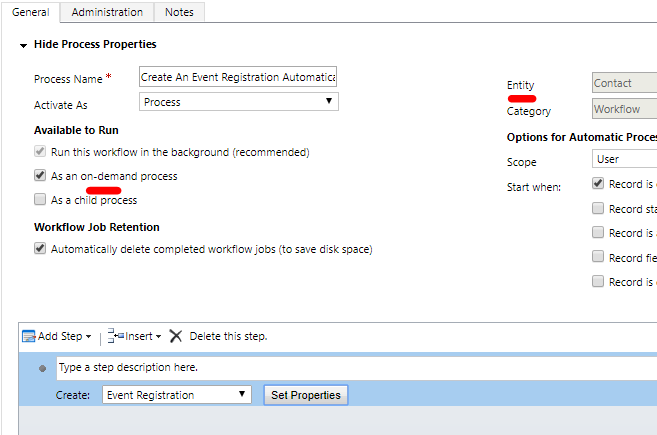
    just create an on-demand workflow, still set the source entity to contact and add a step to create an event registration record:
    x002.PNG

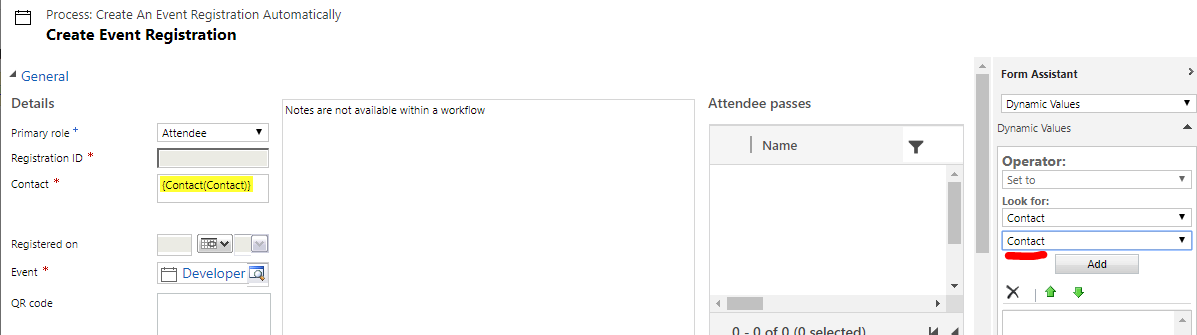
    in properties setting, add dynamic contact value to the event registration form fields.
    x001.PNG

    Then build a customer journey like below:(a trigger tile to detect specific link in your marketing email clicked, and you might add your custom tile in customer journey, so be sure to add the trigger tile after marketing email tile)

    x003.PNG  

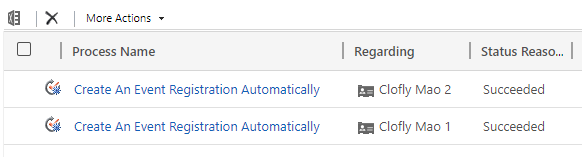
    The workflow will automatically track contacts in the customer journey (recipents who clicked link)
    x004.PNG

    Result in CRM:

    x005.PNG

    Regards,

    Clofly

  • Suggested answer
    ldavies Profile Picture
    5 on at

    We found a solution: We created a custom tile(docs.microsoft.com/.../create-custom-channel) that pointed to the Event entity and specifies an Event for each Customer Journey. The rest of the Journey is fairly simple, send an email and wait for a user to visit a page.

    Once the user clicks on the link in the email and visits a marketing form a trigger will cause this custom tile to be visited, creating an instance of the Custom Channel Activity entity that references both the Contact traversing the Customer Journey and the Event specified for that Journey. We then built a plugin that fires on create of a Custom Channel Activity that would then create an Event Registration. We had to use custom code as the Event record is not directly referenced but is instead stored as it's GUID in a text field called Entity ID on the Custom Channel Activity record.

  • Regina A Profile Picture
    5 on at

    How did you manage to add entity reference to the custom tile?  I want to add reference of ' Event' entity to the custom tile. Is there any way we can do it?

Under review

Thank you for your reply! To ensure a great experience for everyone, your content is awaiting approval by our Community Managers. Please check back later.

Helpful resources

Quick Links

November Spotlight Star - Khushbu Rajvi

Congratulations to a top community star!

Forum Structure Changes Coming on 11/8!

In our never-ending quest to help the Dynamics 365 Community members get answers faster …

Dynamics 365 Community Platform update – Oct 28

Welcome to the next edition of the Community Platform Update. This is a status …

Leaderboard > Customer Insights - Journeys

Last 30 days Overall leaderboard

Featured topics

Product updates

Dynamics 365 release plans




