Hi all..

i have customize report with parameter Project Id and Name from modul Project management
and accounting. i use Contract class like this :
[
DataContractAttribute,
SysOperationContractProcessingAttribute(classstr(ProjTable_UI_Builder),
SysOperationDataContractProcessingMode::CreateUIBuilderForRootContractOnly)
]
public class ProjTable_contract
{
ProjId _projId;
DirPartyName _partyName;
DirPartyNumber _partyNumber;
}
[
DataMemberAttribute('ProjId')
]
public ProjId parmProjId(ProjId _projIdX = _projId)
{
_projId = _projIdX;
return _projId;
}
[
DataMemberAttribute("DirPartyName")
]
Public DirPartyName parmPersonnelName(DirPartyName _partyNameX = _partyName)
{
_partyName = _partyNameX;
return _partyName;
}
[
DataMemberAttribute("DirPartyNumber")
]
Public DirPartyNumber parmPersonnelNumber(DirPartyNumber _partyNumberX = _partyNumber)
{
_partyNumber = _partyNumberX;
return _partyNumber;
}
And then UI Builder class :
----------------------------
public class ProjTable_UI_Builder extends SrsReportDataContractUIBuilder
{
DialogField dialogPersonnelNumber, dialogPersonnelName;
}
public void personnelNameLookup(FormStringControl _lookup)
{
Query query = new Query();
QueryBuildDataSource qbds;
SysTableLookup sysTableLookup;
if (_lookup != null)
{
sysTableLookup = SysTableLookup::newParameters(tableNum(ProjTable_View), _lookup);
sysTableLookup.addLookupfield(fieldNum(ProjTable_View, PersonnelNumber));
sysTableLookup.addLookupfield(fieldNum(ProjTable_View, Name));
sysTableLookup.addLookupfield(fieldNum(ProjTable_View, PIL_Position));
qbds = query.addDataSource(tableNum(ProjTable_View));
sysTableLookup.parmQuery(query);
sysTableLookup.performFormLookup();
}
}
public void personnelNameModified(FormStringControl _formStringControl)
{
ProjTable_contract _ProjTable_contract;
DirPartyTable _DirPartyTable;
DirPerson _DirPerson;
HcmWorker _HcmWorker;
_formStringControl.modified();
_HcmWorker = HcmWorker::findByPersonnelNumber(dialogPersonnelNumber.value());
_DirPerson = DirPerson::find(_HcmWorker.Person);
_DirPartyTable = DirPartyTable::findRec(_DirPerson.RecId);
dialogPersonnelName.value(_DirPartyTable.Name);
if(this.dataContractObject())
{
_ProjTable_contract = this.dataContractObject() as ProjTable_contract;
_ProjTable_contract.parmPersonnelName(_DirPartyTable.Name);
}
}
public void postBuild()
{
super();
dialogPersonnelNumber = this.bindInfo().getDialogField(this.dataContractObject(), methodStr(ProjTable_contract, parmPersonnelNumber));
dialogPersonnelNumber.registerOverrideMethod(methodStr(FormStringControl, lookup),methodStr(ProjTable_UI_Builder, personnelNameLookup), this);
dialogPersonnelNumber.lookupButton(2);
dialogPersonnelName = this.bindInfo().getDialogField(this.dataContractObject(), methodStr(ProjTable_contract, parmPersonnelName));
dialogPersonnelName.allowEdit(false);
}
public void postRun()
{
Dialog dialogLocal = this.dialog();
ProjTable_contract contract = this.dataContractObject() as ProjTable_contract;
super();
dialogLocal.dialogForm().formRun().controlMethodOverload(false);
dialogPersonnelNumber = this.bindInfo().getDialogField(this.dataContractObject(), methodStr(ProjTable_contract, parmPersonnelNumber));
dialogPersonnelNumber.registerOverrideMethod(methodStr(FormStringControl, modified), methodStr(ProjTable_UI_Builder, personnelNameModified), this);
}
And then, i try for run my report.
in modul Project management and accounting.
example : i click one Project, YPP-PRJ/16/05/JL-FP2/AC-03.
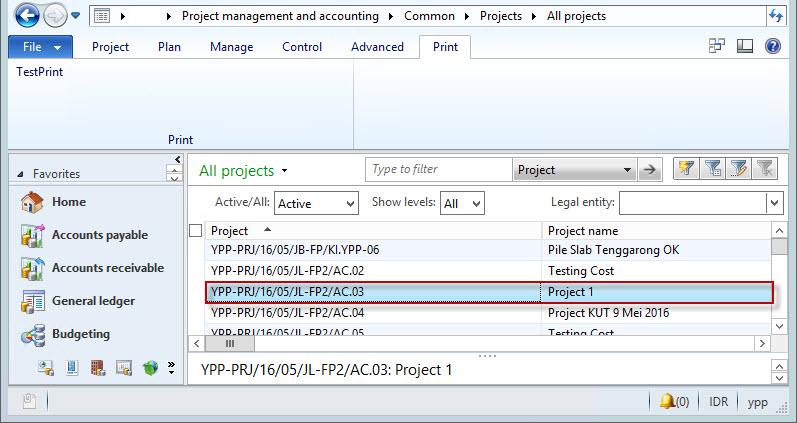
And then i click button Test Print.
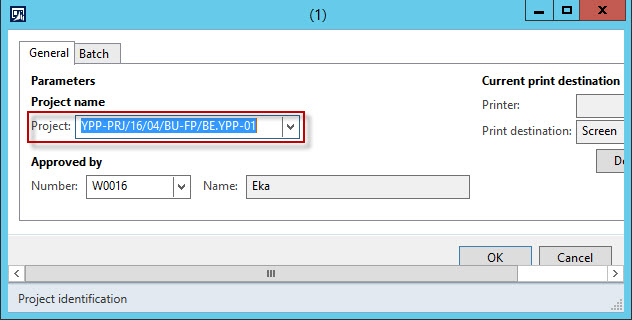
i want, parameter Project is disable and automatic get project based on record in form,
can not select parameter Project.
can i do it in SSRS Report?
and How ?
Thanks all.


