web
You’re offline. This is a read only version of the page.
close
Skip to main content
Community site session details

Community site session details

Session Id :
Finance | Project Operations, Human Resources, ...
Unanswered

Update CostCategory field at ProdTableTrans when Registrating jobs

(0) ShareShare
ReportReport
Posted on by 46

Hello all,

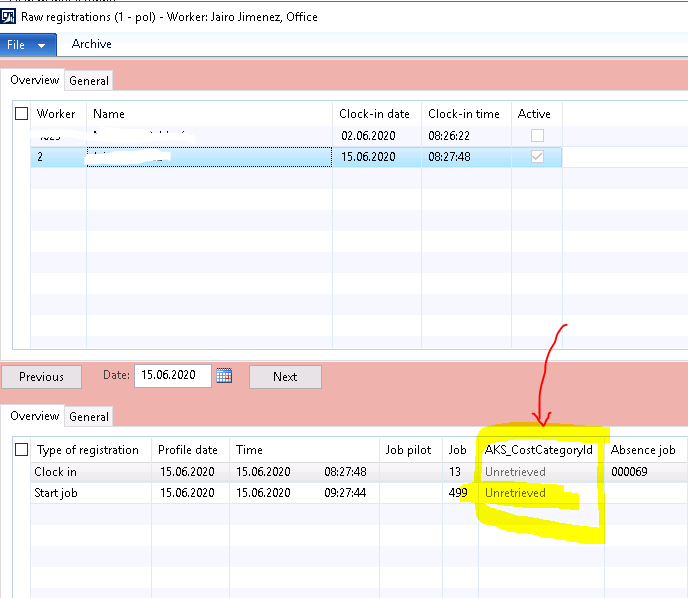
I have a custom relation between Operations and CostCategories, the worker will select from JobRegistration Form which production and costCategory he will work on. In theory the original behavior of AX for Registering job will not be changed. since the worker will still mark on the specific jobId ( by finding it by OprId,ProdId inside JmgJobTable)

I  just need to write on ProdTableTrans, JmgTermReg and  JmgStampJournalTrans  tables the cost Category in the newly added custom Field of each: AKS_CostCategoryId

or just change directly the costcategoryId inside the orignal ProdRouteTrans.CategoryId

I have been debuggin but I still not finding where to code/modify that Commit registration. 

your help is greatly appreciated
pastedimage1592217751059v2.pngpastedimage1592220896045v3.png

I have the same question (0)
  • Michal Krejza Profile Picture
    on at
    RE: Update CostCategory field at ProdTableTrans when Registrating jobs

    Hello Nestor,

    What is version you are working on ?

  • CBNestor Profile Picture
    46 on at
    RE: Update CostCategory field at ProdTableTrans when Registrating jobs

    Hi Michal,

    My version is AX 2012 R3 CU13

    and I think - 70% sure -  a found a clue where is registrating the job in the:

    • JmgTermReg Table = at Classes\JmgTermJob_prod\makeRegistration ( 100% sure )
    • JmgStampJournalsTrans Table = at  Classes\JmgJobBundle\postTime and/or Classes\JmgStandardSystem\postTime  ( 40% sure)
    •  ProdRouteTrans Table = No idea yet :(

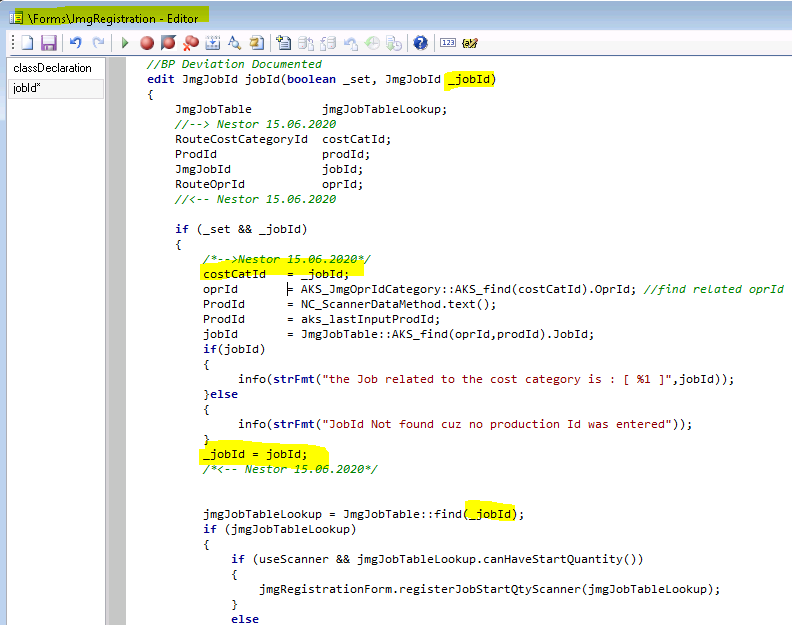
    Now the tricky part is to  Insert that costcategory by passing ProdId and CostCatId which I have in the Forms\JmgRegistration\ClassDeclaration  to the ttCommit from those methods mentioned without messing the code to much

    pastedimage1592391865731v1.pngpastedimage1592391990058v2.png

Under review

Thank you for your reply! To ensure a great experience for everyone, your content is awaiting approval by our Community Managers. Please check back later.

Helpful resources

Quick Links

Responsible AI policies

As AI tools become more common, we’re introducing a Responsible AI Use…

Pallavi Phade – Community Spotlight

We are honored to recognize Pallavi Phade as our Community Spotlight honoree for…

Leaderboard > Finance | Project Operations, Human Resources, AX, GP, SL

#1
André Arnaud de Calavon Profile Picture

André Arnaud de Cal... 724 Super User 2025 Season 2

#2
Martin Dráb Profile Picture

Martin Dráb 580 Most Valuable Professional

#3
CA Neeraj Kumar Profile Picture

CA Neeraj Kumar 554

Last 30 days Overall leaderboard

Product updates

Dynamics 365 release plans