web
You’re offline. This is a read only version of the page.
close
Skip to main content

Notifications

Announcements

No record found.

Community site session details

Community site session details

Session Id :
Customer experience | Sales, Customer Insights,...
Unanswered

How to add html button for each record in view?

(0) ShareShare
ReportReport
Posted on by 587

Can we add html button to each record in the view(not in ribbon)?

I have the same question (0)
  • Inogic Profile Picture
    709 on at

    Hi,

    You cannot add or bind HTML button directly to View columns but however you can achieve this using the PCF control.


    You would need to develop a custom grid using PCF which you can then customize to add button on the column.


    https://docs.microsoft.com/en-us/power-apps/developer/component-framework/overview


    //this is how we add a Html button In view using PCF.

    We get a view columns in Context.parameters.listviewDataSet.columns, in the below code I have replace Business Phone column with Html Button.


    // we can also add new column in view using


    context.parameters.sampleDataSet.addColumn("createdon");    


    private getColumns(): IColumn[] {


            let context = this.props.crmContext;

            let records = context.parameters.listviewDataSet;

            let columnList: IColumn[] = [];

            records.columns.forEach(function (columItem: any, id: any) {

                if(colitem.dataType=="SingleLine.Phone"){

                let colwith = (colitem.width || 150) //+


                let Column: IColumn =

                {

                    key: colitem.name + "_" + id,

                    minWidth: colwidth ,

                    maxWidth: colwidth,

                    name: colitem.displayName,

                     isRowHeader: false,

                    isResizable: true,

                    isCollapsible: false,

                    fieldName: colitem.name,

                    data: colitem.dataType,

                    onRender: (records: any) => {

                        {

                            return (

                                <>

                                {

                                <button style={{width:"60px",margin:"10px",height:"25px"}}>Click</button>      

                                }    

                                 </>

                            )

                        }

                    }  

                    }     

                    columnList.push(Column);      

                }


    //Output
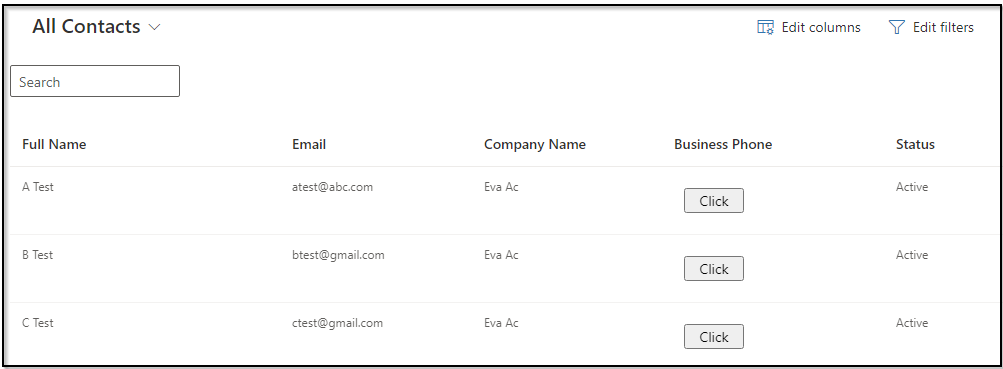
    PCF.png

    Hope this helps.

    Thanks!

  • M.Anas Profile Picture
    35 on at

    Which type of button you want to add?

Under review

Thank you for your reply! To ensure a great experience for everyone, your content is awaiting approval by our Community Managers. Please check back later.

Helpful resources

Quick Links

Responsible AI policies

As AI tools become more common, we’re introducing a Responsible AI Use…

Neeraj Kumar – Community Spotlight

We are honored to recognize Neeraj Kumar as our Community Spotlight honoree for…

Leaderboard > Customer experience | Sales, Customer Insights, CRM

#1
Tom_Gioielli Profile Picture

Tom_Gioielli 70 Super User 2025 Season 2

#2
Gerardo Rentería García Profile Picture

Gerardo Rentería Ga... 33 Most Valuable Professional

#3
Daniyal Khaleel Profile Picture

Daniyal Khaleel 32 Most Valuable Professional

Last 30 days Overall leaderboard

Product updates

Dynamics 365 release plans



