web
You’re offline. This is a read only version of the page.
close
Skip to main content

Notifications

Announcements

No record found.

Community site session details

Community site session details

Session Id :
Service | Customer Service, Contact Center, Fie...
Unanswered

Create Work Order Report as PDF Issue

(0) ShareShare
ReportReport
Posted on by 15

Hi,

I've some troubles creating a Mobile Report in the Field Service Mobile app.

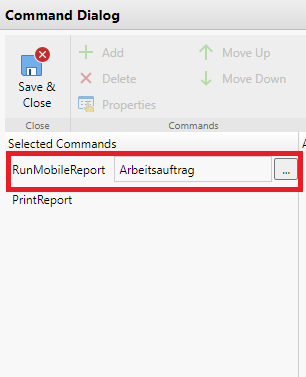
When a report is created (I use the RunMobileReport command)
pastedimage1600260360122v1.png

and Word is chosen as format, than everything works fine.

If I use PDF instead, the font of the result is changed and the company logo is distorted.

I added the PrintReport command, but clicking that button in the app gets me "No report found for this entity type".

I'm very unexperienced with Field Service and hope anybody of you can help me.

Thanks in advance.

I have the same question (0)
  • Al Iggs Profile Picture
    on at

    Are you on the latest release of the app? There were some bug fixes recently.

  • Meachtl Profile Picture
    15 on at

    Hello Alexander,

    the version of the app is 12.1.224.0

    The latest version to choose in woodford is 13.1

    But If i look in the Google Play store, there is no opportunity to update the app.

  • John Holmes Profile Picture
    260 on at

    Have you tried running the project in the Full Resco app to see if the issue exists there?  I have had a couple of instances where issues that exist in the Field Service Mobile App don't exist in the Full Resco App.

    At least then you will know where the problem lies.

  • Meachtl Profile Picture
    15 on at

    Hello John,

    thanks for your tip.

    In the Full Resco app the report looks way better than in the Field Service Mobile app.

    So does this mean that the bug is in the Field Service Mobile App itself and there is nothing I can do other than use the Full Resco app?

  • Al Iggs Profile Picture
    on at

    Hi Martin, FS Mobile and the Resco App use different libraries for creating PDFs, so that's where the problem might be. Have dropped you a private message suggesting to try the preview release. Unfortunately you cannot use the Resco App unless you have a separate license.

Under review

Thank you for your reply! To ensure a great experience for everyone, your content is awaiting approval by our Community Managers. Please check back later.

Helpful resources

Quick Links

Responsible AI policies

As AI tools become more common, we’re introducing a Responsible AI Use…

Neeraj Kumar – Community Spotlight

We are honored to recognize Neeraj Kumar as our Community Spotlight honoree for…

Leaderboard > Service | Customer Service, Contact Center, Field Service, Guides

#1
Tom_Gioielli Profile Picture

Tom_Gioielli 75 Super User 2025 Season 2

#2
Siv Sagar Profile Picture

Siv Sagar 52 Super User 2025 Season 2

#3
Daniyal Khaleel Profile Picture

Daniyal Khaleel 42 Most Valuable Professional

Last 30 days Overall leaderboard

Featured topics

Product updates

Dynamics 365 release plans
