web
You’re offline. This is a read only version of the page.
close
Skip to main content

Notifications

Announcements

No record found.

Community site session details

Community site session details

Session Id :
Microsoft Dynamics AX (Archived)

Is Continuous Integration by VSTS on the D365 Operations related code changes possible on a downloaded VHD?

(0) ShareShare
ReportReport
Posted on by 792

Hello all,

I have currently developed few classes and data entities in my D365 for Operations downloaded all-in-one VM. And I checked in all the changes to VSTS as well.

Now I heard that we can initiate Continuous Integration (C.I.) from VSTS. I have no knowledge in doing C.I. so I am a novice.

My questions are:-

  1. How can I initiate C.I. in VSTS for D365 related code?
  2. Is the output of the C.I. a deployment package that can be imported back into a fresh D365 environment?
  3. Can we start CI in VSTS from a downloaded all-in-one VM? Or, do we need to deploy a 'Build VM' from LCS and only there we can start CI?

I had tried starting the build but you can see the below problem that its not started yet. Its waiting infinitely long.
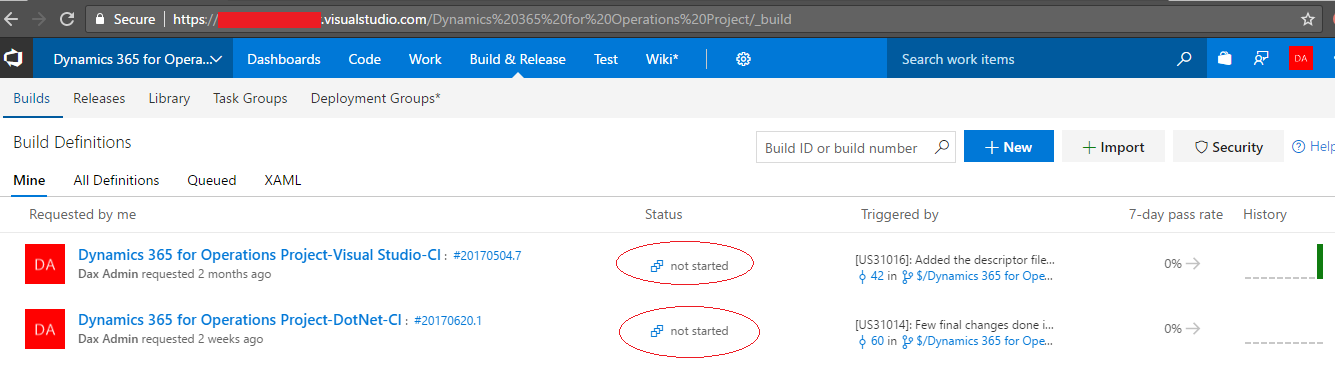
VSTS-CI.png

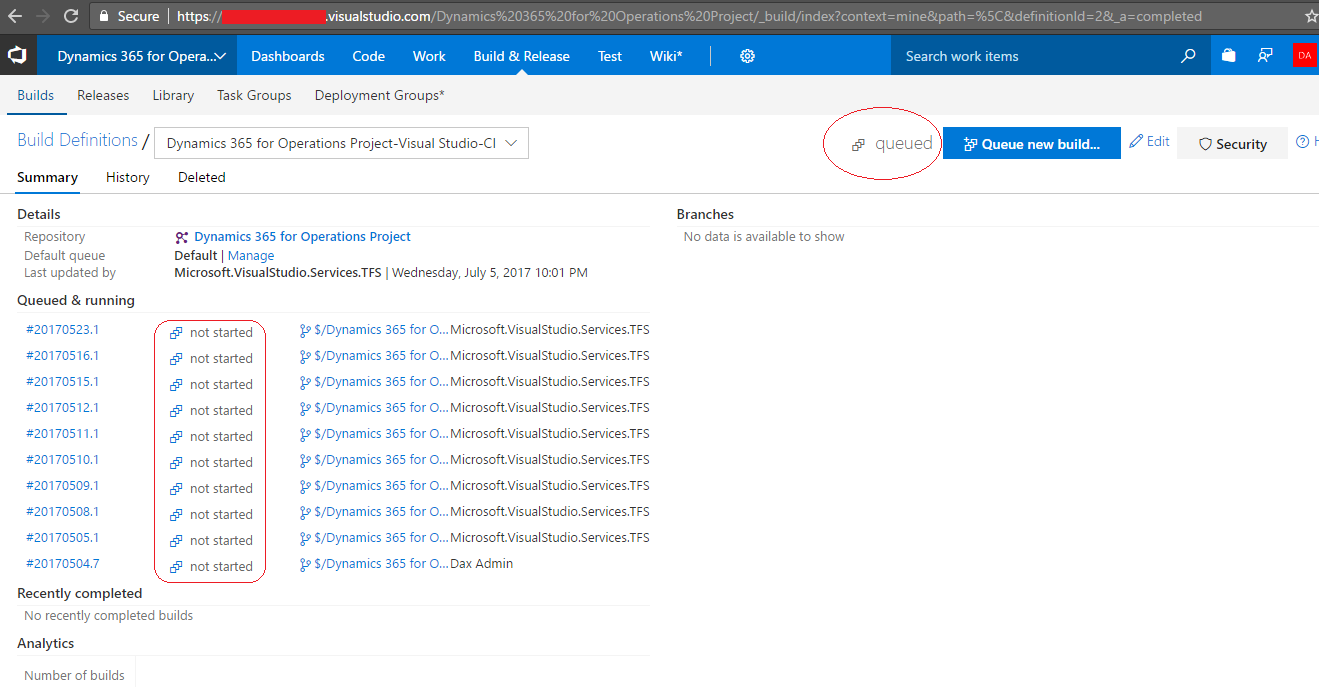
Clicking on the first build definition brings me to:-
VSTS-CI-2.png

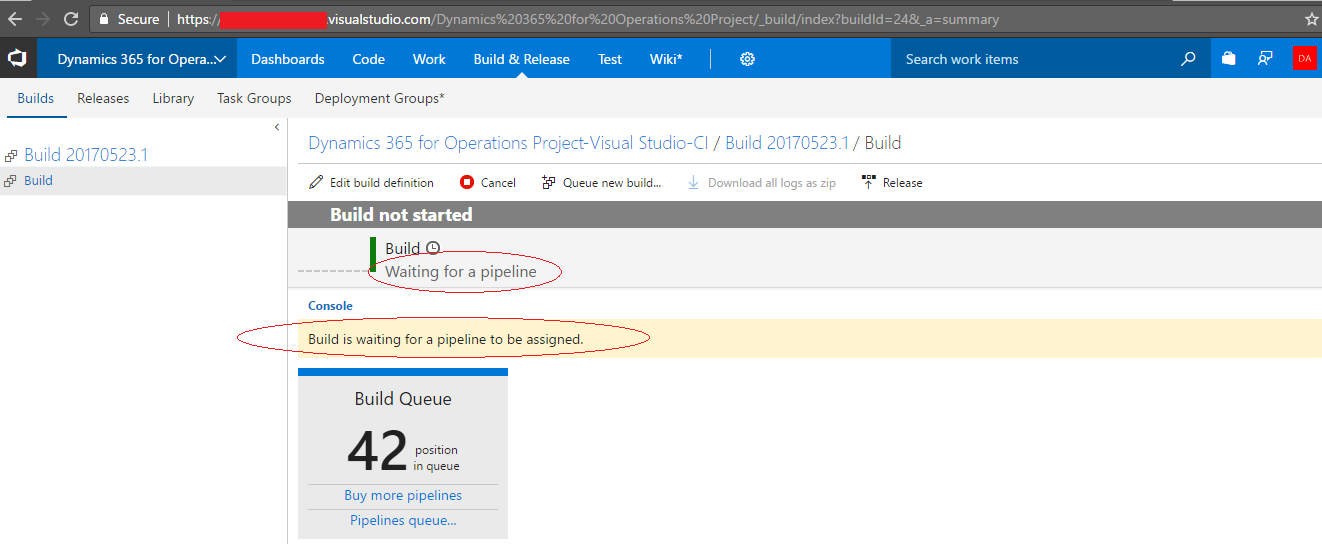
You can see all the builds are not started. Next if I click on any queued build, it takes me to:-
VSTS-CI-3.png

It doesn't find any build pipeline.

Please help me in what should I do now.

Thanks,
Sagnik.

*This post is locked for comments

I have the same question (0)
  • Verified answer
    Martin Dráb Profile Picture
    237,801 Most Valuable Professional on at

    If you deploy a build VM to Azure, everything is set up for you and that's the supported way. But nothing prevents you from configuring a build agent on another machine, if you want. Actually, the downloadable VHD contains some scripts for this purpose, such as BuildEnvironmentReadiness.ps1 and SetupBuildAgent.ps1 (under c:\DynamicsSDK).

    Note that understanding how the build infrastructure of VSTS works would be beneficial for you; consider investing a few dozen minutes to learn the basics.

    By the way, Continuous Integration is process; it's not a component of VSTS or something. It's one way how to use these tools.

  • Suggested answer
    Mea_ Profile Picture
    60,284 on at

    Hi Sagnik Majumder,

    You can refer this blog post for build setup on local VM

    axforce.wordpress.com/.../ax7-continuos-build-test-automation-on-a-local-vm-pt1

  • Sagnik Majumder Profile Picture
    792 on at

    Thanks a lot Martin & ievgen for your reply.

    I will definitely follow as per what you have instructed.

    Regarding the post that ievgen has shared I am facing a problem.

    I don't have agent.zip file inside "C:\DynamicsSDK" as stated here: 

     "Go to your DynamicsSDK folder and unzip the agent.zip file."
    

    Please note that I am using a downloaded VHD. I can remember that it is a DevTest environment PU5 downloaded from LCS.

    Where can I find agent.zip? Is it available outside publicly, or in any older/newer versions of D365 FO?

  • Martin Dráb Profile Picture
    237,801 Most Valuable Professional on at

    These instruction are probably old; I would pay too much attention to them. You could download the agent by yourself from VSTS, but it's not needed, because SetupBuildAgent.ps1 will do it for you.

  • Suggested answer
    Joris dG Profile Picture
    17,775 on at

    Better follow these instructions from the AX ALM team: blogs.msdn.microsoft.com/.../how-to-setup-build-agent-and-create-a-build-definition-manually

  • Sagnik Majumder Profile Picture
    792 on at

    Hi Martin,

    We tried to execute the PS command SetupBuildAgent.ps1 and BuildEnvironmentReadiness.ps1, but they were throwing errors. So we manually downloaded and installed the Build Agent as you mentioned, and put it under Default agent queue.

    Next we created a very simple Build definition consisting of only Get sources and Visual Studio Build solution.

    The parameters are:-

    • Solution: $/Dynamics 365 for Operations Project/Trunk/Main/Projects/<SomeNameOfD365OperationsSolution>/<SomeNameOfD365OperationsSolution.sln>
    • Visual Studio version: 2015
    • MSBuild Arguments/p:OutputPath="$(Agent.BuildDirectory)\Bin" /p:LogPath="$(Agent.BuildDirectory)\Logs"
    • BuildPlatform: x86
    • BuildConfiguration: Debug

    Now when I queued a build, the build failed in Visual Studio Build solution part with the following error:-

    C:\Program Files (x86)\MSBuild\Microsoft\Dynamics\AX\Microsoft.Dynamics.Framework.Tools.BuildTasks.targets(55,5): Error MSB4062: The "CopyReferencesTask" task could not be loaded from the assembly Microsoft.Dynamics.Framework.Tools.BuildTasks, Version=7.0.0.0, Culture=neutral, PublicKeyToken=31bf3856ad364e35. Could not load file or assembly 'Microsoft.Dynamics.Framework.Tools.BuildTasks, Version=7.0.0.0, Culture=neutral, PublicKeyToken=31bf3856ad364e35' or one of its dependencies. The system cannot find the file specified. Confirm that the <UsingTask> declaration is correct, that the assembly and all its dependencies are available, and that the task contains a public class that implements Microsoft.Build.Framework.ITask.
     
    Next I opened Microsoft.Dynamics.Framework.Tools.BuildTasks.targets file and removed the two tasks "CopyReferencesTask" and "BuildTask". 
    Then my VSTS build is succeeding, but I cannot find any output file/zip/folder in the output path.
     
    What am I missing?
    Please suggest.
     

    MSBuild Arguments

  • Sagnik Majumder Profile Picture
    792 on at

    Hi Joris, Thanks for your comment.

    Well, as I have already stated before that I am not using any Azure-deployed Build or Dev VMs. I am using just a downloaded VHD and trying to setup the deployment package generation through VSTS all by myself.

    I tried to follow the steps given in your link but I faces these errors.

    SetupBuildAgent.ps1:-

    Write-Message : 7:23:56 AM: Error configuring VSTS Agent service: A parameter cannot be found that matches parameter
    name 'DestinationPath'.
    At C:\DynamicsSDK\SetupBuildAgent.ps1:637 char:5
    + Write-Message "Error configuring VSTS Agent service: $($_)" -Erro ...
    + ~~~~~~~~~~~~~~~~~~~~~~~~~~~~~~~~~~~~~~~~~~~~~~~~~~~~~~~~~~~~~~~~~
    + CategoryInfo : NotSpecified: (:) [Write-Error], WriteErrorException
    + FullyQualifiedErrorId : Microsoft.PowerShell.Commands.WriteErrorException,Write-Message

    BuildEnvironmentReadiness.ps1:-

    Write-Message : 3:40:56 AM: Error configuring VSTS build environment: Exception setting "Path": "Cannot find path
    'C:\DynamicsSDK\VSOAgent\externals\vstsom\Microsoft.TeamFoundation.Common.dll' because it does not exist."
    At C:\DynamicsSDK\BuildEnvironmentReadiness.ps1:526 char:5
    + Write-Message "Error configuring VSTS build environment: $($_)" - ...
    + ~~~~~~~~~~~~~~~~~~~~~~~~~~~~~~~~~~~~~~~~~~~~~~~~~~~~~~~~~~~~~~~~~
    + CategoryInfo : NotSpecified: (:) [Write-Error], WriteErrorException
    + FullyQualifiedErrorId : Microsoft.PowerShell.Commands.WriteErrorException,Write-Message

    Unable to find type [Microsoft.TeamFoundation.VersionControl.Client.Workspace].
    At C:\DynamicsSDK\BuildEnvironmentReadiness.ps1:221 char:27
    + ... e-Workspace([Microsoft.TeamFoundation.VersionControl.Client.Workspace ...
    + ~~~~~~~~~~~~~~~~~~~~~~~~~~~~~~~~~~~~~~~~~~~~~~~~~~~~~~~~~
    + CategoryInfo : InvalidOperation: (Microsoft.TeamF...lient.Workspace:TypeName) [], RuntimeException
    + FullyQualifiedErrorId : TypeNotFound

    I have very little idea on VSTS build and build-definitions. So what do you think I am missing?

    Regards.

  • Sagnik Majumder Profile Picture
    792 on at

    Also one thing to mention that I don't have the AXModulesBuild.proj file (that I saw in many blogs) in my VSTS checked in branch. I have all the classes, data entities etc checked in under Trunk\Main\Metadata folder, and the VS Solution file (.sln) is placed at the Trunk\Main\Projects folder.

  • Martin Dráb Profile Picture
    237,801 Most Valuable Professional on at

    Don't try to set up the build template from scratch by yourself; it's not gonna work. Either deploy a Build VM Azure, which will create the template and AXModulesBuild.proj (then you can drop the Azure VM, if you don't want to use it), or use the scripts.

    I'll have to look into those scripts to know what code is on lines 526 and 221 (which you should do too; you can even debug them). Please let us know which exact version of the VM you're using.

  • Sagnik Majumder Profile Picture
    792 on at

    My version of the VM is Platform Update 5.

    We have a bit of problem in deploying VMs on Azure due to cost problems, so we are trying hard to utilize downloaded VMs as much as we can. If writing build templates from scratch won't work, then we need to run the scripts. But then the scripts are also throwing errors as already mentioned.

    Plz help.

Under review

Thank you for your reply! To ensure a great experience for everyone, your content is awaiting approval by our Community Managers. Please check back later.

Helpful resources

Quick Links

Responsible AI policies

As AI tools become more common, we’re introducing a Responsible AI Use…

Neeraj Kumar – Community Spotlight

We are honored to recognize Neeraj Kumar as our Community Spotlight honoree for…

Leaderboard > 🔒一 Microsoft Dynamics AX (Archived)

#1
Martin Dráb Profile Picture

Martin Dráb 4 Most Valuable Professional

#1
Priya_K Profile Picture

Priya_K 4

#3
MyDynamicsNAV Profile Picture

MyDynamicsNAV 2

Last 30 days Overall leaderboard

Featured topics

Product updates

Dynamics 365 release plans



