web
You’re offline. This is a read only version of the page.
close
Skip to main content

Announcements

No record found.

News and Announcements icon
Community site session details

Community site session details

Session Id :
Finance | Project Operations, Human Resources, ...
Active Discussion

Hidden Fields in a Payables Batch Window

(0) ShareShare
ReportReport
Posted on by 10

Hey all,

I am new to the forum and I hope this is the correct area to ask a question. 

Our company just did the year end update to 18.5.  After the update all seemed to be fine until one of our AP analysts noticed that there was a missing field within our Payables Batches as seen below:
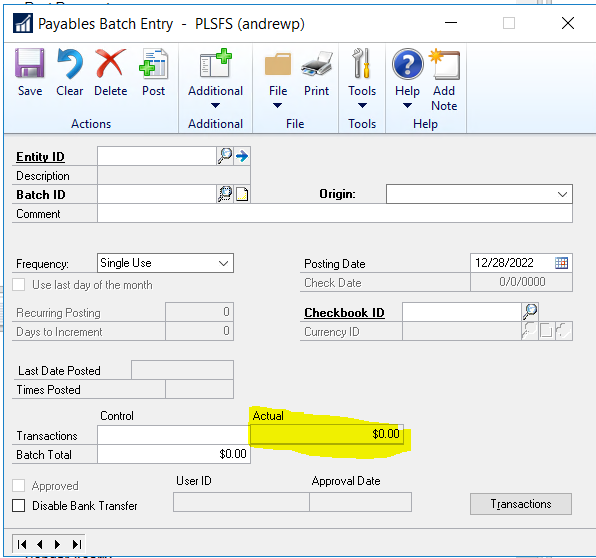
pastedimage1672251594079v2.png

When I dive into the modify window screen as seen below I see that the field should be there but is somehow being suppressed or the amount field is not displaying in the correct position:
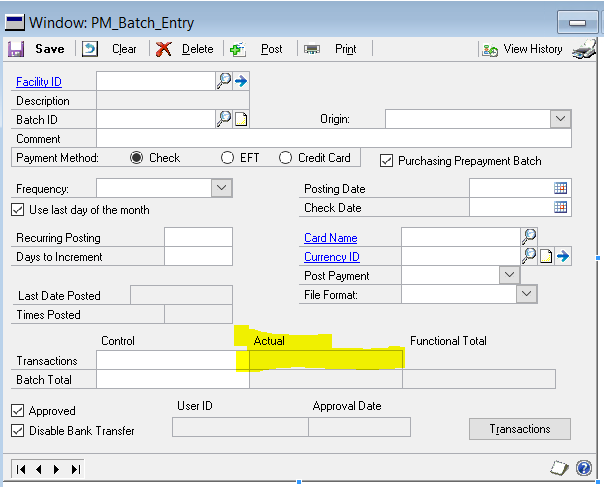
pastedimage1672251576691v1.png

Would any one have any suggestions on how to go about resolving this issue?  I was thinking about increasing the size of the window hoping that would force the fields to display correctly but I do not want to do that if there is an easier fix.

Side note: The general ledger batches display perfectly fine as seen below:
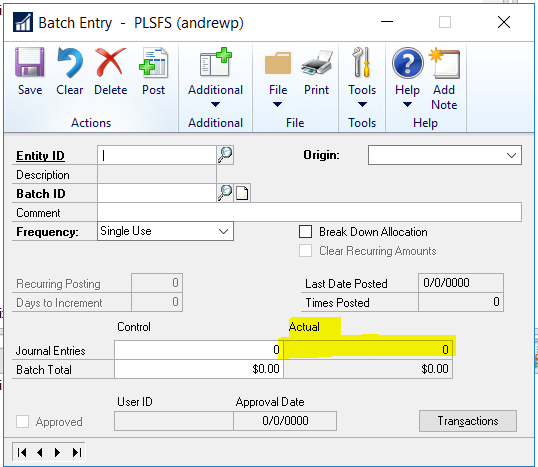
pastedimage1672251740224v3.png

Categories:
  • David Musgrave MVP GPUG All Star Legend Moderator Profile Picture
    14,137 Most Valuable Professional on at

    The fields are in the correct positions.

    Depending on whether the batch contains multicurrency transactions or not will programmatically move and show/hide the fields to swap between functional and originating currency.

    Regards

    David 

  • Mick Egan Profile Picture
    3,561 on at

    Andrew,

    Looks like this is an issue with Binary Stream - Multi Entity Management on 18.5.

    If you change the Alternate Window Security back to the Dynamics GP Payable Batch Window it looks fine.

    I checked MEM on 18.4 and it displays correctly.

    Mick

  • David Musgrave MVP GPUG All Star Legend Moderator Profile Picture
    14,137 Most Valuable Professional on at

    Good catch Mick. I did not see the Entity ID field.

    Follow up with Binary Stream.

    David

  • Andrew Pucinski Profile Picture
    10 on at

    Michael,

    That was it!!!  Thank you very much.  I didn't even think to start with alternate/modified reports and forms.

    I am going to follow up with MEM and see what they say and I will update this thread for anyone else that is having the same issues.

    Thanks again everyone and I wish I would have come to the forums much sooner.

Under review

Thank you for your reply! To ensure a great experience for everyone, your content is awaiting approval by our Community Managers. Please check back later.

Helpful resources

Quick Links

Introducing the 2026 Season 1 community Super Users

Congratulations to our 2026 Super Stars!

Congratulations to our 2025 Community Spotlights

Thanks to all of our 2025 Community Spotlight stars!

Leaderboard > Finance | Project Operations, Human Resources, AX, GP, SL

#1
Giorgio Bonacorsi Profile Picture

Giorgio Bonacorsi 617

#2
André Arnaud de Calavon Profile Picture

André Arnaud de Cal... 461 Super User 2026 Season 1

#3
Syed Haris Shah Profile Picture

Syed Haris Shah 298 Super User 2026 Season 1

Last 30 days Overall leaderboard

Product updates

Dynamics 365 release plans
