web
You’re offline. This is a read only version of the page.
close
Skip to main content

Announcements

No record found.

News and Announcements icon
Community site session details

Community site session details

Session Id :
Dynamics 365 Community / Forums / Finance forum / Create configuration b...
Finance forum

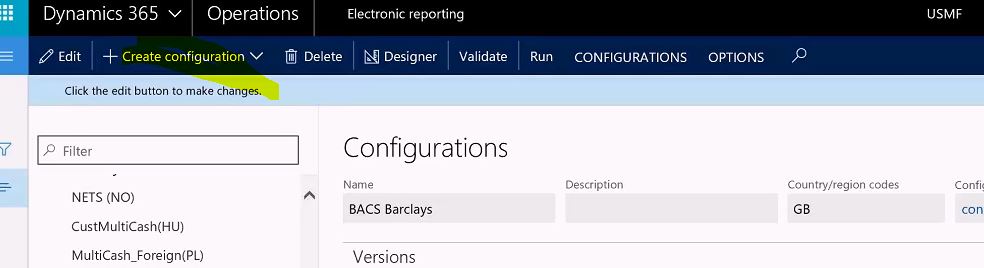
Create configuration button is not visible in Electronic reporting D365 FO.

(0) ShareShare
ReportReport
Posted on by 215

Electroinc-reporting.JPG

Hi All.

I am unable to find the "Create configuration" button to create new version from standard. 

I am using D365 FO 8.1 with "System Administrator, System User, Electronic reporting Developer, Electronic reporting functional consultant role".

Can any one please help

Categories:
I have the same question (0)
  • André Arnaud de Calavon Profile Picture
    303,439 Super User 2026 Season 1 on at

    Hi Santhosh,

    Is this an empty environment? Or do you have configuration providers and/or configuration in this environment?

  • Verified answer
    Eugen Glasow Profile Picture
    6,359 on at

    You must create an own Provider and declare it the active one at the main ER workspace.

    See pp. 7, 8 in erconsult.eu/.../electronic-reporting-er-cookbook-2-new-tips-from-the-kitchen

  • santhosh kumar 1212 Profile Picture
    215 on at

    Hi Andre...!! Thanks for the reply..!!

    Its new environment having configuration provider "Microsoft" and

    created new configuration "Litware, Inc." by looking in MSDN document. i.e. docs.microsoft.com/.../er-configuration-provider-mark-it-active-2016-11

    I just did by looking in code by debugging the form "ERSolutionTable" which has "CreateSolutionButton" i.e "Create configuration" menu button..!!

    but in the code "domainSetting" is null; Do we need to do any Domain setting?

    Thanks again..!! :)

  • Suggested answer
    santhosh kumar 1212 Profile Picture
    215 on at

    Electroinc-reporting-ENABLE-DESIGN-MODE.JPG

    Thanks a lot ..!! it helped..!! :)

    Point 7: From erconsult.eu/.../electronic-reporting-er-cookbook-2-new-tips-from-the-kitchen

    After upgrading to 7.3 you may find yourself unable to edit configurations anymore.

    The reason may be the new parameter Enable design mode available at the Electronic reporting workspace, form Electronic reporting parameters.

    simply Go to Electronic reporting parameters/General tab/ "enable design mode --> checked it as yes/true".

Under review

Thank you for your reply! To ensure a great experience for everyone, your content is awaiting approval by our Community Managers. Please check back later.

Helpful resources

Quick Links

November Spotlight Star - Khushbu Rajvi

Congratulations to a top community star!

Forum Structure Changes Coming on 11/8!

In our never-ending quest to help the Dynamics 365 Community members get answers faster …

Dynamics 365 Community Platform update – Oct 28

Welcome to the next edition of the Community Platform Update. This is a status …

Leaderboard > Finance

Last 30 days Overall leaderboard

Featured topics

Product updates

Dynamics 365 release plans
