web
You’re offline. This is a read only version of the page.
close
Skip to main content

Announcements

No record found.

News and Announcements icon
Community site session details

Community site session details

Session Id :
Small and medium business | Business Central, N...
Answered

How to include fields from two tables in RapidStart -online Step Guide?

(0) ShareShare
ReportReport
Posted on by 29

Hello everyone

I am using RapidStart configuration worksheet to update data in NAV2018.

Specifically, I want to export purchase lines from one vendor from table 39, change the Planned Receipt Date, and re upload, and I have no problem with that.

However, for ease of other users, I want to include other data from Purchase order header table 38 on each line, specifically Vendor Order No.. Purchase Header Document No is always included as a primary Key, so I have tried to include other fields from Purchase Header. But I think I have missed a step, because when I download the template, I do not get the data from Purchase Header.

Can anyone point me to a guide, or instructions on how to do this?

Thank you in advance!
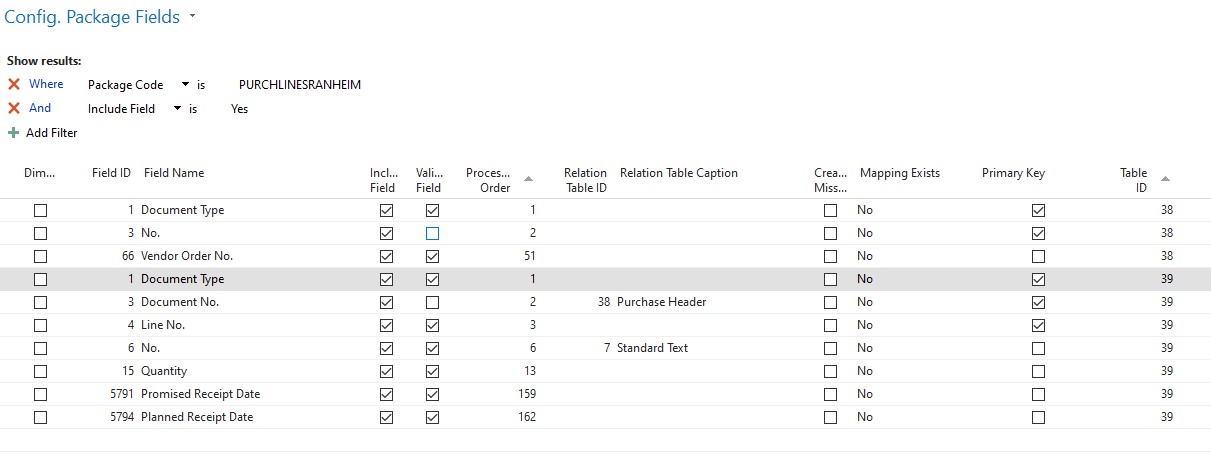
Screenshot-2022_2D00_07_2D00_07-104827.jpg

I have the same question (0)
  • Verified answer
    YUN ZHU Profile Picture
    99,055 Super User 2026 Season 1 on at

    Hi, as far as I know, this cannot be done by standard feature.

    What you can do is to add table 38 to the Configuration Package and export them to the same Excel as two sheets.

    pastedimage1657237554011v1.png

    You can add filters before exporting.

    pastedimage1657237685934v2.png

    Another way needs to be customized, you can add fields on table 38 to table 39, so that when exporting table 39, you can include the data of 38, but it is a new field.

    Hope this helps.

    Thanks.

    ZHU

  • Lovisa LH Profile Picture
    29 on at

    Good afternoon Zhu and thank you for your suggestion.

    It would be a good solution to have Header and Lines download in the same Excel.

    I tried to set it up as your example above, but I got only one table downloaded.

    If you have any more suggestion on what I have missed, I would be pleased to hear it

    With thanks, and apologies for late reply.

    Louise

    Config-Package.jpg_2D00_640x480.jpg

  • Verified answer
    YUN ZHU Profile Picture
    99,055 Super User 2026 Season 1 on at

    Hi, maybe you used Line's action?

    using Export to Excel in the header will export all tables.

    pastedimage1658790420900v1.png

    And using Export to Excel in the line will only export selected tables.

    pastedimage1658790583876v2.png

    Hope this helps.
    Thanks.

    ZHU

  • Lovisa LH Profile Picture
    29 on at

    That was exactly the case! It works now.

    Thank you again for your help Zhu.

    Best Wishes from Iceland,

    Louise

Under review

Thank you for your reply! To ensure a great experience for everyone, your content is awaiting approval by our Community Managers. Please check back later.

Helpful resources

Quick Links

Introducing the 2026 Season 1 community Super Users

Congratulations to our 2026 Super Stars!

Congratulations to our 2025 Community Spotlights

Thanks to all of our 2025 Community Spotlight stars!

Leaderboard > Small and medium business | Business Central, NAV, RMS

#1
OussamaSabbouh Profile Picture

OussamaSabbouh 1,926 Super User 2026 Season 1

#2
YUN ZHU Profile Picture

YUN ZHU 1,158 Super User 2026 Season 1

#3
Khushbu Rajvi. Profile Picture

Khushbu Rajvi. 533 Super User 2026 Season 1

Last 30 days Overall leaderboard

Featured topics

Product updates

Dynamics 365 release plans



