web
You’re offline. This is a read only version of the page.
close
Skip to main content

Announcements

No record found.

News and Announcements icon
Community site session details

Community site session details

Session Id :
Customer experience | Sales, Customer Insights,...
Suggested Answer

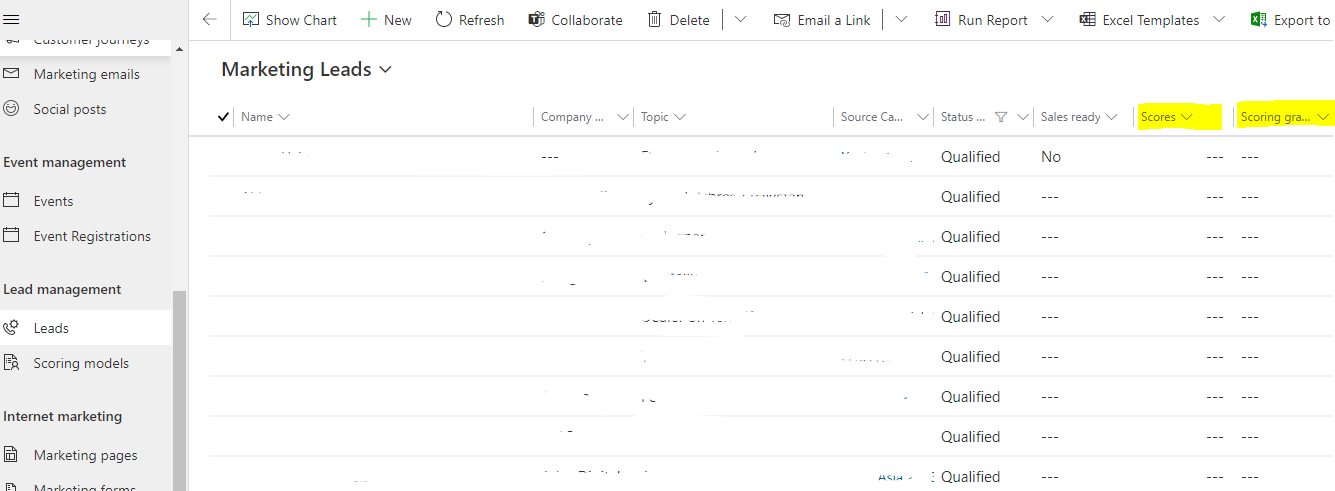
Under the view "Marketing Leads" no values are displayed in the field "Lead Score"

(0) ShareShare
ReportReport
Posted on by 10

I have the current problem that under the view "Marketing Leads" no values are displayed in the the fields "Scores" and "Scoring grades". A lead scoring is already set up and values are already available, which can be seen when you look into the individual lead.

Can anyone help me and tell me how I can get the values to be displayed in the "Marketing leads" view?

I thank you in advance for the support!

Florence Westphal
pastedimage1626275196340v1.png

I have the same question (0)
  • Suggested answer
    Nya Profile Picture
    29,060 on at

    Hi Florence,

    There is no view called "Marketing Leads" in my environment.

    pastedimage1626318446450v1.png

    Is it a custom one?

    If yes, the score and grade are actually recorded in the Lead Score entity. It means that a lead can have several scores and grade from different lead scoring models.

     pastedimage1626318454792v2.png

    And the field Scores and Scoring grade in Lead entity do not actually have any relationship with the above records.

     pastedimage1626318478259v3.png

    They are just two separate fields that you can add to the form to assign values to them so that they will be displayed in the view.

  • DOI-Prozess und  LinkedIn Lead Gen Forms Profile Picture
    10 on at

    Thank you for your answer and support. Yes the field "Marketing leads" is custome. Yes the fields are already subordinated under the lead entity and are already visible under the "Marketing Leads" view but no values are displayed. Maybe I have to link the two fields again in the background somehow?

  • Suggested answer
    Nya Profile Picture
    29,060 on at

    Hi,

    Please insert them into the main form of Lead first and input the value into them.

    Then they will be shown in the view.

Under review

Thank you for your reply! To ensure a great experience for everyone, your content is awaiting approval by our Community Managers. Please check back later.

Helpful resources

Quick Links

Introducing the 2026 Season 1 community Super Users

Congratulations to our 2026 Super Stars!

Congratulations to our 2025 Community Spotlights

Thanks to all of our 2025 Community Spotlight stars!

Leaderboard > Customer experience | Sales, Customer Insights, CRM

#1
ManoVerse Profile Picture

ManoVerse 129 Super User 2026 Season 1

#2
Jimmy Passeti Profile Picture

Jimmy Passeti 46 Most Valuable Professional

#3
NeerajPawar Profile Picture

NeerajPawar 41

Last 30 days Overall leaderboard

Product updates

Dynamics 365 release plans
