web
You’re offline. This is a read only version of the page.
close
Skip to main content

Announcements

News and Announcements icon
Community site session details

Community site session details

Session Id :
Microsoft Dynamics GP (Archived)

1099 questions

(0) ShareShare
ReportReport
Posted on by

2 questions regarding 1099 vendors:

1.)     If I paid a vendor and did not change the tax type to Miscellaneous, it will not calculate that payment on the 1099, correct?

2.)    If #1 is a no, Is there a way to get that payment on the 1099?

3.)    Is the below the only screen that you have to indicate it’s a 1099 vendor?
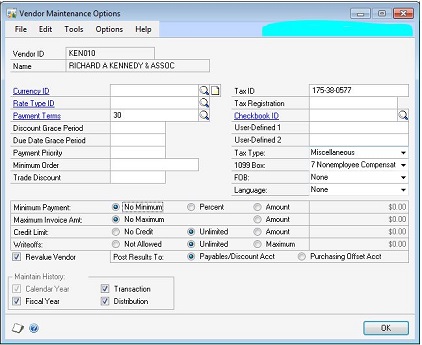
 

*This post is locked for comments

I have the same question (0)
  • Dan Liebl Profile Picture
    7,322 on at

    You are correct.  On the Payables Transaction Entry window, those 1099 settings can be overridden or even dismissed if not a 1099 payment.

    Dan Liebl, CMA CPIM | Senior Consultant | OTT, Inc.| DLiebl@OTT-inc.com

  • Suggested answer
    sandipdjadhav Profile Picture
    18,335 on at

    Hello WennSoft,

    Yes it is possible to bring vendors information on 1099 report which was changed tax type 'Miscellaneous" after making payment.

    Goto-->Cards-->Purchasing-->Summary--Select Vendor. --> Select Period button -->Click on 1099 Arrow--> Enter 1099 payment $ amount to respective fields. Make sure you will save all the way down.

    Print your 1099 and you will see vendor information.

    Thanks

    Sandip Jahdav

  • Suggested answer
    L Vail Profile Picture
    65,271 on at

    Hi,

    There is a tool in the PSTL library called 1099 Modifier. This tool will go back and mark all transactions for vendors that are currently marked as 1099 vendors. So, if you have put transactions in and later marked him as 1099, this is the tool you need to convert those transactions that happened when he wasn't marked to 1099 transactions.

    I think this is what you want to do. The PSTL tools are free, but they are a separate checkbox when you install Dynamics. If you don't have them, do a 'change' in the control panel and add it.  For versions before GP 2013 sp1, you will need to add the window to your shortcut bar. The window is under the Project Series.

    Kind regards,

    Leslie

Under review

Thank you for your reply! To ensure a great experience for everyone, your content is awaiting approval by our Community Managers. Please check back later.

Helpful resources

Quick Links

Season of Sharing Community Challenge Launch!

Jump in, show your community spirit, and win prizes!

Women in Power Builds Momentum

Expanding mentorship, skilling, and AI innovation

Congratulations to the April Top 10 Community Leaders

These are the community rock stars!

Leaderboard > 🔒一 Microsoft Dynamics GP (Archived)

#1
Dan Liebl Profile Picture

Dan Liebl 2

#2
Shravan Attelli Profile Picture

Shravan Attelli 1

Last 30 days Overall leaderboard

Featured topics

Product updates

Dynamics 365 release plans



