web
You’re offline. This is a read only version of the page.
close
Skip to main content

Notifications

Announcements

No record found.

Community site session details

Community site session details

Session Id :
Customer experience | Sales, Customer Insights,...
Answered

Concatenated values of Child record in Parent field

(0) ShareShare
ReportReport
Posted on by 105

Hi All,

This is urgent kindly help.

I have a entity "A" and a child entity "B". The child entity contains a field called "Name".

I need to show concatenation of all child records field in Parent record. 

Parent record should contain concatenation of {child1(Name field) + Child2(Name field) + Child3(Name field) ...etc}

How can I achieve this. Please help.

I have the same question (0)
  • meelamri Profile Picture
    13,216 User Group Leader on at

    Hello,

    Do you have the possibility to use Flow ?

  • SharonP Profile Picture
    105 on at

    Yes we can use flow or background workflows.

  • Verified answer
    meelamri Profile Picture
    13,216 User Group Leader on at

    Hi, 

    I replay your scenario in my environment. I used Flow for the implementation. There are other approaches using plugins or JS code. I chose Flow because it is a quite robust implementation for this scenario and easy to maintain. 

    This is a summary of my flow: 

    pastedimage1613849047435v1.png

    1- When EntityB is created or EntityB's name is updated: 

    pastedimage1613849100400v2.png

    2- Initialization of the variable that will store the concatenation: 

    pastedimage1613849197451v3.png

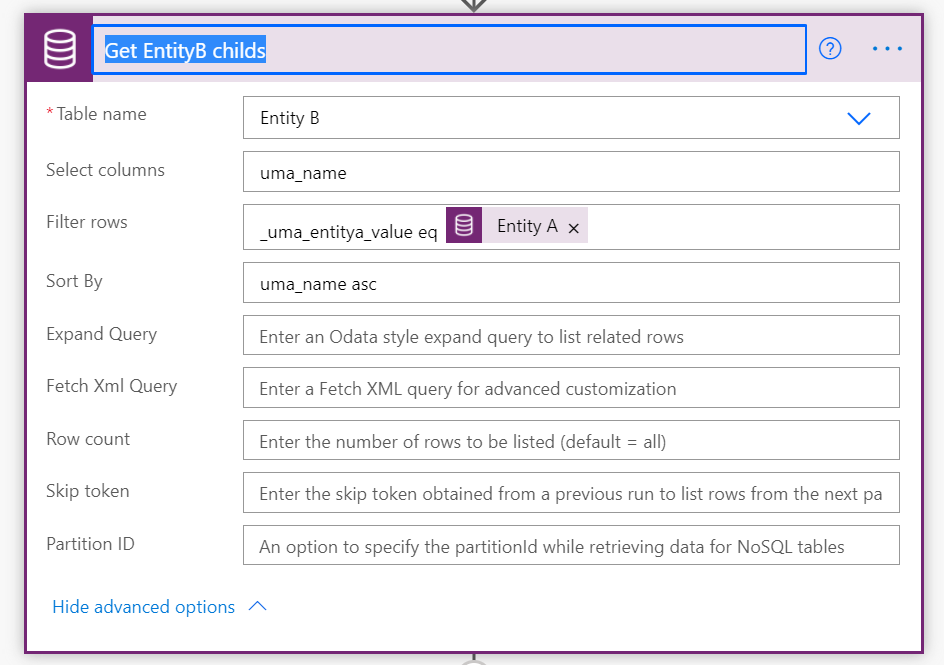
    3- Get EntityB childs with the same EntityA parent: 

    pastedimage1613849266833v4.png

    I use this action to get the childs: 

    pastedimage1613849326931v5.png

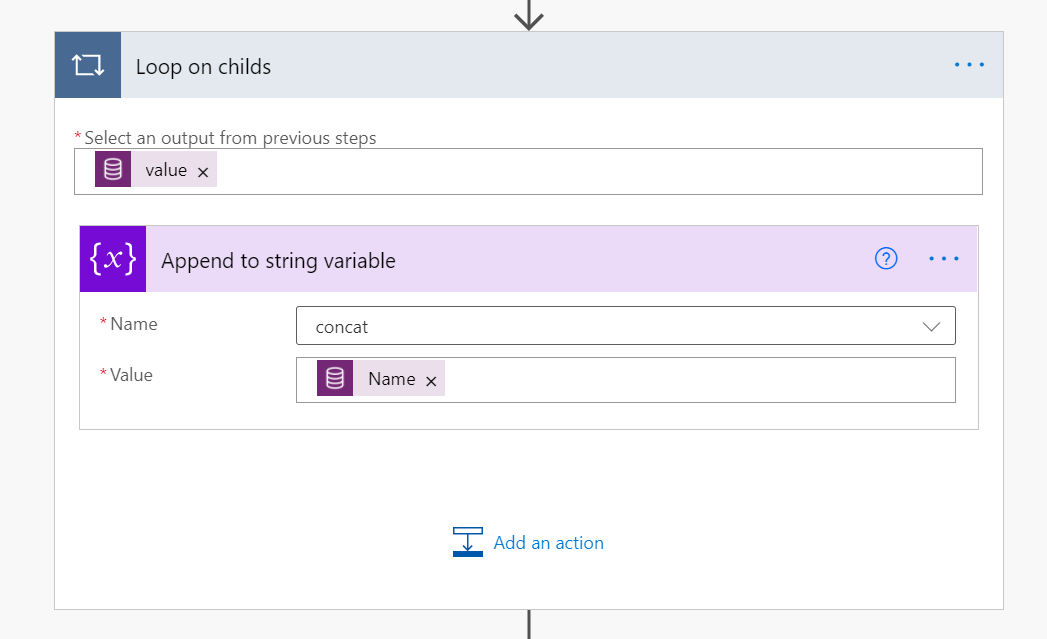
    4- Loop on childs and concat: 

    pastedimage1613849378640v6.png

    You can use the OOB Append to string variable action to perform your concatenation: 

    pastedimage1613849477197v7.png

    5- Update the parent EntityA: 

    pastedimage1613849527183v8.png


    Demo: 

    [View:/cfs-file/__key/communityserver-discussions-components-files/762/Concatenated-values-of-Child-record-in-Parent-field.mp4:400:300]

  • SharonP Profile Picture
    105 on at

    hi,

    I'm confused at Step 3 . Are u getting all child records of the parent entity and if so why? 

    I have created a field in Parent called "Concate" and when any child record is created the name field of child should be added in the Parent Concate field.

    I tried like below. But its not concatenating, its replacing the old value and adding the new.

    pastedimage1613876938157v2.png

    Please advice.

  • SharonP Profile Picture
    105 on at

    Your steps were  absolutely correct . Thank you soo much for your help.

  • meelamri Profile Picture
    13,216 User Group Leader on at

    You are welcome, have a nice weekend.

  • SharonP Profile Picture
    105 on at

    Hi Mehdi,

    If the Child Entity B record is deleted - I want the Concatenate field on parent to be updated and that child record value to be removed. I changed the trigger condition to Create, update and delete but on delete the flow gives error that the parent doesn't exist in the below screenshot step. Any workground?

    pastedimage1614288542274v1.png

  • meelamri Profile Picture
    13,216 User Group Leader on at

    Hi SharonP,

    Yes, I will share a solution with you tomorrow.

  • ravinder_chauhan Profile Picture
    User Group Leader on at

    reply

  • Verified answer
    meelamri Profile Picture
    13,216 User Group Leader on at

    Hi SharonP, 

    I changed the design to take into consideration the Create, Update and Delete operations. I stay with a low code design.

    First, we will create a technical field on the parent entity "Entity A". I named it "Calculate Name Counter" which is a number type.
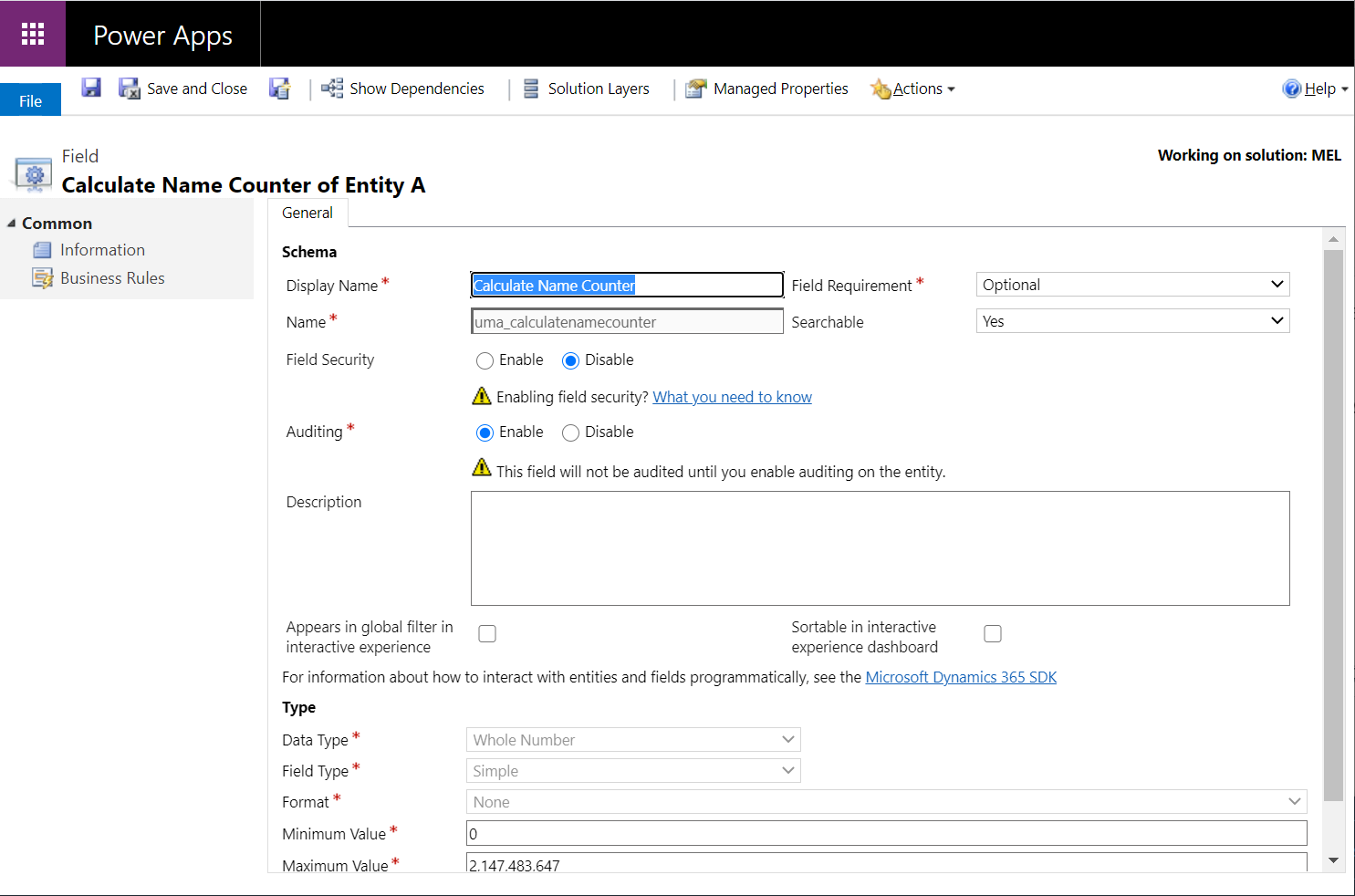
    pastedimage1614343843614v1.png

    Then we will create a real time workflow that will increment the counter by one when creating, updating and deleting a record of entity B: 

    pastedimage1614344602187v2.png

    Finally, we will modify our initial flow to calculate the concatenation when the "Calculate Name Counter" value of the Entity A is updated: 
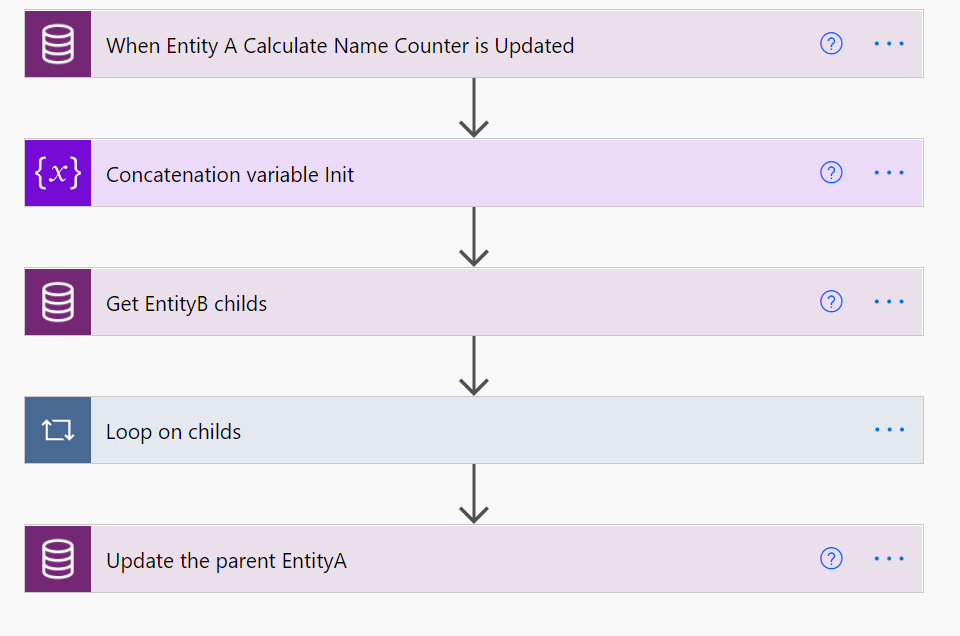
    pastedimage1614344795271v3.png

    1- When Entity A Calculate Name Counter is Updated: 

    pastedimage1614344841528v4.png

    2- Concatenation variable Init:

    pastedimage1614344883630v5.png

    3- Get EntityB childs: 

    pastedimage1614344920275v6.png

    4- Loop on chdilds and concatenate: 

    pastedimage1614344960937v7.png

    5- Update the parent EntityA: 

    pastedimage1614344992296v8.png

    Demo: 

    [View:/cfs-file/__key/communityserver-discussions-components-files/762/3173.Concatenated-values-of-Child-record-in-Parent-field.mp4:320:240]

    Now we also have to deal with the situation where we change the parent (Update LookUp Value) I find this is the most interesting part of this scenario.

    In fact, we will modify the Workflow explained above like this:

    pastedimage1614347466722v9.png

    And we also need a second Workflow that will run before the parent's value changes: 

    pastedimage1614347718554v10.png

    You can download my Unmanaged Solution: https://we.tl/t-61r6lpRr0A

Under review

Thank you for your reply! To ensure a great experience for everyone, your content is awaiting approval by our Community Managers. Please check back later.

Helpful resources

Quick Links

Responsible AI policies

As AI tools become more common, we’re introducing a Responsible AI Use…

Neeraj Kumar – Community Spotlight

We are honored to recognize Neeraj Kumar as our Community Spotlight honoree for…

Leaderboard > Customer experience | Sales, Customer Insights, CRM

#1
Tom_Gioielli Profile Picture

Tom_Gioielli 96 Super User 2025 Season 2

#2
Jimmy Passeti Profile Picture

Jimmy Passeti 50 Most Valuable Professional

#3
Gerardo Rentería García Profile Picture

Gerardo Rentería Ga... 49 Most Valuable Professional

Last 30 days Overall leaderboard

Product updates

Dynamics 365 release plans